


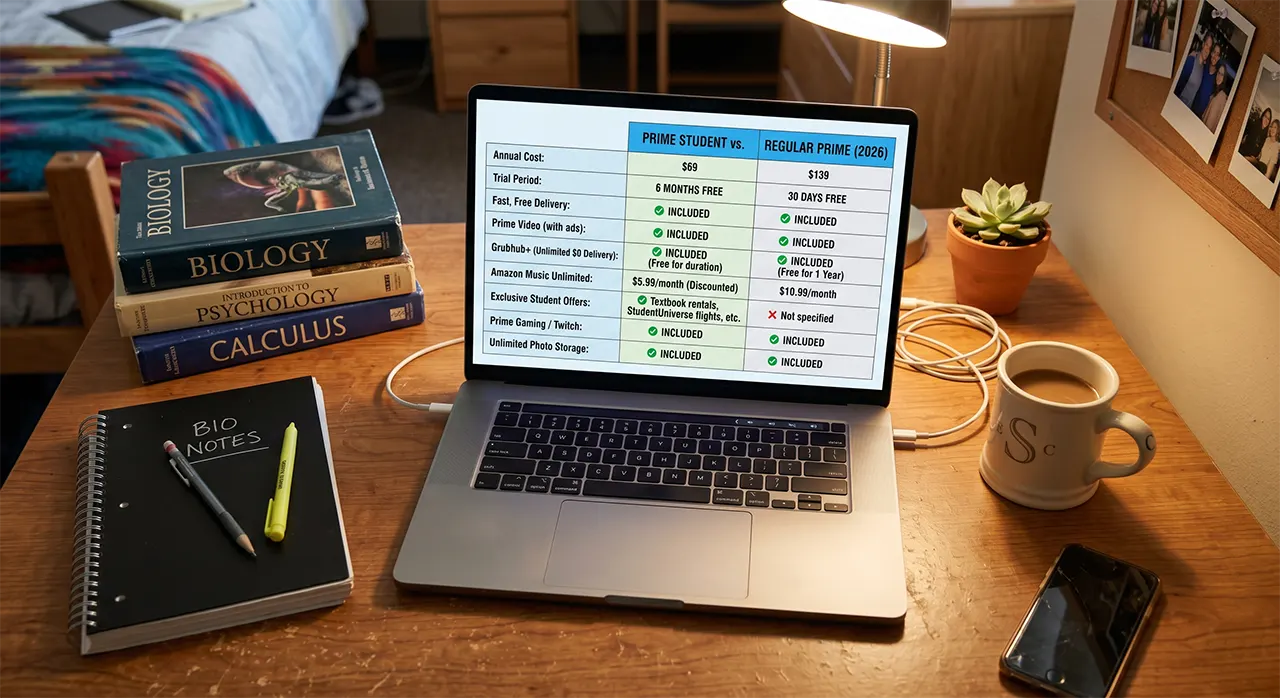
An Amazon Prime Student membership gives college students and adults ages 18 to 24 a 6-month free trial, followed by a 50% discount. You must verify your student status to keep the $69 annual price.
Compare this to a standard Amazon Prime membership, and you will see a massive financial advantage. Imagine walking across the graduation stage. You feel accomplished. Three days later, a sudden $139 charge hits your bank account. You completely forgot about the subscription you started as a freshman.
Amazon recently rebranded “Amazon Prime Student” to “Prime for Young Adults.” The name changed, but the strict rules remain the same. In this guide, you will learn exactly how to sign up, what documents you need for verification, and how to set up a defense against the automatic price hike.
What is Amazon Prime Student?
Amazon Prime Student—now officially called Prime for Young Adults—is a discounted subscription for college students and anyone aged 18 to 24. It includes free shipping and streaming for half the price of a regular membership.
Let’s clear up the confusion immediately. When you search online, you see “Amazon Prime Student.” When you go to the Amazon website, you see “Prime for Young Adults.” These are the exact same program. Amazon changed the name to include young adults who work full-time instead of going to college.
Amazon does not offer this discount out of goodwill. The 6-month free trial is a habit-building tool. Amazon wants you to rely on fast deliveries so much that paying full price later feels unavoidable.
Understanding this rebranding stops you from clicking away when the sign-up page looks different than you expected. The core mechanics, the discounts, and the verification rules remain identical.
Amazon Prime Student vs. Regular Prime: What’s Missing?
An Amazon Prime Student membership costs $69 per year, which is exactly half the $139 regular Prime price. The only major feature you lose with the student plan is the ability to share benefits with family members.
You get the same fast shipping, the same Prime Video access, and the same Grubhub+ membership. However, there is one strict restriction you must know about before you sign up. You cannot share your account.
| Feature | Prime Student (Young Adult) | Regular Prime |
|---|---|---|
| Annual Cost | $69.00 | $139.00 |
| Free Trial Length | 6 Months | 30 Days |
| Prime Video Access | Yes (Includes Ads) | Yes (Includes Ads) |
| Grubhub+ Membership | Yes ($0 delivery fees) | Yes ($0 delivery fees) |
| Household Sharing | NO | Yes (Share with 1 adult) |
| Maximum Duration | 4 Years or Graduation | Unlimited |
If you currently share your Prime account with your parents or roommates, downgrading to the student plan will kick them off your shipping benefits. You must decide if saving $70 a year is worth losing that shared access.
Step-by-Step Guide to Sign Up for Amazon Prime Student
You sign up for Amazon Prime Student by visiting the Prime Young Adults page and selecting your verification method. The process takes about five minutes if you have your documents ready.
Amazon uses a third-party company called SheerID to verify your identity. SheerID connects directly to university databases. You must pass this check to get the 50% discount.
Path 1: Signing up with a .edu Email Address
This is the fastest route to your 6-month free trial. You must have immediate access to your university inbox to complete the verification.
- Navigate to the Sign-Up Page: Go to amazon.com/joinstudent on your web browser.
- Select Your Status: Click the button that says “I am a student.”
- Enter Your Email: Type in your active university email address ending in .edu.
- Check Your Inbox: SheerID sends a verification email immediately. Open the email and click the verification link.
- Confirm Your Trial: Amazon redirects you to a confirmation page. Your 6-month free trial starts instantly.
Path 2: Signing up without a .edu Email Address
Some community colleges or specialized programs do not issue .edu emails. You can still get the discount by uploading physical proof of your enrollment.
- Start the Process: Go to amazon.com/joinstudent and click “I am a student.”
- Trigger the Alternative Option: Enter a non-edu email address. Amazon will prompt you to verify manually.
- Upload Your Documents: SheerID accepts an official college transcript, a tuition bill, or a student ID showing your name and the current academic term. Take a clear photo of the document and upload it.
- Wait for Approval: A human reviewer checks your document. This process takes up to three business days. You will receive an email once Amazon activates your trial.
Do not use a fake document. SheerID regularly audits accounts. If Amazon catches you using a falsified transcript, they immediately cancel your account and ban you from future student discounts.
How to Switch from Regular Prime to Student Prime
You switch from regular Prime to student Prime by visiting amazon.com/joinstudent and verifying your age or student status. Amazon automatically cancels your full-price membership and issues a prorated refund to your original payment method.
Let’s be honest about a common mistake. Many college freshmen buy a standard Prime membership in August before they know about the student discount. They end up overpaying for months because they think it is too late to change. Amazon makes switching incredibly easy, but they hide the option deep in the help menus.
You do not need to cancel your current membership first. If you cancel, you lose your shipping benefits immediately while you wait for verification. Follow this exact sequence to protect your access:
- Open the Portal: Go directly to amazon.com/joinstudent while logged into your current Prime account.
- Verify Your Status: Complete the SheerID verification using your .edu email or uploaded documents.
- Watch for the Refund: Amazon applies the student discount to your account instantly. Amazon then calculates the difference between what you already paid for the year and the $69 student rate. Amazon issues this difference as a credit back to your credit card within three to five business days.
You keep your Prime benefits without a single second of downtime. You simply start paying the correct, lower price.
The Graduation Trap: How to Prevent Your Bill from Doubling
Your Amazon Prime Student membership automatically converts to a $139 regular Prime membership when you graduate or turn 25. You must manually cancel or set a strict reminder to avoid this sudden price increase.
This is the most important section of this guide. Amazon relies on a psychological blind spot to make money off college students. You sign up as a freshman. You enjoy six free months, then you pay $69 a year. You get so used to the convenience that you completely forget the subscription has an expiration date tied to your degree.
Amazon uses the SheerID system to monitor university enrollment databases. The moment your university marks you as “Graduated” or “Withdrawn,” SheerID sends an automated flag to Amazon. Amazon then silently switches your billing cycle to the standard $139 annual rate. Amazon does not send you a warning email asking if you want to keep the discount. The charge just appears on your statement.
Amazon counts on the chaos of graduation week to hide a $70 annual price hike. If you do not set a digital tripwire right now, you will pay for your own inattention.
You must build a “Graduation Defense” to protect your budget. Log into your digital calendar right now. Set an event for exactly one month before your official university graduation date. Title the event: “Cancel Amazon Prime Student.” When that reminder pops up, go to your account settings and click “End Membership.” If you still want Prime after you graduate, you can always sign up for a new 30-day regular trial.
Frequently Asked Questions
Do students get a free Amazon Prime membership?
No, students do not get a completely free Amazon Prime membership. College students get a 6-month free trial. After the trial ends, the membership costs $7.49 per month or $69 per year, which is exactly 50% off the regular price.
Is Prime student only for 18-24 year-olds?
No, Prime Student is not only for 18-24 year-olds. Anyone actively enrolled in a two-year or four-year college degree program qualifies for the discount, regardless of their actual age. The 18-24 age limit only applies to non-students using the “Young Adult” verification path.
Can existing Prime members switch to student?
Yes, existing Prime members can switch to the student plan. You simply visit amazon.com/joinstudent and verify your enrollment. Amazon will automatically convert your account and issue a prorated refund for the price difference.
Can I add my college kid to my Amazon Prime account?
No, you cannot add your college kid to your regular Amazon Prime account to share the student discount. Amazon strictly prohibits benefit sharing on student accounts. Your college kid must create their own separate Amazon account and verify their own student status to get the 50% discount.
How does Amazon Prime know I am a student?
Amazon knows you are a student by using a third-party verification service called SheerID. SheerID connects to your university’s registrar database when you provide a .edu email address, or it employs human reviewers to verify uploaded documents like transcripts or tuition bills.
How long can I keep Amazon Prime as a student?
You can keep Amazon Prime as a student for a maximum of four years. The discount ends immediately when you graduate, or when you reach 25 years of age, whichever event happens first. You cannot restart a new 6-month free trial once your four years expire.
Recent Updates
- 2025 Rebranding: Amazon officially rebranded “Amazon Prime Student” to “Prime for Young Adults.” The pricing, 6-month trial, and verification rules remain identical.
- Household Restriction: Amazon reinforced its policy blocking Prime for Young Adult members from using the Amazon Household feature to share shipping or streaming benefits with roommates.
Conclusion
An Amazon Prime Student membership saves you $70 a year, but only if you manage the lifecycle of the account correctly. You now have the exact steps to verify your identity, the secret method to switch your existing account for a prorated refund, and the awareness of SheerID’s automatic graduation tracking.
Your next step happens right now. Do not close this page and promise yourself you will deal with it later. Open your phone’s calendar app. Create a reminder titled “Audit Amazon Prime” scheduled for exactly one month before your expected graduation date. By taking 15 seconds to set this reminder today, you guarantee you will never pay the full $139 penalty for forgetting to cancel.
Did you successfully switch from a regular Prime account to the student plan? Tell us how long the refund took to hit your bank account in the comments below.

Belayet Hossain is a Senior Tech Expert and Certified AI Marketing Strategist. Holding an MSc in CSE (Russia) and over a decade of experience since 2011, he combines traditional systems engineering with modern AI insights. Specializing in Vibe Coding and Intelligent Marketing, Belayet provides forward-thinking analysis on software, digital trends, and SEO, helping readers navigate the rapidly evolving digital landscape. Connect with Belayet Hossain on Facebook, Twitter, Linkedin or read my complete biography.