


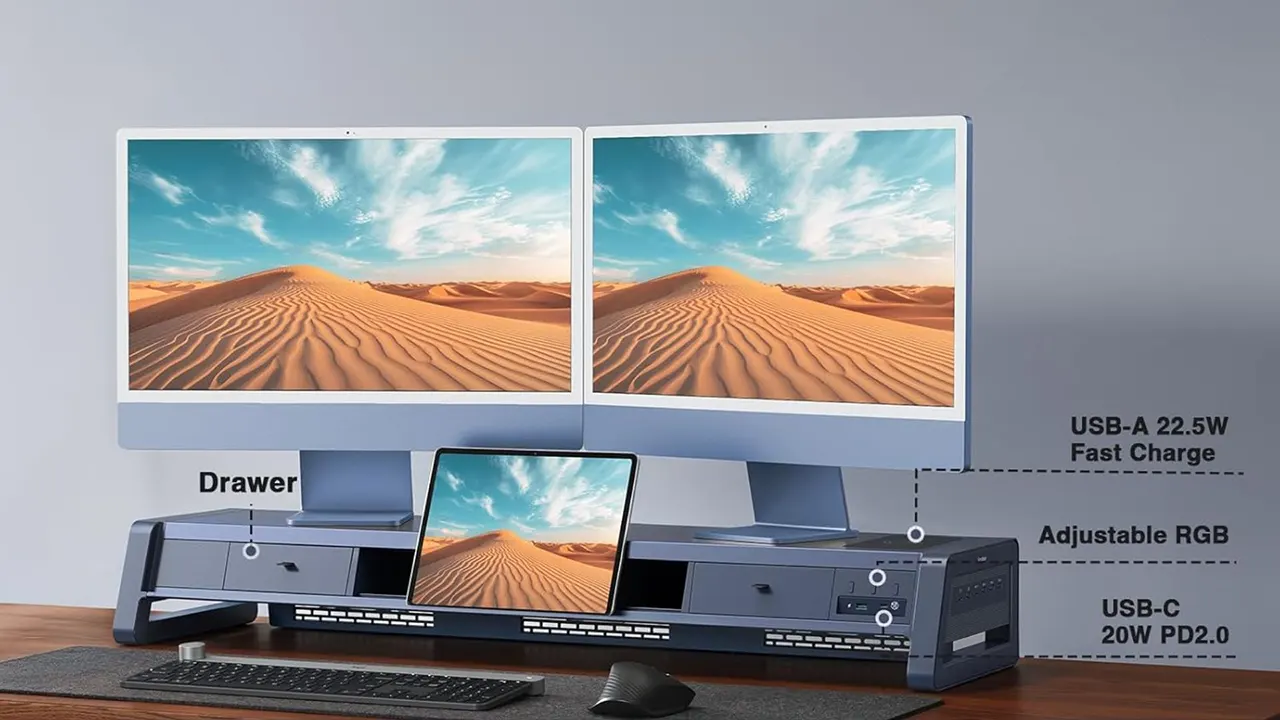
A dual monitor stand with USB ports is the ultimate desk upgrade for productivity. It lifts your screens to eye level to stop neck pain while adding easy-access charging for your phone and mouse. This setup clears cable clutter, saves desk space, and keeps your essential devices powered up all day long.
Do you feel like your desk is a mess of tangled wires? Many of us struggle with short charging cables and sore necks after a long day of work. It is frustrating to reach behind a heavy computer just to plug in a simple thumb drive. You deserve a workspace that feels organized and helps you stay focused on your tasks.
The good news is that a dual monitor stand with USB ports can solve these problems at once. It combines ergonomic support with a built-in power hub to make your life easier. In this guide, we will look at how to choose the right stand and set it up for success. You are about to turn your messy desk into a pro-level workstation.
What Is a Dual Monitor Stand with USB Ports?
A dual monitor stand with USB ports is a heavy-duty arm or shelf designed to hold two computer screens side-by-side. It attaches to your desk and includes built-in USB outlets in the base or the frame. These ports allow you to plug in keyboards, mice, or charging cables directly into the stand instead of the computer.
Using this tool helps you position your screens at the perfect height for your eyes. This reduces the strain on your back and shoulders during long hours of gaming or writing. The USB ports act as an extension cord for your PC, bringing your connection points closer to your hands. It is a smart way to merge physical comfort with digital convenience.
This accessory is perfect for anyone who needs more screen space and a cleaner desk. By lifting the monitors, you open up a lot of room underneath for notebooks or snacks. The integrated ports mean you never have to crawl under your desk again to find a plug.
Why Your Home Office Needs Integrated USB Ports
Integrated USB ports turn a simple monitor mount into a central command station for your tech. Most modern computers have ports in the back, which are hard to reach and often get dusty. Having ports on your monitor stand means you can swap devices in seconds without moving your heavy CPU. It is all about making your daily workflow smoother and faster.
These ports are great for charging your smartphone, wireless headphones, or smartwatches while you work. Some stands even support high-speed data transfer, so you can move files from a flash drive quickly. When your tools are easy to reach, you spend less time fussing with gear and more time being productive. It also helps keep your cables short and tidy on top of the desk.
Modern professionals often have five or more devices that need power at the same time. A stand with a built-in hub acts as a power strip for your desktop gadgets. It simplifies your setup by reducing the number of wires hanging off the back of your desk.
Top Benefits of Using a Dual Monitor Stand
The biggest benefit of a dual monitor stand with USB ports is better health through ergonomics. According to the Occupational Safety and Health Administration (OSHA), your monitor should be at or slightly below eye level. A stand lets you tilt and turn your screens to match your height perfectly. This prevents “tech neck” and helps you maintain good posture throughout the day.
- More Desk Space: Lifting screens off the desk clears up square footage for other tasks.
- Improved Focus: Two screens allow you to see more apps at once, which can increase productivity by up to 40%.
- Cable Management: Most stands have hidden clips to hide ugly power cords.
- Easy Connectivity: USB ports on the base provide instant access for peripherals.
- Flexible Viewing: You can turn one screen sideways (portrait mode) for reading long documents.
By investing in a quality mount, you are protecting your physical health and your mental clarity. A clean, organized desk leads to a less stressed mind. You will find that you can work longer and feel better when your equipment is placed exactly where you need it.
Key Features to Look for Before Buying
When shopping for a dual monitor stand with USB ports, you must check the weight capacity first. Each arm needs to be strong enough to hold your specific monitors without sagging. Look for stands made of solid steel or high-grade aluminum for the best stability. Cheap plastic parts can break or wobble, which is very distracting when you are trying to type.
The type of USB ports also matters for your specific needs. Some stands only provide “pass-through” ports, meaning they just extend the port from your computer. Others have “powered” hubs that can charge devices even if your computer is turned off. Check if the stand supports USB 3.0 for fast file speeds or if it is just USB 2.0 for simple devices like mice.
| Feature | What to Check | Why It Matters |
|---|---|---|
| Weight Limit | Lbs per arm | Prevents monitors from falling |
| VESA Size | 75×75 or 100×100 | Ensures the stand fits your screen |
| USB Version | 3.0 vs 2.0 | Affects data transfer speed |
| Mount Type | C-Clamp or Grommet | Determines how it fits your desk |
Choosing a stand with gas spring arms is often better than a fixed pole. Gas springs allow you to move the monitors up and down with just one finger. This flexibility is great if you like to switch between sitting and standing during your shift.

How to Install Your New Monitor Stand
Installing a dual monitor stand with USB ports is a simple task that takes about 20 minutes. Most kits come with all the tools you need, like an Allen wrench. First, you attach the base to the back of your desk using the C-clamp. Make sure the clamp is tight so the heavy monitors do not tip the desk over.
Next, you attach the VESA plates to the back of your monitors using four screws for each screen. Slide the monitors onto the arms and lock them in place according to the manual. Finally, plug the USB cable from the stand’s base into your computer’s USB port. Now your built-in hub is ready to use for all your favorite accessories.
- Clear your desk surface and check the thickness of your table.
- Secure the base clamp tightly to the edge of the desk.
- Attach the mounting brackets to the back of both monitors.
- Lift and slide the monitors onto the support arms.
- Connect the USB extension cable to your PC or power brick.
- Adjust the tension screws so the screens stay at your preferred height.
Once everything is mounted, take a moment to hide your wires in the cable trays. This makes the whole setup look professional and clean. You will be amazed at how much better your room looks once the “spaghetti” of wires is gone.
The Impact of Dual Monitors on Productivity
Research shows that having more screen real estate makes you a faster worker. A study by Wichita State University found that dual monitors improve performance and user satisfaction. You can keep your email open on one screen while you work on a project on the other. This stops you from constantly clicking “Alt-Tab” to switch between windows.
A dual monitor stand with USB ports makes this high-productivity setup even more efficient. You won’t run out of battery on your phone because it is plugged in right next to you. You can also quickly plug in a webcam or a microphone for video calls. This setup removes the small friction points that slow you down throughout the day.
When your workflow is not interrupted by technical issues or physical pain, you enter a state of “flow.” This is where you do your best work in less time. A good monitor stand is not just furniture; it is a tool for better output.
Comparing Different Mounting Options
There are two main ways to attach your dual monitor stand with USB ports to your desk. The most common is the C-Clamp, which grips the edge of the desk like a vice. This is perfect for most people because it does not require drilling any holes. It is also easy to move if you decide to change your desk layout later.
The second option is the Grommet mount, which goes through a hole in the middle of your desk. This is the most stable option and looks very sleek because it sits in the center. If your desk already has a cable hole, this is a great choice. Both styles usually include the USB hub in the very bottom of the base for easy access.
“Switching to a dual arm mount gave me back 30% of my desk surface. The built-in USB ports are a lifesaver for my wireless mouse dongle.” — Verified User Review.
Before you buy, measure the thickness of your desk to ensure the clamp will fit. Some glass desks are too thin or fragile for heavy clamps, so be careful. Choosing the right mount ensures your expensive monitors stay safe and secure.
Smart Cable Management Tips
Cable management is the secret to a beautiful and functional office. A dual monitor stand with USB ports usually has built-in channels to guide your wires. Start by grouping your power and HDMI cables together with Velcro ties. Thread them through the arm covers so they disappear from view.
Since your USB ports are on the stand, use short 1-foot cables for your desk accessories. This prevents long loops of wire from cluttering your mouse area. If you have many cables, consider using a cable sleeve to bundle them into one “trunk” that runs down the back of the desk. A tidy desk reduces visual distractions and helps you stay calm.
Remember to leave a little bit of slack in the cables near the joints of the arms. This allows you to move or rotate the monitors without pulling the plugs out. A well-managed desk looks great and makes it much easier to clean your workspace.
Common Questions About Monitor Stands
Will a dual monitor stand fit my screens?
Most stands fit screens from 13 to 32 inches. Check the VESA pattern on the back of your monitor (the four screw holes). If your monitor has 75x75mm or 100x100mm holes, it will fit almost any standard stand.
Do the USB ports work for data transfer?
Yes, most dual monitor stands with USB ports support data transfer. You must connect the main USB cable from the stand into your computer’s USB port. This allows your PC to “see” anything you plug into the stand.
Can I use this stand on a standing desk?
Absolutely! These stands are perfect for standing desks. They keep your monitors stable while the desk moves up and down. Just make sure your cables are long enough to reach the wall outlet when the desk is at full height.
What if my monitor doesn’t have screw holes?
If your monitor has a smooth back, you can buy a VESA adapter kit. These are “arms” that grip the corners of your screen. This allows you to mount non-VESA monitors to a standard dual arm stand.
Is it hard to move the monitors once they are mounted?
If you get a gas spring arm, it is very easy. You can move the screens with a light touch. If you get a static pole stand, you may need to loosen a bolt to change the height.
Do I need a special tool for the USB ports?
No, the USB ports are “plug and play.” Your computer will treat the stand like a normal USB hub. No special software or drivers are usually required for basic charging and data.
Final Verdict
Buying a dual monitor stand with USB ports is one of the smartest moves for any remote worker or gamer. It solves the problem of neck strain by putting your screens at the right height. It also fixes the problem of messy desks by adding a convenient power hub and cable storage. You get a cleaner look and a more comfortable body for a very reasonable price.
When you choose a stand, focus on weight capacity and the quality of the arms. A gas spring model offers the best flexibility for daily use. With the added benefit of USB connectivity, you will have fewer wires and more room to be creative. Start building your dream workspace today and feel the difference in your daily productivity.
Would you like me to help you compare the top-rated dual monitor stands with USB ports available this year?

Belayet Hossain is a Senior Tech Expert and Certified AI Marketing Strategist. Holding an MSc in CSE (Russia) and over a decade of experience since 2011, he combines traditional systems engineering with modern AI insights. Specializing in Vibe Coding and Intelligent Marketing, Belayet provides forward-thinking analysis on software, digital trends, and SEO, helping readers navigate the rapidly evolving digital landscape. Connect with Belayet Hossain on Facebook, Twitter, Linkedin or read my complete biography.