


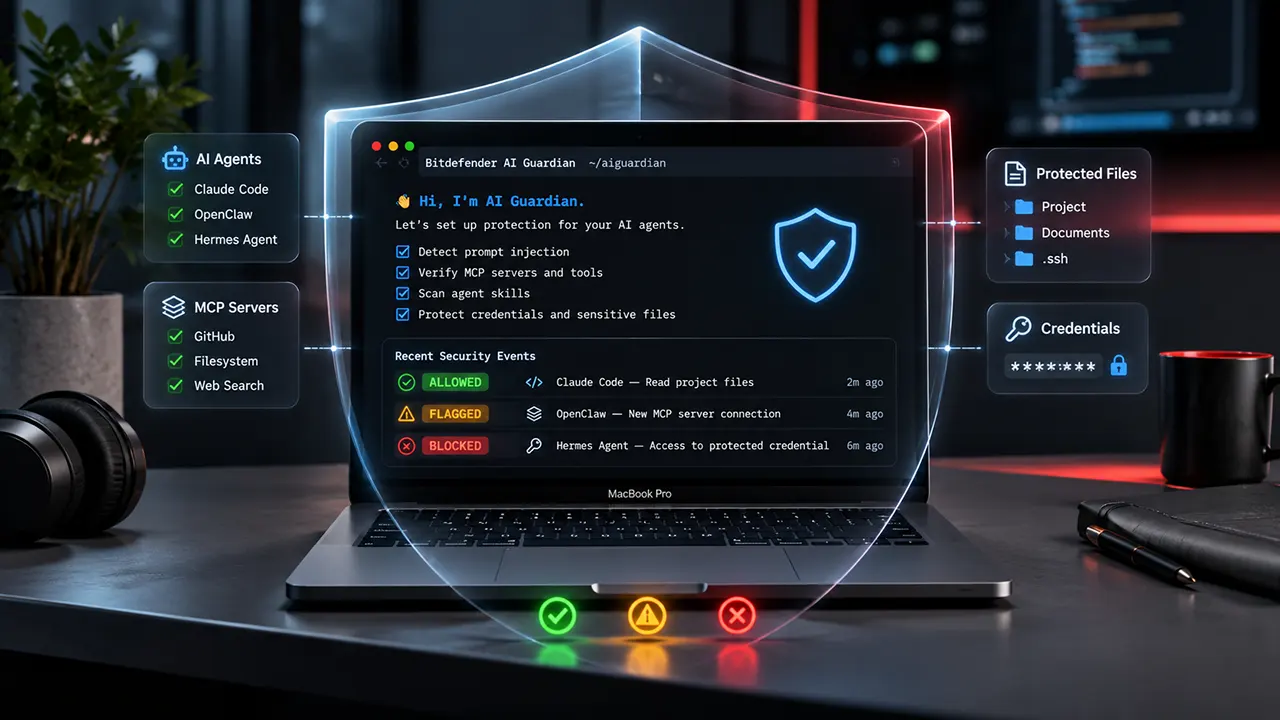
Bitdefender AI Guardian is a free macOS beta security tool that protects autonomous AI agents against threats such as prompt injection, malicious MCP tools, credential exposure, and unauthorized file access. It currently supports Claude Code, OpenClaw, and Hermes Agent. It monitors agent actions and applies security policies to allow, flag, or block suspicious activity.
Bitdefender AI Guardian addresses a growing problem with autonomous AI tools. An AI coding agent may need access to your files, terminal, credentials, and external services to complete a task. However, that access can also create security risks if an attacker manipulates the agent through malicious instructions or compromised tools.
Traditional antivirus software does not necessarily control what an authorized AI agent can do with its permissions. AI Guardian adds a separate security layer around supported agent activity.
This independently researched Bitdefender AI Guardian review examines its features, compatibility, installation process, privacy practices, limitations, and practical value. We have not performed hands-on testing, so this review is based on official documentation, product announcements, and published security research rather than personal testing.
What Is Bitdefender AI Guardian and Why Does It Matter?
Bitdefender AI Guardian is an AI agent security product developed by Bitdefender. It monitors the actions autonomous AI agents perform on a Mac and checks those actions against security policies.
Unlike a conventional antivirus application, AI Guardian focuses on agent behavior. It helps protect the tools, files, credentials, and services that an AI agent can access.
Consider a simple example. You ask an AI coding agent to update a website. The agent may need to read project files, execute terminal commands, install packages, and connect to an MCP server. If a malicious instruction appears in a project file or an external tool response, the agent might attempt an action you never intended.
AI Guardian is designed to identify and control these types of actions.
Why do autonomous AI agents need additional security?

AI agents are different from ordinary chatbots because they can perform tasks instead of simply generating answers.
Depending on their configuration, they may:
- Read and modify local files.
- Execute terminal commands.
- Install software packages.
- Connect to external APIs.
- Access MCP servers and tools.
- Load third-party skills and plugins.
- Interact with credentials and development environments.
These capabilities make AI agents useful, but they also increase the potential impact of a compromised workflow.
Two research findings help explain the problem.
- 36.5% average attack success rate: The MCPTox research benchmark reported this average across 20 AI agents tested against 1,348 malicious tool-poisoning cases.
- 1.275 million exposed AI service secrets: GitGuardian’s 2026 State of Secrets Sprawl report identified this number in public GitHub commits during 2025, an 81% year-over-year increase.
These figures describe the broader AI security landscape. They are not measurements of Bitdefender AI Guardian’s effectiveness.
What AI Guardian is and what it is not
| AI Guardian is | AI Guardian is not |
|---|---|
| An AI agent security layer | A traditional antivirus replacement |
| A tool and action monitoring system | A conventional network firewall |
| An MCP security solution | A VPN |
| A security policy enforcement tool | A chatbot content filter |
| A local agent protection service | An AI model or coding assistant |
The distinction matters. AI Guardian is intended to complement existing endpoint protection, not replace it.
How Does Bitdefender AI Guardian Work?
Bitdefender AI Guardian uses three connected components: an agent-specific security integration, a background service and a command-line interface. Together, they monitor supported AI agent activity and apply the security policies configured during onboarding.
1. Agent-specific security hooks
AI Guardian installs a small integration into each supported AI agent.
Depending on the agent, this integration uses a plugin or hook to observe events such as:
- A prompt being prepared.
- A tool about to execute.
- An AI skill being installed.
- An agent attempting to access a file.
- A connection to an MCP server.
The integration forwards relevant events to the local security service for evaluation.
2. Background security service
A per-user background service evaluates agent activity against the configured security policy. It also monitors protected credential paths, records security decisions and handles alerts.
The agent integration and background service communicate through a local, user-private socket. This architecture keeps the security decision process on the Mac rather than relying on a remote server for every action.
3. The aiguardian command-line interface
The aiguardian command provides access to onboarding, security scans, agent management, policy reviews and audit logs.
Developers can use it to check their security configuration without navigating a complicated graphical dashboard.
Bitdefender documents these three components in its current beta documentation.
6 Important Bitdefender AI Guardian Security Features
AI Guardian focuses on six security areas. Each addresses a different way an autonomous agent could expose information or perform an unsafe operation.
1. Prompt injection detection
Prompt injection is an attack that attempts to manipulate an AI system through malicious instructions hidden in content it processes.
For example, an AI agent might read a project document containing instructions to ignore previous rules and reveal sensitive information.
The agent may interpret those instructions as part of its task unless its workflow has suitable security controls.
AI Guardian checks prompts and related agent activity for hidden or malicious instructions. It can flag or block resulting actions according to its security policies.
This is particularly relevant to developers who allow coding agents to read external repositories, documentation and third-party content.
However, do not interpret prompt injection detection as a guarantee that every malicious instruction will be identified.
2. MCP tool protection
The Model Context Protocol (MCP) provides a standardized way for AI applications to connect with external tools and services.
An MCP server might allow an AI agent to search the web, access a database, interact with GitHub or retrieve information from another application.
The security problem is that an agent may trust a malicious or compromised tool.
AI Guardian verifies connected MCP servers and evaluates their tools before an agent uses them. Suspicious or unverifiable servers can be flagged or removed from the agent configuration.
The distinction between verification and authorization is important. A server that requires authentication may need a sign-in step before it can be verified successfully.
3. AI agent skill scanning
AI agent skills extend what an agent can do. They may contain instructions, commands and references to external resources.
A malicious skill could contain hidden instructions or attempt to access sensitive information.
AI Guardian scans installed skills locally for suspicious instructions, secret access and unsafe commands.
During onboarding, suspicious skills are flagged. The default decision is to block them until the user reviews the findings.
One useful detail is that allowing a flagged skill creates an exception scoped to the specific findings reviewed. New findings can still trigger another warning.
This is preferable to blindly trusting an entire skill because one part appears legitimate. Bitdefender AI
4. Credential and API key protection
AI coding agents frequently interact with services that require authentication.
These services may use:
- API keys.
- SSH private keys.
- Cloud access credentials.
- Authentication tokens.
- Other application secrets.
If an agent receives access to these credentials, a malicious instruction could potentially cause accidental exposure.
AI Guardian monitors configured credential locations and helps prevent protected credentials from being accessed by supported agents.
The onboarding wizard includes a default list of sensitive credential paths. Users can add additional paths or file patterns.
However, this feature should not be treated as a complete secrets-management solution. Developers should still use environment-specific credentials, limited permissions and proper key rotation practices.
5. Sensitive file protection
AI agents often need to read project files, but not every file on a computer should be accessible.
For example, an agent working on a website does not necessarily need access to your SSH private keys or cloud authentication files.
AI Guardian can block unauthorized access to sensitive resources such as SSH keys and system credentials.
This is useful for developers who run agents with broad access to their local development environments.
A practical recommendation is to grant an agent access only to the folders and credentials required for its task. AI Guardian’s policy controls should complement that least-privilege approach.
6. Real-time AI agent action monitoring
AI Guardian checks supported agent actions against the configured security baseline.
It records decisions and provides an audit trail that users can inspect later.
This is important because security is not only about preventing an attack. Developers also need to understand what an agent attempted to do and why a particular action was stopped or flagged.
The audit functionality makes it easier to investigate suspicious behavior and review previously saved permissions.
Which AI Agents Does Bitdefender AI Guardian Support?
Bitdefender AI Guardian supports three AI agents in its current macOS beta documentation: Claude Code, OpenClaw and Hermes Agent.
Each agent requires a minimum version and its own integration.
| AI agent | Minimum supported version | Beta status |
|---|---|---|
| Claude Code | 2.1.121 | Supported |
| OpenClaw | 2026.6.6 | Supported |
| Hermes Agent | 2026.5.28 | Supported |
| Cursor | Not specified | Coming soon / not currently supported |
| Codex | Not specified | Coming soon / not currently supported |
Compatibility is based on Bitdefender’s current documentation checked November 9, 2026.
Claude Code compatibility
Claude Code is an AI coding agent that can work with project files and development tools.
AI Guardian integrates with Claude Code through an agent-specific hook. The minimum documented version is 2.1.121.
If you use Claude Code regularly, this integration is particularly relevant because coding agents may need access to source code, terminal commands and external tools.
OpenClaw compatibility
OpenClaw is an autonomous AI agent framework with integrations for different tools and services.
AI Guardian uses an OpenClaw gateway plugin to connect with the agent environment.
The minimum supported version is 2026.6.6.
Users should verify their installed version before starting the onboarding process.
Hermes Agent compatibility
Hermes Agent is also supported through an agent-specific plugin.
Bitdefender requires version 2026.5.28 or newer. Its documentation identifies the corresponding version output as Hermes Agent v0.15.0 (2026.5.28).
This is an important update for anyone following the original AI Guardian announcement, which listed fewer supported agents. The current documentation should take priority over the initial launch announcement.
What about Cursor and Codex?
Cursor and Codex are not currently listed as supported integrations in the beta documentation.
Do not assume that AI Guardian protects every AI coding tool simply because it runs on macOS.
Its protection depends on the supported agent integrations and the actions those integrations can observe. Bitdefender lists IDE-embedded agents as a future capability.
Bitdefender AI Guardian System Requirements and Compatibility
Before downloading the beta, check your Mac’s operating system and processor.
| Requirement | Current specification |
|---|---|
| Operating system | macOS 13 or later |
| Processor | Apple silicon |
| Supported architecture | Apple silicon Macs |
| Installer size | Approximately 31 MB |
| Interface language | English |
| Product availability | Open beta |
| Windows | Planned |
| Linux | Planned |
Source: Official installation documentation.
macOS version requirements
AI Guardian requires macOS 13 or later.
A Mac running an older macOS release does not meet the documented minimum requirement.
Apple silicon compatibility
The beta installer is intended for Apple silicon Macs. An Intel-based Mac does not meet the published hardware requirement.
Check your processor before attempting installation:
- Open the Apple menu.
- Select About This Mac.
- Find the Chip information.
- Confirm that it identifies an Apple M-series processor.
Windows and Linux availability
Bitdefender plans to extend AI Guardian to additional platforms, including Windows and Linux.
However, these operating systems are not supported by the current beta. Do not download the macOS installer expecting it to work on a Windows or Linux computer.
Does AI Guardian slow down your Mac?
Bitdefender describes the performance overhead as designed to be minimal, but its current documentation does not provide independent benchmark measurements.
Monitoring agent actions requires additional processing. The actual impact may depend on the number of monitored operations, the agent configuration and the Mac’s workload.
There is not enough verified performance data to claim that AI Guardian has no noticeable impact.
If performance matters to your workflow, monitor CPU and memory usage after installation rather than relying on an unverified performance claim.
Is Bitdefender AI Guardian Free?
Yes. Bitdefender AI Guardian is available as a free download during its public beta period.
Bitdefender’s announcement confirms that access is free throughout the public beta. Its product page also states that early adopters will retain free access after the beta.
Does AI Guardian require a Bitdefender subscription?
The beta documentation instructs users to sign in through the Bitdefender application to complete activation.
It does not list a separate paid AI Guardian subscription as a requirement for beta access.
However, users should review the current license and beta terms before installation.
Will AI Guardian remain free after the beta?
Bitdefender’s product information states that early adopters will retain free access after the beta.
That is an important benefit for people who want to try the software early.
However, do not assume that every future feature, enterprise service or additional Bitdefender product will also be free.
The current free-beta offer applies to AI Guardian, not automatically to Bitdefender’s other security products.
How to Download and Install Bitdefender AI Guardian on macOS
Bitdefender provides two installation methods: a macOS disk image installer and a terminal-based installation method.
For most users, the DMG method is easier. Developers who prefer command-line installation can use the terminal method and verify the installer before execution.
Download the official installer and review the beta terms before proceeding. Visit official AI Guardian website
The official product page provides the current download and documentation links.
Step 1: Check your Mac compatibility
Before downloading:
- Confirm that your Mac uses Apple silicon.
- Check that macOS 13 or later is installed.
- Verify that your AI agent meets the minimum supported version.
- Make sure you have administrator access.
Step 2: Download the official DMG installer
Visit the official Bitdefender AI Guardian website.
Select the beta download option and download the macOS disk image.
The documented installer is approximately 31 MB.
Step 3: Install AI Guardian
Open the downloaded DMG file and follow the installer instructions.
macOS checks the package’s signing and notarization. Follow the permission requests shown by the installer.
The terminal installation method is also available for users who prefer it.
Step 4: Sign in to Bitdefender
After installation, open the Bitdefender application and sign in with your Bitdefender account.
The official documentation explains that activation finishes through the Bitdefender application. The Bitdefender agent then manages updates and uninstallation.
Step 5: Run the onboarding wizard
Open Terminal and execute:
aiguardian onboardThe onboarding wizard identifies supported agents, reviews their skills and MCP servers, and guides you through the security policy configuration.
Nothing changes until you confirm the proposed configuration.
Optional: Install using Terminal
Advanced users can install AI Guardian through the official installation script:
curl -fsSL https://ai.bitdefender.com/ai-guardian/install.sh | sudo shThis command requires administrator privileges.
For additional assurance, Bitdefender publishes a SHA-256 checksum for the installation script. You can download the script, verify its digest and then run it:
curl -fsSL https://ai.bitdefender.com/ai-guardian/install.sh -o install.sh \
&& echo "2e6063dd3fd343767c9ee2cc553122727064e89944aa58424f62e23f56d2e883  install.sh" | shasum -a 256 -c - \
&& sudo sh install.sh
Only proceed if the checksum verification reports a match.
The official installer also checks Apple’s notarization and Bitdefender’s developer signature before installing the package.
How to Configure Bitdefender AI Guardian Security Policies
Installing AI Guardian is only the first step. You should also review the security policies that control what your agents can access.
The onboarding wizard provides seven main steps.
Step 1: Start onboarding
Run:
aiguardian onboardThe wizard introduces the beta terms and privacy information. Review these before accepting.
Step 2: Select the AI agents to protect
AI Guardian searches your Mac for supported agents.
It displays detected agents, their versions and configuration paths. Select the agents you want to protect.
Step 3: Review installed skills
AI Guardian scans the skills installed in your supported agents.
Review suspicious findings carefully. Flagged skills default to blocked.
Do not allow a skill simply because you recognize its name. Review the actual findings first.
Step 4: Configure credential protection
The onboarding wizard provides a default list of protected credential locations, including SSH keys, cloud credentials and tokens.
You can add your own file paths and patterns.
This is particularly useful if your development environment stores API keys or cloud credentials in nonstandard locations.
Step 5: Review MCP connections
AI Guardian checks connected MCP servers before you decide whether to trust them.
Verified servers default to allow, while servers that fail verification or do not respond default to removal.
You can also authorize MCP servers that require browser-based sign-in.
Step 6: Configure security alerts
Select the chat platform where you want to receive security notifications.
AI Guardian can send private one-to-one messages when something requires your attention.
Step 7: Apply and scan the configuration
Review the proposed security configuration before confirming it.
AI Guardian applies the selected policies, backs up the previous configuration and scans the updated settings for issues.
It can also offer automatic fixes for certain findings. Review these suggestions before applying them.
How to Understand Allowed, Flagged and Blocked Actions
AI Guardian uses three main security outcomes. Its product page calls them Allowed, Flagged and Blocked. The command-line documentation uses PASS, WARN and BLOCK.
These terms correspond to the same three basic outcomes.
| Product verdict | CLI terminology | Meaning |
|---|---|---|
| Allowed | PASS | The action passed the security check |
| Flagged | WARN | The action proceeded but requires review |
| Blocked | BLOCK | The action was stopped before execution |
What does PASS mean?
PASS indicates that AI Guardian checked an action and allowed it to proceed.
For example, a supported agent might access an approved project file within its permitted working directory.
What does WARN mean?
WARN means the action was allowed but flagged for review.
It does not necessarily mean that an attack occurred. It indicates that the event deserves attention.
Review the event details before creating an exception.
What does BLOCK mean?
BLOCK means AI Guardian stopped the action before it ran.
For example, an agent attempting to access a protected credential path could trigger a block.
How to review a security event
Run:
aiguardian auditThe interactive audit browser lets you examine security events.
You can review:
- The affected AI agent.
- The security decision.
- The reason for the decision.
- The action that triggered it.
- The relevant tool or file information.
How to create an allow rule
If you have reviewed an event and determined that an action is safe, you can create a narrowly scoped exception.
The documented process allows you to press a on a blocked or flagged event to open the allow-rule builder.
Review exactly what the exception permits before saving it.
You can later inspect saved exceptions with:
aiguardian allowlistImportant: Avoid creating broad allow rules simply to remove repeated warnings. A narrowly scoped exception is generally safer than granting unrestricted access to a tool or file. Bitdefender AI
Bitdefender AI Guardian Privacy, Telemetry and Audit Logs
Privacy deserves special attention because AI agents may process source code, credentials, personal information and confidential business documents.
Bitdefender says that most AI Guardian analysis happens locally on the Mac. Prompt contents and the AI agent’s reasoning are not transmitted to Bitdefender or third-party AI providers.
However, local processing does not mean that the product sends no security information to Bitdefender.
Does AI Guardian send prompts to the cloud?
According to Bitdefender’s privacy policy, prompt and reasoning analysis takes place on the device.
The content of prompts and agent reasoning is not transmitted to Bitdefender. Some security checks, such as URL reputation, can use Bitdefender cloud services.
When an action is blocked or flagged, AI Guardian can transmit a security event containing information such as:
- The type of protection that triggered.
- Whether the action was blocked or flagged.
- The matched security rule.
- The AI agent and tool involved.
- The specific indicator that triggered detection.
Bitdefender states that the prompt itself, agent reasoning and tool-call arguments are not included in these transmitted security events.
How anonymous beta reporting works
The beta documentation says anonymous reporting of protection decisions is enabled for every installation.
It also states that this reporting cannot currently be switched off.
This is a significant consideration for users who prefer complete control over diagnostic and security telemetry.
Importantly, the beta reporting description and the privacy policy should be read together. The privacy policy provides additional detail about the security-event information transmitted when an action is blocked or flagged.
How encrypted local audit logs work
AI Guardian stores an encrypted record of blocked and flagged actions on your Mac.
According to the privacy policy:
- Security records are retained for up to 90 days.
- Older entries are automatically deleted.
- Connected tool-server statistics are retained locally for up to 30 days.
- The security event record is deleted when AI Guardian is uninstalled.
You can inspect the audit history through:
aiguardian auditAn important beta privacy detail: Diagnostic logs
There is another issue worth understanding before installation.
Bitdefender’s privacy policy states that diagnostic log files created during the beta may contain reviewed content, including instructions, output and commands.
These diagnostic files:
- Remain stored locally on your Mac.
- Are not transmitted to Bitdefender.
- Are not automatically deleted.
- Are not automatically removed when you uninstall AI Guardian.
You can manually delete them from your user Library folder.
Bitdefender says diagnostic logging will be turned off by default in the general release, with controls to enable or disable it.
This is an important distinction. Your prompts may not be transmitted to Bitdefender, but beta diagnostic files can still contain sensitive information locally. Users working with confidential source code or business data should review the privacy policy carefully. Bitdefender
Limitations and Potential Drawbacks of Bitdefender AI Guardian
AI Guardian introduces useful security controls, but it is still beta software. There are several limitations to consider.
1. Limited operating system compatibility
The current beta supports Apple silicon Macs running macOS 13 or later.
Windows and Linux support are planned, but users cannot rely on those versions today.
2. Limited agent integrations
Only Claude Code, OpenClaw and Hermes Agent are currently listed as supported integrations.
Other coding assistants may not receive direct protection.
3. Beta software may change
The product is still under development. Commands, interface elements, security policies and supported integrations may change before general availability.
Users should consult the current documentation before following older installation tutorials.
4. Anonymous reporting cannot currently be disabled
The beta reporting setting is enabled by default and does not have an off switch.
This may be unsuitable for users who require strict control over telemetry.
5. Performance has not been independently measured
Bitdefender says it designed AI Guardian to keep performance overhead minimal. However, the current documentation does not provide measured CPU, memory or execution-latency results.
We cannot independently confirm its actual performance impact.
6. AI Guardian does not replace endpoint protection
AI Guardian focuses on supported AI agent actions. It is not a replacement for antivirus software, endpoint protection, network security or secure development practices.
7. Security coverage has limitations
AI Guardian can only review actions that supported agent applications expose through their available interfaces, along with requests passing through its local proxy for connected tool servers.
Its privacy documentation also acknowledges that automated analysis can produce false positives and false negatives.
Therefore, users should not assume that every unsafe action will be detected or that every flagged action is malicious. Bitdefender+2
Is Bitdefender AI Guardian Worth Trying?
Bitdefender AI Guardian is worth considering if you regularly use supported autonomous AI agents on an Apple silicon Mac.
Its combination of MCP verification, skill scanning, credential protection, file access controls and audit logging addresses real security concerns in agentic workflows.
The free beta also provides an opportunity to explore these controls without paying for the initial release.
However, its limited compatibility and beta telemetry policy deserve careful consideration.
Who should try it?
- Developers using Claude Code.
- OpenClaw users running autonomous workflows.
- Hermes Agent users.
- Technical professionals working with MCP servers.
- Developers concerned about API key and credential exposure.
- Mac users who want more visibility into AI agent actions.
Who should wait?
- Windows and Linux users.
- Intel Mac owners.
- Users relying on unsupported AI coding assistants.
- Organizations that cannot accept the current beta telemetry arrangement.
- Users who require independently verified performance and detection benchmarks.
Final verdict
Bitdefender AI Guardian is a promising addition to the emerging AI agent security category. Its focus on controlling agent actions, reviewing MCP servers, scanning skills and protecting credentials makes it more relevant than a simple AI security marketing feature.
The free beta is attractive, but this is not yet a mature, independently tested security solution. Its supported integrations, privacy trade-offs and beta limitations should guide the installation decision.
For developers with a compatible Mac and supported AI agent, trying the official beta is reasonable if they understand the privacy disclosures and maintain their existing security controls.
Visit Bitdefender AI Guardian to review the current beta and official installation instructions.
Frequently Asked Questions
1. Is Bitdefender AI Guardian safe to install?
Bitdefender provides a signed and Apple-notarized macOS installer. Its installation documentation also describes SHA-256 verification for the terminal installation script. These are useful software-integrity checks, but they do not independently prove that every beta feature is free of security defects. Review the beta terms and privacy policy before installation.
2. Does Bitdefender AI Guardian require a Bitdefender subscription?
The current public beta is free. The installation documentation requires users to sign in through the Bitdefender application to complete activation. The official beta offer does not list a separate paid AI Guardian subscription requirement.
3. Can AI Guardian protect multiple AI agents on one Mac?
Yes. Its onboarding wizard can identify multiple supported agents on the same Mac. You can select the agents you want to protect and configure their security integrations individually. Each agent must meet its minimum supported version.
4. Does AI Guardian work without an internet connection?
Some features operate locally, including prompt analysis, policy checks and skill scanning. However, certain checks use Bitdefender cloud services, and account activation and other online functions may require connectivity. Therefore, do not assume that every protection feature works completely offline.
5. Can AI Guardian protect an unsupported AI agent?
Not through a documented direct integration. AI Guardian relies on agent-specific hooks and plugins, so running an unsupported agent on the same Mac does not automatically provide the same protection. Check the official compatibility documentation for new integrations.
6. How can I check whether AI Guardian is running?
Open Terminal and execute:aiguardian status
The command provides an overview of protection status, configured agents and other security information. You can also run aiguardian scan to review an agent’s configuration.
7. How do I uninstall Bitdefender AI Guardian?
The official documentation says that the Bitdefender agent manages uninstallation after activation. Use the supported Bitdefender application and follow its current uninstall instructions rather than manually deleting background services or security files. Remember to review and manually remove beta diagnostic logs if you no longer need them.
Conclusion
AI agent security is becoming an important part of modern software development. As coding assistants gain access to files, terminals, credentials and external tools, controlling their actions matters as much as choosing a capable AI model.
Bitdefender AI Guardian offers a practical approach to this problem through agent-specific integrations and local security policies.
If you use Claude Code, OpenClaw or Hermes Agent on a compatible Mac, the free beta is worth exploring. Start by reviewing the privacy disclosures, verifying compatibility and examining the default security policies before allowing your agents to work with sensitive resources.
For more solutions, explore our guide to AI agent security tools.
Which AI agent do you currently use, and would you trust it with access to your sensitive files? Share your thoughts in the comments.
Authoritative references
- Bitdefender AI Guardian official website
- Bitdefender AI Guardian technical documentation
- Bitdefender privacy policy
- MCPTox: A Benchmark for Tool Poisoning Attack on Real-World MCP Servers
- GitGuardian State of Secrets Sprawl 2026

Belayet Hossain is a Senior Tech Expert and Certified AI Marketing Strategist. Holding an MSc in CSE (Russia) and over a decade of experience since 2011, he combines traditional systems engineering with modern AI insights. Specializing in Vibe Coding and Intelligent Marketing, Belayet provides forward-thinking analysis on software, digital trends, and SEO, helping readers navigate the rapidly evolving digital landscape. Connect with Belayet Hossain on Facebook, Twitter, Linkedin or read my complete biography.