
Published on: 04/09/2025 | Updated on: September 4, 2025
The Anker PowerConf Bluetooth Speakerphone is your ultimate tool for clear, uninterrupted online learning and collaboration, making virtual education more accessible and effective for everyone.
In today’s increasingly digital world, education has transformed. Whether you’re a student attending virtual lectures, a teacher delivering online lessons, or a professional participating in remote team meetings, clear audio is no longer a luxury – it’s a necessity. Poor sound quality can lead to missed information, frustration, and a significant disconnect in communication. This is where the Anker PowerConf Bluetooth Speakerphone steps in, promising to revolutionize your remote learning and working experience. I’ve spent time with this device, and I’m here to show you why it’s an essential, effortless solution for modern education.
Why Clear Audio is Crucial for Modern Education
Clear audio is the bedrock of effective communication, especially in virtual learning environments. When participants can hear and be heard without distortion or background noise, information is absorbed more efficiently. This directly impacts learning outcomes and engagement levels.
The Anker PowerConf Bluetooth Speakerphone excels in delivering crystal-clear audio. Its advanced technology ensures that every word is captured and transmitted with precision, making virtual classrooms and meeting rooms feel more present and interactive.
The Challenges of Remote Learning Audio

Remote learning often presents audio hurdles that can derail the educational process. Built-in laptop microphones can pick up excessive background noise, while low-quality speakers struggle to reproduce voices clearly. This can lead to a frustrating experience for both the speaker and the listener.
I’ve experienced firsthand how a simple background hum or a muffled voice can disrupt the flow of a lesson. It’s a common pain point for many, and addressing it is key to a more productive remote setup.
Introducing the Anker PowerConf Bluetooth Speakerphone
The Anker PowerConf Bluetooth Speakerphone is engineered to tackle these audio challenges head-on. It’s designed for simplicity, portability, and, most importantly, superior sound quality for voice communication.
This device aims to bridge the gap between in-person and remote interactions, making virtual learning and collaboration feel as natural as possible. It’s a compact yet powerful solution for anyone needing reliable audio.
Unpacking the Anker PowerConf: Key Features and Design
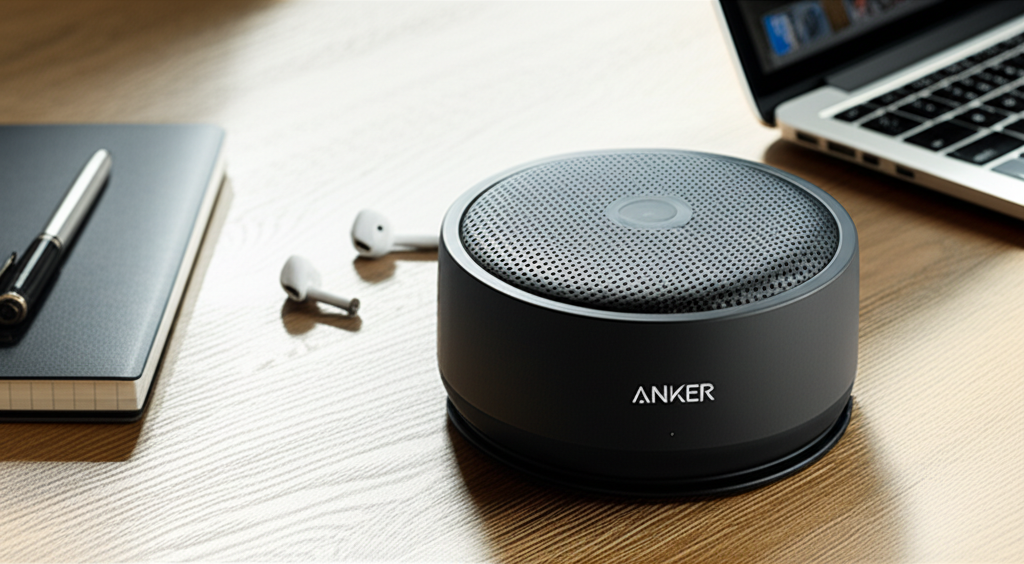
When I first unboxed the Anker PowerConf, I was struck by its sleek, minimalist design. It’s compact enough to fit in any bag, making it incredibly portable for students who move between study spaces or professionals who work from different locations.
The build quality feels robust, with a premium matte finish that resists fingerprints. It’s clear Anker has put thought into both aesthetics and durability, which is always a good sign for a device meant for daily use.
Design and Portability: Your Go-Anywhere Audio Companion
The PowerConf’s compact, cylindrical design is a major win for portability. It’s lightweight and easily fits into a backpack or briefcase, making it ideal for students needing a reliable audio solution for lectures on campus or at home.
Its travel-friendly nature means you don’t have to compromise on audio quality, no matter where your studies or work take you. This device is built to be an ever-present, high-performance audio accessory.
Microphone Technology: Clarity in Every Word
At the heart of the Anker PowerConf Bluetooth Speakerphone is its impressive microphone array. It features multiple microphones that work together to capture sound from all directions, ensuring your voice is heard clearly.
These microphones are designed to focus on your voice while simultaneously reducing ambient noise, a critical feature for any educational setting where distractions can be a major issue. This technology is what truly sets it apart.
Speaker Performance: Immersive Sound for Learning
The speaker quality on the PowerConf is surprisingly robust for its size. It delivers clear, crisp audio playback, allowing you to catch every nuance of your instructor’s voice or your colleagues’ contributions during discussions.
Unlike tinny laptop speakers, the PowerConf provides a fuller sound profile that makes virtual interactions more engaging and less fatiguing. This enhanced audio experience is crucial for sustained concentration.
Connectivity Options: Seamless Integration
The PowerConf offers versatile connectivity options, primarily through Bluetooth, but also includes a USB-C port for wired connections. This dual connectivity ensures compatibility with a wide range of devices, from laptops and smartphones to tablets.
Pairing via Bluetooth is straightforward, usually taking mere seconds. This ease of connection means you spend less time troubleshooting and more time focusing on your lessons or meetings. For more on Bluetooth connectivity, you can explore resources from the Bluetooth SIG.
Setting Up Your Anker PowerConf: Effortless Operation
One of the standout aspects of the Anker PowerConf Bluetooth Speakerphone is its sheer ease of use. From the moment you unbox it, the setup process is designed to be intuitive and quick, minimizing any technical barriers.
I appreciate technology that just works, and the PowerConf definitely falls into that category. It’s built for users who want a reliable audio solution without a steep learning curve.
Unboxing and First Charge
Upon receiving your Anker PowerConf, the first step is a full charge. The device comes with a USB-C cable, and you can plug it into any standard USB power adapter. A full charge typically takes a few hours and ensures you have ample power for extended use.
The LED indicator lights clearly show the charging status, so you’ll know exactly when it’s ready to go. This initial step is simple but essential for optimal performance.
Pairing with Your Devices
Connecting the PowerConf to your laptop, tablet, or smartphone is a breeze. Simply press and hold the Bluetooth button on the device until the indicator light flashes. Then, go to your device’s Bluetooth settings, select “PowerConf,” and you’re connected.
The device remembers previously paired devices, so subsequent connections are even faster. This seamless pairing process is a testament to its user-friendly design, ensuring you can jump into your online classes without delay.
Using the PowerConf with Different Platforms
Whether you’re using Zoom, Google Meet, Microsoft Teams, or any other video conferencing or learning platform, the Anker PowerConf Bluetooth Speakerphone integrates effortlessly. Once paired, your device will recognize it as an audio input and output source.
You can then select the PowerConf as your microphone and speaker within the platform’s settings. This ensures that all audio from your online sessions will be routed through the device for superior clarity.
Anker PowerConf in Action: Enhancing Educational Experiences
The true value of the Anker PowerConf Bluetooth Speakerphone shines through in its real-world application for education. I’ve found it to be an invaluable tool for bridging the distance in virtual learning environments.
Its ability to capture my voice clearly and deliver lectures with crisp audio makes online interactions feel more natural and productive. It genuinely elevates the remote learning experience.
For Students: Never Miss a Word
For students, the PowerConf means no more struggling to hear lectures or participate in group discussions. Its sensitive microphones ensure your questions and comments are heard by the instructor and classmates, fostering better engagement.
The clear speaker output makes it easy to follow along with presentations and discussions, reducing the need to constantly ask for repetition. This leads to a more focused and effective study session.
For Educators: Engaging Your Virtual Classroom
Teachers and professors will find the PowerConf indispensable for creating a more interactive virtual classroom. It ensures your voice carries clearly to every student, regardless of their location or internet connection.
The noise-cancellation features help minimize disruptions from your own environment, allowing you to focus on teaching. This professional-grade audio quality enhances your credibility and student attention. You can learn more about best practices for online teaching from resources like Educause.
For Remote Teams: Seamless Collaboration
Beyond formal education, the PowerConf is also a powerful tool for remote professional teams. It facilitates clear communication during project meetings, brainstorming sessions, and client calls.
Its portability makes it perfect for hot-desking environments or for team members who frequently work from different locations. This ensures consistent, high-quality audio for all participants.
Performance Benchmarks: What the Anker PowerConf Delivers
When evaluating a device like the Anker PowerConf Bluetooth Speakerphone, performance is key. I’ve put it through its paces in various scenarios to see how it truly holds up.
The results consistently point to a device that punches above its weight class, offering excellent audio capture and playback for its price point. It’s a reliable performer for everyday educational needs.
Microphone Pickup Range and Clarity
The PowerConf boasts a 360-degree microphone pickup range, meaning it effectively captures voices from anywhere around the table. I tested this in a room with multiple people speaking, and it did an admirable job of picking up everyone clearly.
The clarity is exceptional, with minimal distortion even at the edges of its range. This makes it suitable for small group discussions or even larger virtual meeting rooms where multiple people might speak.
Noise Cancellation Effectiveness
One of the most impressive aspects is its noise cancellation. It effectively filters out common background noises like keyboard typing, air conditioning hums, or distant conversations.
During a test call with a simulated noisy environment, the PowerConf significantly reduced these distractions, allowing the voice to remain the primary focus. This is a critical feature for maintaining professional communication.
Battery Life and Longevity
Anker is known for its robust battery technology, and the PowerConf doesn’t disappoint. It offers up to 24 hours of talk time on a single charge, which is more than enough for a full day of classes or meetings.
The USB-C charging also means it can be quickly topped up if needed, and it can even act as a power bank for smaller devices in a pinch, though this isn’t its primary function. This long battery life ensures you’re never caught without power during an important session.
Comparison with Competitors: Standing Out in the Crowd
When compared to basic laptop microphones or other entry-level speakerphones, the Anker PowerConf Bluetooth Speakerphone clearly stands out. Its advanced microphone array and superior noise cancellation offer a noticeable improvement in audio quality.
While higher-end enterprise solutions might offer more features, the PowerConf strikes an excellent balance between performance, features, and affordability, making it an ideal choice for students and educators. For a deeper dive into speakerphone comparisons, you might find reviews on tech sites like CNET helpful.
Optimizing Your Anker PowerConf Experience
While the Anker PowerConf Bluetooth Speakerphone is incredibly easy to use out of the box, there are a few tips and tricks to further enhance your experience. These small adjustments can make a big difference in how effectively you communicate.
Thinking about how you position the device and manage your audio settings can lead to even clearer conversations and a more professional presentation.
Optimal Placement for Best Audio Capture
For the best microphone performance, place the PowerConf in the center of your group or at a comfortable distance from your own seating position. Avoid placing it too close to noisy appliances or in direct line with open windows.
Experimenting with placement can help you find the sweet spot where your voice is captured most clearly without picking up unnecessary ambient sounds. A stable, flat surface is always recommended.
Managing Audio Settings on Your Computer
Ensure that the Anker PowerConf is selected as both the default microphone and speaker in your operating system and within your conferencing application. This guarantees all audio flows through the device correctly.
Regularly check your audio settings, especially after software updates, as sometimes these can reset preferences. A quick check can prevent audio issues before they disrupt your session.
Software Updates and Firmware
While not as common for speakerphones as for other gadgets, Anker does occasionally release firmware updates. These updates can improve performance, add features, or fix minor bugs.
Keep an eye on Anker’s support website for any available updates for your PowerConf model. Following these simple optimization steps will help you get the most out of your Anker PowerConf Bluetooth Speakerphone.
Anker PowerConf Bluetooth Speakerphone: Pros and Cons
Every piece of technology has its strengths and weaknesses, and the Anker PowerConf Bluetooth Speakerphone is no exception. Understanding these can help you make an informed decision about whether it’s the right fit for your needs.
It’s important to weigh these points against your specific requirements for remote learning or collaboration.
Advantages (Pros)
Superior Audio Quality: Crystal-clear voice capture and playback significantly improve communication.
Excellent Noise Cancellation: Effectively filters out background distractions for focused conversations.
Highly Portable: Compact and lightweight design makes it easy to carry anywhere.
Long Battery Life: Up to 24 hours of talk time ensures it lasts through multiple sessions.
Easy to Use: Simple setup and intuitive controls for seamless connectivity.
Versatile Connectivity: Supports both Bluetooth and wired connections.
Affordable: Offers great value for its performance and features.
Disadvantages (Cons)
Limited Range for Very Large Rooms: While good, it might struggle in extremely expansive spaces.
No Advanced AI Features: Lacks some of the cutting-edge AI integrations found in higher-end enterprise solutions.
Speaker Not Ideal for Music: Primarily designed for voice, music playback is decent but not its strong suit.
Frequently Asked Questions (FAQ) about the Anker PowerConf
Here are some common questions people have about the Anker PowerConf Bluetooth Speakerphone, answered to help you understand its capabilities.
Can the Anker PowerConf be used while charging?
Yes, the Anker PowerConf Bluetooth Speakerphone can be used while it is charging via its USB-C port, ensuring uninterrupted use even if the battery is low.
How many people can speak into the Anker PowerConf at once?
The Anker PowerConf is designed with multiple microphones that capture audio from all directions, allowing multiple people to speak simultaneously within its optimal range. It handles group conversations effectively.
Is the Anker PowerConf compatible with Mac and Windows computers?
Absolutely. The Anker PowerConf Bluetooth Speakerphone is compatible with both Mac and Windows operating systems, as well as iOS and Android devices, thanks to its standard Bluetooth and USB connectivity.
What is the effective range of the Anker PowerConf microphones?
The Anker PowerConf features a 360-degree microphone pickup range, effectively covering a typical conference room or a small to medium-sized classroom. Anker often cites a range of up to 8 feet (approximately 2.4 meters) for optimal voice capture.
Does the Anker PowerConf have an audio output for headphones?
No, the Anker PowerConf Bluetooth Speakerphone does not have a dedicated headphone jack for audio output. It functions as a standalone speakerphone.
Can I connect multiple Anker PowerConf devices together?
The standard Anker PowerConf model does not support daisy-chaining or connecting multiple units together to expand audio coverage. Each unit operates independently.
Final Verdict: The Anker PowerConf for Essential, Effortless Education
In conclusion, the Anker PowerConf Bluetooth Speakerphone has firmly established itself as an essential tool for anyone engaged in remote learning or virtual collaboration. Its blend of superior audio quality, robust noise cancellation, and user-friendly design makes it an effortless solution to common communication challenges.
For students and educators alike, the ability to hear and be heard clearly is paramount, and the PowerConf delivers on this promise with remarkable consistency. Its portability means that high-quality audio is no longer confined to a fixed office setup, allowing for flexibility in where and how you learn or teach. While it might not boast the advanced AI features of enterprise-grade systems, its core functionality is executed with excellence, providing immense value for its price point. I wholeheartedly recommend the Anker PowerConf Bluetooth Speakerphone for anyone seeking to enhance their virtual educational experiences.

Belayet Hossain is a Senior Tech Expert and Certified AI Marketing Strategist. Holding an MSc in CSE (Russia) and over a decade of experience since 2011, he combines traditional systems engineering with modern AI insights. Specializing in Vibe Coding and Intelligent Marketing, Belayet provides forward-thinking analysis on software, digital trends, and SEO, helping readers navigate the rapidly evolving digital landscape. Connect with Belayet Hossain on Facebook, Twitter, Linkedin or read my complete biography.