


What Gemini Spark Actually Is
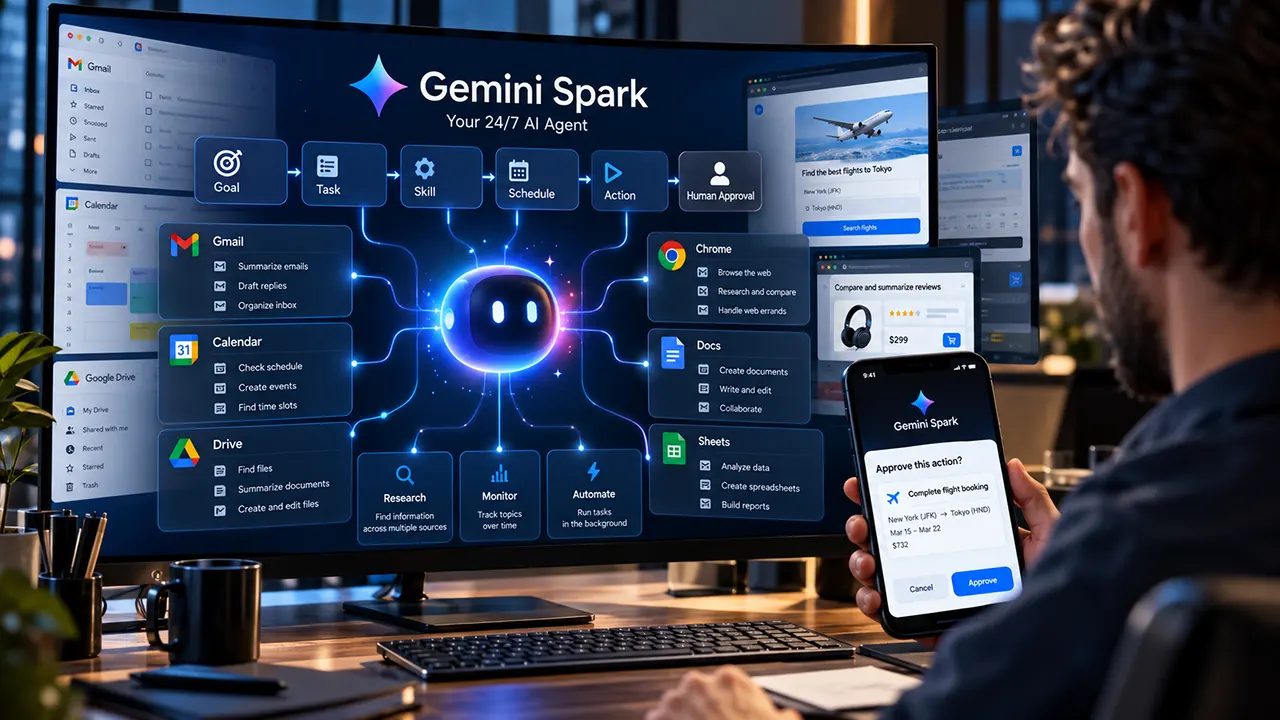
Gemini Spark is Google’s personal AI agent designed to handle complex digital tasks and ongoing workflows in the background. Instead of only answering a prompt, Spark can work toward a goal, use connected information and tools, run scheduled tasks, and ask for your involvement when an important action needs your approval.
That makes Gemini Spark different from a normal chatbot. You can give it a goal such as organizing email, researching a topic, planning a trip, or monitoring information over time, then let it work through the task instead of manually prompting it at every step.
The important detail is that “24/7” does not mean Spark can perform every action without you. Google still builds human supervision into sensitive workflows, particularly when a task involves actions such as signing in or making a payment.
Why Gemini Spark Agent Is Different From a Normal AI Chatbot
A normal AI chatbot usually follows a simple pattern:
Prompt → Response
An AI agent works differently:
Goal → Plan → Tools → Multi-step actions → Result → Human approval when needed
That distinction explains the appeal of Gemini Spark.
If you ask a chatbot to find flight options, you may receive a list of flights. With an agentic workflow, the system can potentially research options across websites, compare them, and continue with parts of the booking process.
Spark also supports ongoing work. You can create a task, give it reusable instructions through a Skill, and schedule that work to happen at a particular time or when a condition occurs.
This makes Spark less like a search box and more like a digital assistant that can manage a workflow.
How Gemini Spark Agent Works: Tasks, Skills, and Schedules
Google describes three core building blocks for Spark: Tasks, Skills, and Schedules.
What Gemini Spark Tasks Do
A Task represents the larger goal you want Spark to manage.
For example, instead of repeatedly asking Gemini to research AI news, you could give Spark a broader goal such as:
Research important AI developments and prepare a useful digest for me.
Spark can then work through the objective using the information sources and tools available to it.
The key idea is that a Task describes what you want done.
What Gemini Spark Skills Do
Skills are reusable instructions and context that tell Gemini how to perform a particular type of work.
For example, you could have a Skill for writing emails or a Skill for handling travel-related work. Spark can use relevant Skills when completing a Task.
Think of Skills as the reusable playbook behind a workflow.
What Gemini Spark Schedules Do
Schedules determine when a Task should run.
You can schedule work for a specific time or create certain condition-based workflows. Google currently documents time-based schedules, Gmail monitors, and topic monitors.
This creates a useful mental model:
- Task = what Spark should do
- Skill = how Spark should do it
- Schedule = when Spark should do it
That model is one of the easiest ways to understand Gemini Spark.
What Can Gemini Spark Do?
Spark’s usefulness becomes clearer when you move from the marketing description to specific actions.
Gmail and Email Tasks
Spark can work with Gmail when the relevant Google Workspace connection is enabled.
Documented capabilities include searching and summarizing email conversations, creating drafts, replying to existing threads, forwarding messages, and organizing email.
That opens up practical workflows such as reviewing a busy inbox, finding messages about a specific project, or preparing a summary of important email activity.
The useful distinction is that Spark can manage an email workflow rather than simply summarize an email you manually paste into a chat.
Google Calendar Tasks
Gemini Spark Agent can work with Google Calendar to help manage schedules.
Documented actions include checking your calendar, responding to invitations, creating events, changing meeting times, changing locations, cancelling events, and finding available scheduling slots.
For a busy professional, this can turn calendar management from a series of small manual actions into part of a larger workflow.
Google Drive, Docs, Sheets, and Slides
Spark can also work across Google’s productivity services.
Depending on the connected service and task, documented capabilities include finding files in Drive, working with Google Docs, creating or editing Sheets, and creating or editing Slides.
This is important for productivity because many real tasks do not live inside one application.
For example, a project may involve an email, a document, a spreadsheet, and a calendar event. An agent can potentially connect those pieces into one workflow instead of treating each application as a separate conversation.
Google Keep and Google Tasks
Gemini Spark Agent can also work with Google Keep and Google Tasks.
This extends its usefulness beyond information retrieval. Spark can potentially connect information it finds with notes, lists, reminders, and task management.
That makes the Google ecosystem itself an important part of the Spark experience.
Research and Multi-Source Work
Research is another major use case.
Gemini Spark Agent can perform deeper research across multiple sources and produce results designed around a particular goal. Google also positions Spark for ongoing monitoring, allowing users to follow topics rather than repeatedly starting the same research task.
This is especially useful for work where the information changes over time.
Gemini Spark Agent and Chrome: What the Browser Agent Can Actually Do
One of the biggest developments for Gemini Spark is its integration with Chrome.
Google introduced Chrome auto browse for Spark in July 2026, allowing Spark to handle more complex web errands with permission.
Examples include researching flights, handling certain shopping tasks, and starting booking workflows.
The difference is significant because the agent is no longer limited to information that already exists inside Google’s own services.
Gemini Spark Chrome Integration
With Chrome auto browse, Gemini Spark Agent can interact with websites on your behalf.
When using the local Chrome browser, Spark can access sites that you are already signed into. With permission, it can also use login information saved in Google Password Manager for supported account workflows.
However, this capability comes with an important safety boundary: Spark does not simply take over every sensitive action.
Google says users remain involved in sensitive stages such as payments.
Local Chrome vs. Remote Browser
Spark can use different browser environments, and understanding the distinction helps explain the “24/7” claim.
| Browser mode | Device must stay awake? | Can use logged-in sites? | Can continue after device is closed? |
|---|---|---|---|
| Local Chrome | Yes | Yes | No |
| Remote browser | No | Supported for applicable workflows | Yes |
With local Chrome, your device and Chrome need to remain awake and running.
A remote browser is different. It is a separate browser environment that can allow a task to continue even after you close your device.
However, remote browsing does not remove the need for human involvement. If a website requires an action such as signing in, Spark may stop and ask you to take over.
This local-versus-remote distinction is one of the most important details to understand before assuming that every Spark task can run unattended.
Can Gemini Spark Agent Work While You’re Offline?
Yes, for supported background tasks, but there is an important distinction between Spark’s cloud-based work and local Chrome browsing.
Google describes Spark as a background agent that can continue working even when your phone or laptop is turned off.
That is what makes the “24/7 agent” description meaningful.
However, local Chrome automation is different. If Spark is using your local Chrome browser, your computer and Chrome need to remain awake. If the device becomes unavailable, Spark may use a remote browser when the task can continue that way.
So the better mental model is:
Cloud task: can continue while your device is unavailable.
Local Chrome task: requires your device and Chrome to remain available.
Remote browser task: can continue after your device is closed, although some stages can still require you to take over.
What Permissions Does Gemini Spark Need?
Spark’s usefulness depends heavily on what information and services you connect to it.
Google Account and Connected Apps
Current Google documentation says Spark requires an eligible personal Google Account, and supported Google AI subscription access. Connected Google services must also be enabled when Spark needs to work with their data.
The more services you connect, the more useful Spark can become for cross-application workflows.
But that also means you should think carefully about which information you want an AI agent to access.
Chrome and Password Manager
Chrome auto browse introduces another permission layer.
When Spark first needs to browse through your local Chrome browser, Chrome asks for permission to connect the browser to Spark. Spark then asks for confirmation for browsing tasks.
With permission, Spark can use websites where you are already signed in. Google also says it can use saved Password Manager login information for supported workflows.
This is powerful, but it is also exactly why browser automation deserves more scrutiny than ordinary AI text generation.
What Data Can Spark Process?
Depending on the task, Spark can use information from connected applications, websites, chats, Skills, Personal Intelligence, location and other available sources.
When browser automation involves third-party websites, information needed to complete the task may be shared with those services.
For that reason, Google advises users not to enter sensitive login or payment information directly into a Spark task thread.
What Actions Require Human Approval?
Spark is designed to operate autonomously, but autonomy has boundaries.
A useful way to think about Spark is as an autonomy spectrum:
Information work → Routine actions → Web actions → Sensitive actions
Information gathering may require little intervention. More consequential actions can require confirmation or a user takeover.
For example, Spark may research a travel option and begin a booking workflow, but a sensitive step such as payment can be handed back to you.
Similarly, a website may require you to sign in yourself before Spark can continue.
This is not a weakness unique to Spark. It is an important design principle for any AI agent that can interact with real accounts and websites.
Is Gemini Spark Safe?
Gemini Spark introduces a different category of AI risk because it can potentially act rather than simply produce text.
The Main Risks
The most important risks include:
- Incorrect actions caused by misunderstanding your goal.
- Unintended changes to connected services.
- Exposure of information from connected accounts.
- Risks associated with logged-in websites.
- Prompt injection attacks on websites.
- Incorrect or unwanted background actions.
- Tasks continuing while you are unavailable.
Google specifically warns that Spark is still experimental and recommends active supervision.
How to Use Spark More Safely
Start with low-risk tasks.
For example, begin with research, summaries, inbox organization, or recurring information gathering before giving an agent access to sensitive workflows.
Avoid putting passwords, payment details, or other sensitive information directly into Spark task instructions.
When a browser workflow reaches a sensitive step, review what is happening before taking over.
Also remember that a scheduled task can run when you are offline. If you schedule something that could create a meaningful consequence, make sure you are comfortable with the action happening without immediate supervision.
Recommended read: Gemini 3.5 Flash: What Changed and Why Google Search Feels Different
Gemini Spark Productivity: Best Real-World Use Cases
Spark makes the most sense when a task is repetitive, digital, multi-step, and easy to review. Let’s check how Gemini spark agent uses in different type pf task.
Inbox Management
Ask Spark to identify important email activity, summarize specific threads, or organize recurring newsletter clutter.
The value is not simply that Gemini can summarize email. The larger benefit is that email management can become part of an ongoing workflow.
Weekly Planning
A recurring workflow could review recent email activity, identify important items, and help create a prioritized plan.
The agent can potentially connect information from email and calendar rather than treating them as unrelated tasks.
Research Monitoring
Spark is particularly interesting for information that changes over time.
Instead of manually repeating the same research prompt, a scheduled workflow can monitor a topic and provide updates.
This can be useful for technology news, competitors, products, industry developments, or other subjects where new information appears regularly.
Meeting Preparation
A more advanced workflow could combine relevant emails, documents, calendar information, and notes to prepare useful background before a meeting.
The advantage comes from connecting information sources rather than simply generating another summary.
Travel Planning
Chrome integration makes travel a particularly interesting agent use case.
Spark can research options across websites and potentially continue through parts of a booking workflow, while sensitive stages can be handed back to the user.
Personal Administration
Spark can also help with repetitive digital administration such as finding information, organizing tasks, tracking ongoing topics, and maintaining recurring workflows.
The strongest use cases are usually the ones where you repeatedly perform the same sequence of digital steps.
Gemini Spark Limitations You Should Know
Spark is powerful, but it is not a replacement for human judgment.
There Is a Concurrent Task Limit
Google currently documents a maximum of 15 concurrently running tasks.
That means Spark is not an unlimited pool of background agents.
Scheduled Work Is Not the Same as Real-Time Monitoring
Some schedules can be delayed, particularly during high traffic.
Google also warns that monitors are not appropriate for time-critical events where an immediate response is required.
Do not use a background monitor as if it were a guaranteed real-time alerting system.
Sensitive Actions Still Need You
Some tasks can stop and request your involvement.
That is particularly important for authentication and sensitive browser actions.
Local Chrome Has a Device Dependency
Local browser automation requires the device and Chrome to stay awake.
The remote browser option reduces this limitation, but it does not eliminate all human checkpoints.
Spark Is Still Evolving
This may be the biggest long-term limitation.
Spark is a rapidly developing product. Its supported services, geographic availability, subscription requirements, browser capabilities, limits, and safety controls can change.
Anyone publishing a Spark guide should therefore verify these details before each major update.
Who Should Use Gemini Spark?
Gemini Spark is a strong fit for:
- Google Workspace-heavy professionals.
- Researchers.
- Creators with repetitive digital work.
- People who manage large email volumes.
- Users who regularly perform multi-step web research.
- People who want recurring background workflows.
- Users comfortable reviewing AI actions before sensitive steps.
Gemini Spark may not be ideal for:
- People who rarely use Google services.
- Users who need guaranteed real-time execution.
- Highly sensitive workflows where mistakes are unacceptable.
- Tasks involving irreversible actions that should never happen without direct human review.
- People looking for completely unsupervised automation.
The best Spark user is not someone who wants AI to make every decision. It is someone who wants to delegate repetitive digital work while retaining control over important decisions.
Gemini Spark vs. a Normal AI Chatbot
| Capability | Normal AI chatbot | Gemini Spark |
|---|---|---|
| Answer questions | Yes | Yes |
| Generate content | Yes | Yes |
| Multi-step goal execution | Varies | Core capability |
| Background tasks | Limited or varies | Yes |
| Scheduled workflows | Varies | Yes |
| Connected Google services | Varies | Yes |
| Web browsing | Varies | Yes |
| Browser actions | Varies | Yes through supported Chrome workflows |
| Work while device is off | Not generally the defining model | Yes for supported background tasks |
| Human takeover | Varies | Built into applicable agent workflows |
| Ongoing monitoring | Limited or varies | Supported through schedules and monitors |
The key difference is therefore not simply “smarter answers.”
It is delegation.
A chatbot primarily helps you think or create. An agent is designed to take a goal and perform parts of the work.
Read also: Gemini Spark vs Microsoft Autopilot/Scout: Which AI Agent Is Better?
Gemini Spark Availability and Requirements in the USA
For current access, Google says Spark requires users to be 18 or older, use a personal Google Account, and have an eligible Google AI subscription. Keep Activity also needs to be enabled.
Google’s current documentation lists Spark as available wherever Gemini Apps are supported, with certain regional exclusions.
For US users, Chrome auto browse was initially rolled out as part of the July 2026 Spark expansion.
Because Google continues to change Gemini plans and regional availability, check the current Google documentation before publishing exact pricing or promising access to a particular account.
Is Gemini Spark Worth Using?
The answer depends less on how impressive the technology sounds and more on the type of work you want to delegate.
Spark makes the most sense when your task is:
Repetitive + digital + multi-step + reviewable
For example, researching a recurring topic, managing routine email, organizing information, or preparing recurring reports can be a good fit.
Be more cautious when a task is:
Sensitive + irreversible + time-critical
That is where human supervision matters most.
The most useful way to think about Gemini Spark is not as an AI that replaces you. It is an agent that can take repetitive digital work off your plate while giving you control over important decisions.
Frequently Asked Questions
1. What is Gemini Spark?
Gemini Spark is Google’s personal AI agent for managing complex tasks and ongoing workflows. It can work with connected Google services, websites, Skills, schedules and other information sources to perform multi-step work in the background.
2. Is Gemini Spark really a 24/7 AI agent?
Yes, Google describes Spark as a 24/7 personal AI agent. Supported background tasks can continue even when your phone or computer is turned off. However, 24/7 does not mean every task runs without human involvement.
3. Can Gemini Spark work when my computer is off?
Supported cloud-based Spark tasks can continue while your computer is off. Local Chrome automation is different because your device and Chrome must remain awake. A remote browser may allow an eligible task to continue after the device is closed.
4. Can Gemini Spark use Chrome?
Yes. Chrome auto browse allows Spark to perform supported multi-step web tasks. It can work with logged-in websites and, with permission, saved login information in Google Password Manager. Sensitive stages can still require you to take over.
5. Can Gemini Spark access Gmail?
Yes. When Gmail is connected, Spark can perform documented actions such as searching and summarizing email, drafting replies, forwarding messages, and managing certain email workflows.
6. Can Gemini Spark manage Google Calendar?
Yes. Spark can check calendars, create events, respond to invitations, reschedule meetings, change locations, cancel events, and find suitable scheduling slots through supported Workspace actions.
7. Can Gemini Spark edit Google Docs and Sheets?
Yes. Google’s documentation describes Spark actions across Google Drive, Docs, Sheets and Slides, although the exact action depends on the connected service and task.
8. Does Gemini Spark need permission to browse the web?
Yes. Chrome auto browse requires permission, and Spark asks for confirmation before browsing tasks. You can also disable Spark’s auto-browse capability on a device.
9. Can Gemini Spark make payments?
Spark can participate in web workflows that reach payment-related stages, but Google says sensitive actions such as payments are handed back to the user rather than being completed autonomously.
10. Is Gemini Spark safe?
Spark includes safeguards and human checkpoints, but Google describes it as experimental and recommends supervision. Users should avoid assigning sensitive tasks without understanding what information and permissions the workflow requires.
11. Does Gemini Spark require coding?
No. Spark is designed around natural-language goals, Tasks, Skills and Schedules rather than requiring users to write code.
12. How many Gemini Spark tasks can run at once?
Google currently documents a maximum of 15 concurrently running tasks. This limit, like other Spark capabilities, should be rechecked because the product is still evolving.
The Bottom Line on Gemini Spark
Gemini Spark represents a meaningful shift in how Google’s Gemini ecosystem can be used. Instead of asking AI to complete one prompt at a time, you can delegate broader goals and let the agent work across connected services, scheduled workflows, research tasks and supported web activities.
The most important thing to understand is the boundary between automation and autonomy. Spark can work in the background, but sensitive actions, authentication steps, payments and other consequential moments can still require you.
If your daily work involves repetitive digital tasks across Gmail, Calendar, Drive, Chrome and the web, Spark is worth exploring. Start with low-risk workflows, learn where human approval is required, and expand its access only when you understand the trade-offs.

Belayet Hossain is a Senior Tech Expert and Certified AI Marketing Strategist. Holding an MSc in CSE (Russia) and over a decade of experience since 2011, he combines traditional systems engineering with modern AI insights. Specializing in Vibe Coding and Intelligent Marketing, Belayet provides forward-thinking analysis on software, digital trends, and SEO, helping readers navigate the rapidly evolving digital landscape. Connect with Belayet Hossain on Facebook, Twitter, Linkedin or read my complete biography.