


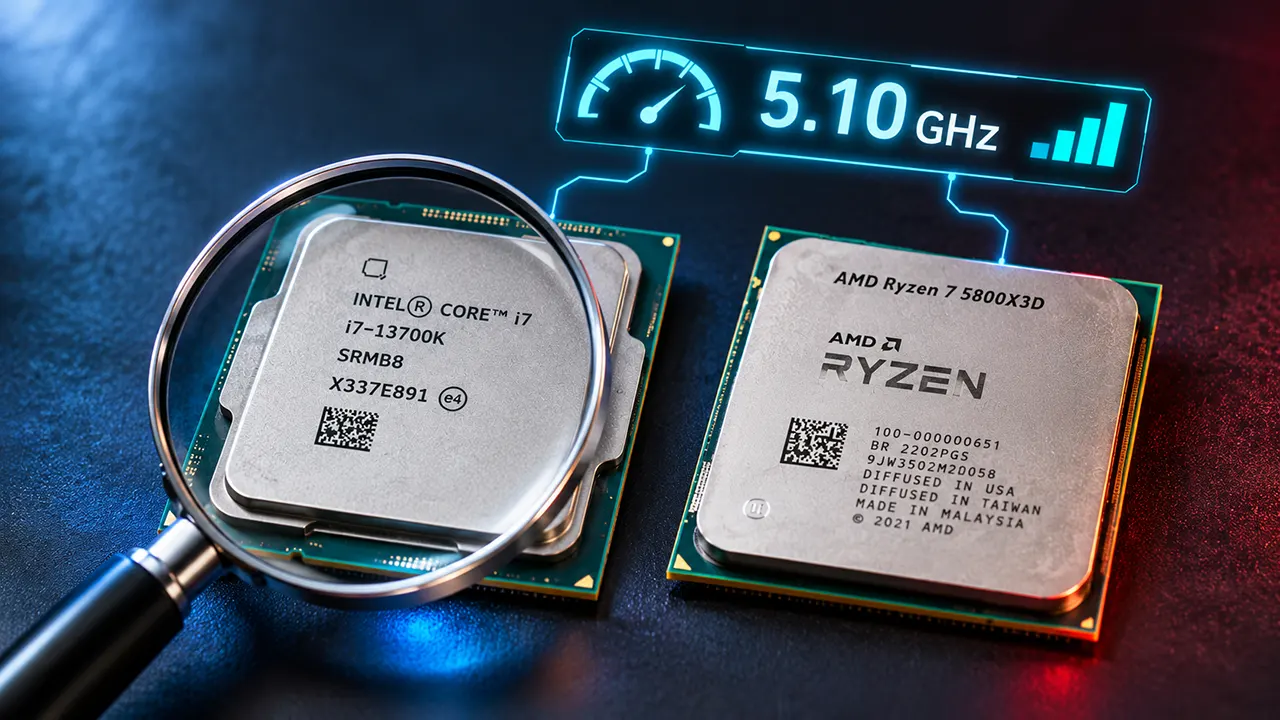
To know processor speed by model number, first identify the manufacturer, processor family, generation or series, and model suffix. Then check its official specifications for base clock, maximum boost clock, cores, threads, and cache. A model number helps identify a CPU, but it does not directly tell you how fast the processor performs.
A Processor Model Number Is More Than Just a Speed Rating
Imagine you are buying a new laptop. One model has an Intel Core i7 processor, while another has an AMD Ryzen 7. A third laptop has an Intel Core Ultra 5. Which one is faster?
The answer is not as simple as comparing i5, i7, or Ryzen 7 labels.
A processor model number contains useful information about its product family, performance tier, generation, and sometimes its intended use. However, it does not provide a complete picture of processing speed.
For example, consider these processors:
- Intel Core i5-12400
- Intel Core i7-14700K
- Intel Core Ultra 7 365
- AMD Ryzen 5 5600
- AMD Ryzen 5 7600
- AMD Ryzen AI 9 HX 475
Each processor belongs to a different product family or generation. Their model numbers follow different naming rules.
To identify a faster processor, you need to understand these naming conventions and verify the actual specifications.
This guide explains how to read Intel and AMD processor model numbers, understand their generations and suffixes, and compare their performance before buying a computer.
How to Know Processor Speed by Model Number
You can identify a processor’s general performance class by reading its model number. Start by identifying the manufacturer and processor family. Next, examine its series, model number, and suffix. Finally, check the official specifications to confirm its clock speed and other performance characteristics.
Follow these steps:
- Identify the manufacturer: Determine whether the processor comes from Intel or AMD.
- Identify the processor family: Look for Core i5, Core Ultra 7, Ryzen 5, or Ryzen AI 9.
- Identify the generation or series: Check the model-number structure used by that particular family.
- Read the suffix: Look for letters such as K, F, H, U, X, or X3D.
- Check clock speed: Find the base frequency and maximum boost frequency.
- Compare performance: Examine core count, architecture, cache, power limits, and benchmark results.
For example, Intel Core i5-13400 belongs to the traditional 13th Generation Core family. The first two digits, 13, identify its generation. The remaining digits identify the specific processor model.
However, this traditional decoding method does not apply to every modern Intel processor. Intel Core Ultra and newer Intel Core processors use different naming conventions.
How to Read Intel Processor Model Numbers
Intel has used several processor naming systems over the years. The traditional Core i-series naming system remains common in existing computers, while newer products use Intel Core and Intel Core Ultra branding.
Understanding these differences will help you avoid confusing an older processor with a newer model.
Understanding Older Intel Core i3, i5, i7, and i9 Numbers
Traditional Intel Core processors use a familiar naming structure.
Consider this example:
Intel Core i5-13400
| Model component | Meaning |
|---|---|
| Intel Core | Processor family |
| i5 | Performance tier |
| 13 | 13th Generation |
| 400 | Specific model identifier |
The first digits after the hyphen generally identify the generation in these traditional model numbers.
Here are some examples:
| Processor | Generation |
|---|---|
| Core i5-10400 | 10th Generation |
| Core i5-11400 | 11th Generation |
| Core i5-12400 | 12th Generation |
| Core i5-13400 | 13th Generation |
| Core i5-14400 | 14th Generation |
Notice that the generation number increases as Intel releases newer processor families.
The same general method applies to many older Core i7 and Core i9 models.
For example, Intel Core i7-14700K belongs to the 14th Generation Core family.
Important: A newer generation often brings architectural improvements, but a newer processor is not automatically faster than every older processor. The exact model and workload matter.
How to Read Intel Core Ultra Model Numbers
Intel introduced Core Ultra branding for its premium processor family. These processors use a different numbering convention from traditional Core i-series models.
Consider three examples:
- Intel Core Ultra 7 165H
- Intel Core Ultra 5 228V
- Intel Core Ultra 7 365
The number after the performance tier helps identify the processor series.
| Processor | Series | Product family |
|---|---|---|
| Core Ultra 7 165H | Series 1 | Core Ultra |
| Core Ultra 5 228V | Series 2 | Core Ultra |
| Core Ultra 7 365 | Series 3 | Core Ultra |
The first digit of the three-digit SKU identifies the series in these examples.
The remaining digits identify the particular model. The final letter identifies its product variant.
Intel’s newer Core Ultra Series 3 family includes processors such as the Core Ultra 7 365 and Core Ultra 9 386H. These processors have different specifications despite sharing the same broad product family.
For current model numbers and specifications, consult the official Intel Core Ultra naming guide.
Understanding New Intel Core 3, Core 5, and Core 7 Processors
Intel also uses a shorter naming system for its mainstream Core processors.
These processors do not carry the traditional i3, i5, or i7 branding.
For example:
- Intel Core 7 150U
- Intel Core 7 250H
The processor number uses a three-digit format. The first digit identifies the series in this naming family.
| Model | Series |
|---|---|
| Core 7 150U | Series 1 |
| Core 7 250H | Series 2 |
Intel Core 3, Core 5, and Core 7 processors belong to this newer naming family.
Do not confuse Core 7 with Core Ultra 7. They are different product families, even though both use a similar performance-tier number.
This distinction is particularly important when comparing newer laptops.
What Do Intel Processor Suffixes Mean?
The letters at the end of an Intel processor model number provide additional information about its design and intended use.
For example:
- Intel Core i7-14700K
- Intel Core i5-13400F
- Intel Core i7-14700T
- Intel Core Ultra 7 165H
Here is what some common Intel suffixes mean:
| Suffix | General meaning |
|---|---|
| K | Unlocked desktop processor |
| F | Requires a separate graphics solution |
| KF | Unlocked processor without integrated graphics |
| T | Power-optimized desktop variant |
| H | High-performance laptop processor |
| HX | High-performance laptop processor class |
| HK | High-performance, unlocked laptop processor |
| U | Power-efficient laptop processor |
| P | Performance-oriented thin-and-light laptop processor |
| V | Used for Intel Lunar Lake mobile processors |
These suffixes are not interchangeable. Their meanings and availability depend on the processor family.
For example, K generally indicates an unlocked desktop processor, while H identifies a laptop performance class.
A K suffix does not guarantee that a processor will outperform every non-K model. Actual performance also depends on architecture, cooling, and operating conditions.
For the latest definitions, see Intel’s official processor suffix guide.
How to Read AMD Ryzen Processor Model Numbers
AMD Ryzen processors have their own naming system. The company uses Ryzen 3, Ryzen 5, Ryzen 7, and Ryzen 9 branding for different performance tiers.
However, desktop and laptop processors do not always follow identical numbering rules.
You should identify the processor family before interpreting its model number.
Understanding AMD Ryzen 3, 5, 7, and 9
AMD uses four familiar performance tiers:
| Processor family | General performance class |
|---|---|
| Ryzen 3 | Entry-level |
| Ryzen 5 | Mainstream |
| Ryzen 7 | Higher-performance |
| Ryzen 9 | High-end |
For example:
- Ryzen 3 4100
- Ryzen 5 5600
- Ryzen 7 7700X
- Ryzen 9 9950X
The Ryzen number indicates its general product tier, not an exact processing speed.
A newer Ryzen 5 processor can outperform an older Ryzen 7 model. Therefore, you should compare exact processor models rather than relying only on Ryzen 3, 5, 7, or 9 branding.
How to Read AMD Ryzen Desktop Processor Numbers
AMD desktop processors use model numbers that help identify their product series and specific variants.
Consider the Ryzen 5 7600.
| Model component | Meaning |
|---|---|
| Ryzen | Processor family |
| 5 | Performance tier |
| 7 | 7000 Series |
| 600 | Specific model identifier |
Compare these examples:
| Processor | Product series | Architecture |
|---|---|---|
| Ryzen 5 5600 | Ryzen 5000 | Zen 3 |
| Ryzen 5 7600 | Ryzen 7000 | Zen 4 |
| Ryzen 7 9700X | Ryzen 9000 | Zen 5 |
The architecture information is important because processors from different generations can have different performance characteristics.
For example, the Ryzen 5 5600 uses Zen 3, while the Ryzen 5 7600 uses Zen 4.
The Ryzen 9000 family uses Zen 5 architecture.
However, do not assume that every processor within a Ryzen series uses an identical design. Some product families include different architectures or configurations.
What Do AMD Ryzen Desktop Suffixes Mean?
AMD uses letters at the end of processor model numbers to distinguish certain variants.
| Suffix | General meaning |
|---|---|
| X | Higher-performance desktop variant |
| X3D | Processor with 3D V-Cache technology |
| G | Desktop processor with integrated Radeon graphics in applicable generations |
| F | Desktop variant without integrated graphics in applicable generations |
For example:
- Ryzen 7 9700X
- Ryzen 7 9800X3D
- Ryzen 5 5600G
The X3D suffix deserves particular attention for gaming computers. AMD’s 3D V-Cache technology adds additional cache memory to supported processors.
However, a processor with X3D branding is not automatically the best choice for every application. Gaming, rendering, and productivity workloads can respond differently to cache and clock-speed differences.
Also, AMD has changed its integrated graphics strategy across processor generations. Do not assume that every Ryzen processor without a G suffix lacks integrated graphics.
How to Read AMD Ryzen Laptop Processor Numbers
AMD laptop processors can be more complicated than desktop models.
AMD introduced a mobile naming system in 2023 that uses four digits to communicate several pieces of information.
Consider these examples:
- Ryzen 5 7530U
- Ryzen 5 7540U
The four digits have different meanings.
| Digit | Meaning |
|---|---|
| First digit | Model-year series |
| Second digit | Market segment |
| Third digit | CPU architecture |
| Fourth digit | Feature level |
For example, the Ryzen 5 7530U and Ryzen 5 7540U both belong to the Ryzen 7000 mobile family, but they use different CPU architectures.
The Ryzen 5 7530U uses Zen 3 architecture, while the Ryzen 5 7540U uses Zen 4.
This is an important example of why you should not judge a laptop processor only by its series number.
A higher model number does not necessarily mean a completely different performance class.
AMD’s Ryzen PRO model-number guide explains the underlying four-digit mobile naming system.
Understanding AMD Ryzen AI 300 and 400 Series
AMD’s Ryzen AI processors add another naming family that buyers should understand.
Examples include:
- Ryzen AI 9 HX 370
- Ryzen AI 9 HX 475
- Ryzen AI 9 465
- Ryzen AI 7 450
These names combine a performance tier, model identifier, and product variant.
Ryzen AI 300 and Ryzen AI 400 belong to different product series. They should not be decoded using the older Ryzen desktop model-number formula.
For example, AMD’s Ryzen AI 9 HX 475 uses:
- 12 CPU cores.
- 24 threads.
- Zen 5 and Zen 5c architecture.
- Up to 5.2 GHz maximum boost clock.
- 28W default TDP.
- Configurable TDP of 15W to 54W.
- Up to 60 NPU TOPS.
These are manufacturer specifications, not independent benchmark results.
Notice that the processor has both CPU and NPU specifications. NPU TOPS measures AI processing capability and should not be confused with CPU clock speed.
You can verify these details through the official AMD Ryzen AI 9 HX 475 specifications.
How to Tell Which Processor Is Faster
Reading processor model numbers is only the first step. To determine which processor is faster, compare the specifications and benchmark results of the exact models.
Start by comparing processors within the same product category. Then consider their architecture, clock speed, cores, threads, cache, and power limits.
Compare Processors Within the Same Family
Comparing two processors from the same family makes it easier to understand their differences.
For example, consider two Intel desktop processors:
- Core i5-12400
- Core i5-13400
Both belong to the Core i5 family, but they come from different generations.
Compare their exact specifications instead of assuming that the newer model is automatically faster in every application.
You should examine:
- CPU architecture.
- Number of cores and threads.
- Base and maximum boost frequency.
- Cache capacity.
- Power requirements.
- Independent benchmark results.
Compare Intel and AMD Processors
Comparing Intel and AMD requires more attention because their naming systems are different.
An Intel Core i7 is not directly equivalent to an AMD Ryzen 7 in every workload.
The same applies to Intel Core Ultra 7 and AMD Ryzen AI 7.
Use these comparison criteria:
| Comparison factor | What to examine |
|---|---|
| Single-core performance | Everyday applications and lightly threaded workloads |
| Multi-core performance | Rendering and heavily threaded applications |
| Gaming performance | CPU performance in the games you play |
| Power consumption | Performance under realistic power limits |
| Integrated graphics | Graphics capability without a separate GPU |
| AI processing | NPU capability where relevant |
| Price | Actual system or processor cost |
Use the same benchmark version and comparable testing conditions whenever possible.
Useful independent resources include Geekbench Browser, PassMark CPU Benchmarks, and Maxon Cinebench.
Real Example: Ryzen 5 5600 vs Ryzen 5 7600
Let’s compare two AMD desktop processors to understand why model numbers alone do not tell the whole story.
| Specification | Ryzen 5 5600 | Ryzen 5 7600 |
|---|---|---|
| Series | Ryzen 5000 | Ryzen 7000 |
| Architecture | Zen 3 | Zen 4 |
| CPU cores | 6 | 6 |
| Threads | 12 | 12 |
| Base clock | 3.5 GHz | 3.8 GHz |
| Maximum boost | Up to 4.4 GHz | Up to 5.1 GHz |
| L3 cache | 32 MB | 32 MB |
| Default TDP | 65W | 65W |
| Socket | AM4 | AM5 |
Sources: AMD Ryzen 5 5600 specifications and AMD Ryzen 5 7600 specifications.
Both processors have six cores and 12 threads. However, the Ryzen 5 7600 uses a newer architecture and supports a higher maximum boost frequency.
The two processors also use different motherboard platforms. The Ryzen 5 5600 uses AM4, while the Ryzen 5 7600 uses AM5.
This matters when upgrading an existing computer because a processor upgrade may require a compatible motherboard and memory.
The specifications suggest important advantages for the Ryzen 5 7600, but they do not establish the exact performance difference in every application. Independent benchmarks are necessary for that conclusion.
6 Processor Specifications That Matter More Than the Model Number
A processor model number identifies the product. Its specifications explain how it works.
When comparing two CPUs, these six characteristics provide a more useful picture of their capabilities.
Clock Speed: Base Clock vs Maximum Boost Clock
Clock speed measures how frequently a processor performs clock cycles. It is expressed in gigahertz (GHz).
For example:
- 2.5 GHz.
- 3.5 GHz.
- 4.0 GHz.
- 5.0 GHz.
A higher clock frequency can improve performance when comparing processors with similar architectures and operating conditions.
However, clock speed alone does not determine total processing performance.
There are two important frequency specifications.
Base clock: The processor’s specified base operating frequency under defined power and thermal conditions.
Maximum boost clock: The highest advertised boost frequency under suitable conditions. It is not a guarantee that every core will operate at that frequency continuously.
For example, a CPU with a maximum boost frequency of 5.0 GHz may operate at a lower frequency during sustained workloads because of power and temperature limits.
CPU Cores and Threads
Cores and threads help determine how a processor handles multiple tasks.
A physical core is an individual processing unit inside the CPU. A thread is a sequence of instructions that the processor schedules for execution.
For example:
| Processor configuration | Cores | Threads |
|---|---|---|
| Example A | 4 | 8 |
| Example B | 6 | 12 |
| Example C | 8 | 16 |
More cores and threads can improve performance in applications that use parallel processing.
Video rendering, 3D modeling, compression, and some professional applications can benefit from additional processing resources.
However, more cores do not guarantee faster performance in every application. Some programs depend heavily on single-core performance.
Intel also uses hybrid processor designs with Performance-cores and Efficient-cores in applicable families. Therefore, total core count does not always tell you how many high-performance cores a processor has.
CPU Architecture and IPC
CPU architecture describes the underlying design of a processor.
Intel and AMD regularly introduce architectural improvements to increase performance and efficiency.
One important concept is IPC, or instructions per cycle.
IPC describes how many instructions a processor can complete per clock cycle under a given workload.
A newer architecture may complete more work at the same clock frequency than an older architecture.
This explains why an older 5 GHz processor may not outperform a newer 4 GHz processor.
When comparing processors from different generations, architecture is one of the most important specifications to investigate.
CPU Cache Memory
Cache is a small, high-speed memory located within or closely integrated with the processor.
It stores frequently needed data so the CPU can access it more quickly than retrieving it from system memory.
The main cache levels are:
| Cache | General purpose |
|---|---|
| L1 | Smallest and fastest cache |
| L2 | Larger secondary cache |
| L3 | Larger shared cache in many processor designs |
Cache capacity can influence performance, particularly in applications that repeatedly access the same data.
AMD’s X3D processors are a notable example. They use 3D V-Cache technology to increase available L3 cache.
However, a larger cache does not automatically make a processor faster in every workload.
TDP, Power Limits, and Cooling
Power consumption and cooling have a major effect on sustained processor performance.
TDP stands for Thermal Design Power. It is a thermal-design specification, not a direct measurement of how much electricity a CPU always consumes.
Intel and AMD use different power specifications and terminology. Therefore, do not compare their TDP or power figures as if every measurement were identical.
Laptop processors are especially sensitive to power configuration.
A manufacturer may configure a laptop to operate at a particular power limit based on its cooling system, battery requirements, and physical design.
This means two laptops using the same processor model can deliver different sustained performance.
A well-cooled laptop may maintain higher performance during a long workload than a thinner model with more restrictive thermal limits.
Integrated Graphics and NPU
Modern processors can include additional processing hardware beyond their CPU cores.
Two important examples are integrated graphics and neural processing units.
Integrated graphics: A graphics processor built into the CPU package or processor platform. It handles display output and graphics tasks without requiring a separate graphics card.
NPU: A neural processing unit designed to accelerate certain AI workloads.
Intel Core Ultra and AMD Ryzen AI processors include NPU capabilities in applicable models.
An NPU’s performance is often expressed in TOPS, meaning trillions of operations per second.
Do not confuse NPU TOPS with CPU clock speed. They measure different types of processing capability.
For everyday computing, CPU performance may matter more than NPU performance. For supported local AI applications, the NPU can become an important buying consideration.
How to Check Your Processor Speed on a Computer
If you already own a computer, you do not need to guess its processor model. You can identify it using your operating system.
Check CPU Speed in Windows 11 and Windows 10
Windows provides several ways to identify your processor.
Method 1: Use Task Manager
- Press Ctrl + Shift + Esc.
- Open the Performance tab.
- Select CPU.
- Look at the processor name in the upper-right area.
- Check the current Speed and Base speed information.
The processor name identifies the exact model. The speed field shows its current operating frequency, which can change according to workload and power conditions.
Method 2: Use System Information
- Press Windows + R.
- Type
msinfo32. - Press Enter.
- Find the Processor entry under System Summary.
You will see the processor identification information.
This method is useful when you need to copy the exact model number before searching for its specifications.
Check Processor Information in Linux
Linux users can identify their processor through the terminal.
Open Terminal and enter:
lscpu
This command displays information such as:
- CPU architecture.
- Model name.
- CPU family.
- Number of CPUs.
- Cores per socket.
- Threads per core.
- Cache information.
To display only the processor model name, use:
lscpu | grep "Model name"
Remember that reported frequency information can depend on the CPU, kernel, and system configuration. Use the manufacturer’s specifications to verify advertised base and maximum boost frequencies.
Verify Exact CPU Specifications
After identifying your processor, visit the manufacturer’s official specification database.
For Intel processors, use Intel ARK.
For AMD processors, use the AMD Processor Specifications database.
Search using the complete processor model number, including its suffix.
For example, searching for Core i7-14700K is more useful than searching only for Core i7.
This helps you avoid confusing different variants with similar names.
What Is a Good Processor Speed for a Laptop or Desktop?
There is no single GHz value that makes a processor good for every computer user.
The right processor depends on the applications you use, your budget, and the performance you expect.
Here is a practical way to choose.
| Usage | What to prioritize |
|---|---|
| Web browsing and basic office work | Modern entry-level CPU with sufficient cores |
| Office multitasking | Balanced single-core and multi-core performance |
| Programming | Strong CPU performance and sufficient memory |
| Gaming | Strong single-core performance and suitable GPU pairing |
| Video editing | Good multi-core performance and suitable memory support |
| 3D rendering | Strong multi-core performance |
| Professional workstation tasks | High sustained performance and platform capabilities |
| Local AI workloads | CPU, GPU, memory, and supported NPU capabilities |
Everyday Computing
For browsing, email, document editing, and online meetings, you do not necessarily need an expensive high-end processor.
A modern entry-level or mainstream CPU can handle these tasks comfortably.
For this type of computer, consider the complete system. Adequate RAM and an SSD can make a significant difference to everyday responsiveness.
You can also read our guide on how much RAM a laptop needs.
Gaming
Gaming performance depends on both the CPU and graphics card.
A powerful CPU cannot compensate for an unsuitable graphics card in a GPU-limited game.
Look for a processor with strong gaming benchmarks, suitable core performance, and enough cache for your preferred games.
AMD X3D processors are worth considering for gaming-focused desktop builds, but compare actual game benchmarks before purchasing.
Video Editing and Professional Work
Video editing, rendering, and other demanding workloads can benefit from higher multi-core performance.
However, software optimization also matters. Some applications use multiple CPU cores efficiently, while others rely more heavily on single-core performance or GPU acceleration.
Check benchmarks from the applications you actually plan to use.
Common Mistakes When Comparing Processor Model Numbers
Even experienced computer buyers can misunderstand processor naming conventions. Avoid these common mistakes.
Assuming Core i7 is always faster than Core i5: A newer Core i5 can outperform an older Core i7. Compare exact models and generations.
Assuming a higher model number means higher speed: Model numbers identify products. They are not direct performance scores.
Comparing GHz alone: Architecture, IPC, cores, cache, and power limits all influence performance.
Using desktop naming rules for laptop processors: Intel and AMD have different naming conventions across their product families.
Ignoring processor suffixes: A suffix can identify an important difference in power, graphics, or intended use.
Ignoring laptop cooling: A processor’s advertised specifications do not guarantee identical performance across all laptop designs.
Comparing unrelated benchmarks: Always use comparable benchmark versions and testing conditions.
FAQs: How to Know Processor Speed
1. Does a Higher Processor Model Number Mean Faster Performance?
No. A higher processor model number does not automatically mean better performance. Model numbers identify the processor family, generation, and variant. To determine which processor is faster, compare its architecture, clock frequencies, cores, threads, cache, power limits, and benchmark results.
2. Can Two Laptops With the Same Processor Have Different Performance?
Yes. Two laptops with the same processor can deliver different performance because manufacturers configure power limits, cooling systems, and operating profiles differently. Memory configuration and firmware settings can also influence results. This is why independent laptop reviews and sustained workload benchmarks are useful when comparing computers.
3. Is a 2026 Processor Always Faster Than a 2024 Processor?
No. A newer release date does not guarantee better performance in every workload. A 2024 high-performance processor can outperform a 2026 entry-level processor in certain applications. Compare the exact models, architecture, specifications, and relevant benchmarks rather than relying only on release year.
4. Can I Compare Intel and AMD Processors Using Their Model Numbers Alone?
No. Intel and AMD use different processor naming conventions. An Intel Core i7 and an AMD Ryzen 7 represent broad performance tiers, not identical specifications. Compare their actual clock speeds, cores, threads, architecture, cache, power requirements, and benchmark results to make a meaningful decision.
5. Should I Prioritize CPU Clock Speed or Core Count When Buying a Computer?
It depends on your workload. Higher clock speed and strong single-core performance can benefit applications that rely on one or a few cores. Additional cores can help with rendering, video editing, and other heavily threaded tasks. For most buyers, the best approach is to compare real application benchmarks instead of prioritizing one specification.
Make a Smarter Processor Comparison Before Buying
A processor’s model number is a useful starting point, but it should never be your only buying criterion.
First, identify the processor family and generation. Then verify the exact specifications and compare independent benchmark results for the applications you intend to use.
This simple approach helps you avoid paying more for a processor that does not provide meaningful performance benefits for your needs.
If you are comparing two computers, write down their complete CPU model numbers and check their official specifications before making your final decision.

Belayet Hossain is a Senior Tech Expert and Certified AI Marketing Strategist. Holding an MSc in CSE (Russia) and over a decade of experience since 2011, he combines traditional systems engineering with modern AI insights. Specializing in Vibe Coding and Intelligent Marketing, Belayet provides forward-thinking analysis on software, digital trends, and SEO, helping readers navigate the rapidly evolving digital landscape. Connect with Belayet Hossain on Facebook, Twitter, Linkedin or read my complete biography.