Close Menu
itphobia.com
  • Home
  • Free Tools
    • Free Readability Checker
    • Free Search Engine Index Checker
    • Free Meta Tag Checker
  • Services
    • Article writing
    • Lead Generation
    • Link Building
  • Blog
    • Reviews
      • iPhone Reviews
      • Android
      • Camera
      • iPad
      • Tablet
      • Desktop
      • Laptop
      • Gadget
    • Desk Productivity Tech
      • Desk Setup Ideas
      • Tech Reviews
        • Keyboards
      • Desk Accessories
      • Ergonomics & Comfort
      • Smart Desk Tools
      • WFH Setups
      • Buyer’s Guides
    • Apple
    • Apps
    • Business
      • Finance
        • Investing
          • Currencies & Foreign Exchange
      • Business & Industrial
        • Advertising & Marketing
          • Marketing
        • Business Operations
          • Management
        • Business Services
          • E-Commerce Services
            • Food delivery
          • Fire Security Services
          • Hospitality Industry
          • Warehousing
          • Editing & Writing Services
        • Chemicals Industry
          • Coatings & Adhesives
      • Retail Trade
      • Retail Equipment & Technology
    • Computers & Electronics
      • Computer Security
        • Network Security
      • Consumer Electronics
        • Electronics Repair
        • TV & Video Equipment
      • Electronics & Electrical
        • Electronic Components
    • Digital Marketing
      • SEO
      • Social Media
      • Affiliate Marketing
    • Software
    • Gadget
    • Mobile & Smartphones
    • Windows Phone
    • Domain & Hosting
    • Make Money
    • Graphic Design
    • Blogging
    • Content
    • Data Science
    • Programming
    • Crypto
    • Robotics
    • Metaverse
    • Security
    • Networking
    • Tech support
    • Technology
    • Web Design
    • WordPress
    • Windows
    • More

Subscribe to Updates

Get the latest creative news from FooBar about art, design and business.

loader

Email Address*

First Name

Last Name

What's Hot

Smart Call Management with an AI Receptionist

14/03/2026

Amazon My Account Guide: Login, Security & Order Management

01/03/2026

Best AI 3d modeling tool 2026: Tripo vs Meshy vs Hyper Reviewed

25/02/2026
Facebook X (Twitter)
itphobia.com
  • Home
  • Free Tools
    • Free Readability Checker
    • Free Search Engine Index Checker
    • Free Meta Tag Checker
  • Services
    • Article writing
    • Lead Generation
    • Link Building
  • Blog
    • Reviews
      • iPhone Reviews
      • Android
      • Camera
      • iPad
      • Tablet
      • Desktop
      • Laptop
      • Gadget
    • Desk Productivity Tech
      • Desk Setup Ideas
      • Tech Reviews
        • Keyboards
      • Desk Accessories
      • Ergonomics & Comfort
      • Smart Desk Tools
      • WFH Setups
      • Buyer’s Guides
    • Apple
    • Apps
    • Business
      • Finance
        • Investing
          • Currencies & Foreign Exchange
      • Business & Industrial
        • Advertising & Marketing
          • Marketing
        • Business Operations
          • Management
        • Business Services
          • E-Commerce Services
            • Food delivery
          • Fire Security Services
          • Hospitality Industry
          • Warehousing
          • Editing & Writing Services
        • Chemicals Industry
          • Coatings & Adhesives
      • Retail Trade
      • Retail Equipment & Technology
    • Computers & Electronics
      • Computer Security
        • Network Security
      • Consumer Electronics
        • Electronics Repair
        • TV & Video Equipment
      • Electronics & Electrical
        • Electronic Components
    • Digital Marketing
      • SEO
      • Social Media
      • Affiliate Marketing
    • Software
    • Gadget
    • Mobile & Smartphones
    • Windows Phone
    • Domain & Hosting
    • Make Money
    • Graphic Design
    • Blogging
    • Content
    • Data Science
    • Programming
    • Crypto
    • Robotics
    • Metaverse
    • Security
    • Networking
    • Tech support
    • Technology
    • Web Design
    • WordPress
    • Windows
    • More
Facebook X (Twitter)
0 Shopping Cart
itphobia.com
Home»Blog»3M Adjustable Monitor Stand Review: Real Use Cases, USB Hub Perks & Honest Verdict

3M Adjustable Monitor Stand Review: Real Use Cases, USB Hub Perks & Honest Verdict

Blog
3M Adjustable Monitor Stand
Share
Facebook Twitter Pinterest Email
Published on: 05/08/2025 | Updated on: August 5, 2025

A 3M Adjustable Monitor Stand is a height-adjustable desk accessory that lifts your screen to eye level for better posture and less neck strain. Many models, like the MS85B and MS80B, even include a built-in 4-port USB hub to reduce cable clutter and improve desk functionality.

If you’re working from home, gaming for hours, or trying to tidy up a messy desk, you’ve probably looked at monitor stands. The 3M Adjustable Monitor Stand—especially the MS85B and MS80B—has gained traction for doing more than just lifting your screen.

I’m reviewing this stand after testing it with both large and small monitors. You’ll get insights into USB port use cases, real-world Amazon user feedback, build quality, and how it compares to similar ergonomic options. This is for you if you care about posture, productivity, and trusted brands like 3M.

You’ll learn:

  • Why height adjustability matters for neck and back comfort
  • What makes the USB hub version worth the upgrade
  • Which model (MS80B vs MS85B) works better for your setup
  • What Reddit, Amazon, and YouTube users say about long-term use

Whether you’re setting up a new home office or just optimizing your space, this guide will help you decide if 3M’s stand is the right move.

✅ Use a 3M adjustable monitor stand if you want better posture, USB accessibility, and a cleaner desk setup — especially if you work long hours at a screen.

🔹 What Is a 3M Adjustable Monitor Stand?

A 3M Adjustable Monitor Stand is a desk accessory designed to elevate your monitor to a healthier, more ergonomic height. It helps reduce neck and shoulder strain by positioning your screen at eye level and freeing up valuable desk space underneath.

Models like the MS80B and the MS85B offer different benefits: the MS80B focuses on height customization with durable leg segments, while the MS85B adds a built-in 4-port USB hub for connecting devices directly from your desk. These stands typically support monitors up to 40 lbs, offer adjustable height options (up to 5.9 inches), and come in neutral black or silver finishes to blend with any workspace.

Whether you’re working from home, optimizing a minimalist desk setup, or upgrading your office ergonomics, a 3M computer monitor stand delivers practical improvements without complicated setup.

👨‍💻 Who Should Read This Review?

This review is for:

  • Remote workers setting up long-term home offices
  • Tech reviewers and gear testers seeking trusted ergonomic accessories
  • Desk job professionals who spend 6+ hours a day at a screen
  • Design minimalists who want clean cable setups and clutter-free desks

We’ll break down:

  • Build quality & design comparisons
  • USB functionality in the MS85B vs basic stands
  • Real user reviews and performance feedback
  • How it stacks up against similar monitor risers

Use a 3M adjustable monitor stand if you want better posture, USB accessibility, and a cleaner desk setup — especially if you work long hours at a screen.

🔹 Model Breakdown – 3M MS85B vs MS80B vs Basic Riser
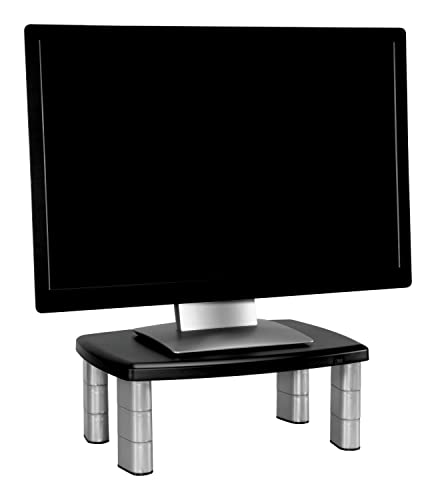
3M Adjustable Monitor Stand, Three Leg Segments Simply Adjust Height From 1" to 5 7/8", Sturdy Platform Holds Up to 80 lbs, 11-inch Space Between Columns for Storage, Silver/Black (MS80B)

Check on amazon

Here’s a clear comparison of the key 3M adjustable monitor stand models and the basic riser option. This will help you pick the right stand for your desk and workflow needs.

3M Adjustable Monitor Stand, Three Leg Segments Simply Adjust Height From 1" to 5 7/8", Sturdy Platform Holds Up to 80 lbs, 11-inch Space Between Columns for Storage, Silver/Black (MS80B)

Check on amazon
FeatureMS85BMS80BBasic Riser
Dimensions23.5″ W x 11″ D x 4.5-6.5″ H23.5″ W x 11″ D x 4.5-6.5″ HVaries, usually smaller
USB Ports4-port USB 3.0 hub integratedNoneNone
Maximum Weight SupportUp to 40 lbsUp to 40 lbsUsually up to 30 lbs
Colors AvailableBlackBlackBlack or grey
Price Range$75 – $100$50 – $70$20 – $40
Amazon AvailabilityWidely availableWidely availableCommon on Amazon

Amazon Basics Height Adjustable Rectangular Computer Monitor Riser Desk Stand with Storage for Reduced Neck Strain - Fits Monitors, Laptops Up to 22lbs, Black

Check on amazon

Amazon Review Insight:
One MS85B user noted, “This stand was the only one sturdy enough for my dual-monitor setup. The built-in USB hub helped me manage cables and keep my desk clutter-free.”

The MS85B stands out for multi-device setups thanks to its wide platform and USB hub. The MS80B offers the same height adjustability but without USB ports, making it perfect for those who want a simple, clean monitor lift. The Basic Riser is a budget-friendly option, ideal for lighter monitors or less frequent use.

For more details on choosing the right monitor stand, check out ergonomic guidelines from OSHA and product info on 3M’s official site.

Choose the MS85B if you need extra USB ports and support for multiple devices. Opt for the MS80B if you want a sturdy riser without extra features.

🔹 What Real Users Say (Amazon + Reddit + Social Insights)

Many users praise the 3M adjustable monitor stands for keeping their desks clean and improving posture. One Reddit user shared, “Decluttered my desk, finally no more leaning forward.” However, some Amazon reviewers note that the USB ports feel tight and could be better positioned. An unexpected use is using the stand as a holder for a PlayStation and controller.

Most users love the stand’s durability and clutter-free design but wish for more flexible USB port placement.

Quote:
“I bought the MS85B for the USB hub but ended up appreciating the space under the stand even more.” – Verified Amazon reviewer

🔹 Who Should (and Shouldn’t) Buy This Stand?

The 3M adjustable monitor stand is perfect for remote workers using external monitors, those with many USB devices, and anyone suffering from neck or back pain. It helps organize cables and improves comfort. But if you only use a laptop or have a very heavy ultra-wide monitor over 40 pounds, this might not be the right fit.

This stand is great for improving posture and reducing desk clutter but not ideal for laptop-only setups or very large monitors.

🔹 Setup Tips: How to Use a 3M Adjustable Monitor Stand Right

Place the top of your screen at eye level for the best ergonomics. Use the built-in cable slots or side gaps to keep wires neat. You can pair the stand with a standing desk if the surface size fits. Adding anti-slip pads under the stand helps keep it steady during use.

Keep your monitor’s top edge at eye level and use cable management features to create a tidy, efficient workspace.

🔹 Alternatives Worth Considering (Short Comparison)

If you’re exploring options besides the 3M adjustable monitor stand, consider the Fellowes Monitor Riser, which offers solid build quality and simple design. The Amazon Basics Metal Stand is an affordable, no-frills choice for basic needs. For those wanting more movement, the Autonomous Monitor Arm provides full rotation and height flexibility but requires more setup and desk space.

3M leads in build quality and trusted brand reputation, while monitor arms suit users needing full swivel and height adjustments.

🔹 Final Verdict – Is the 3M Adjustable Monitor Stand Worth It?

In short, yes—the 3M Adjustable Monitor Stand is a smart buy for anyone who spends long hours at their desk. It improves posture, frees up desk space, and its USB hub adds valuable connectivity. Users consistently praise its sturdy design and ergonomic benefits.

This stand is a small investment that delivers big improvements in comfort, organization, and productivity.

Buy it now on Amazon.

FAQ

  1. How much weight can a 3M monitor stand hold?

    Most 3M models support up to 40 pounds, enough for dual monitors or large displays.

  2. Does the 3M stand work with laptops?

    Yes, but it works best when paired with an external keyboard and mouse for ergonomic setup.

  3. What’s the difference between MS85B and MS80B?

    The MS85B has a 4-port USB hub and a wider surface compared to the simpler MS80B.

  4. Can I use this on a standing desk?

    Yes, as long as your desk surface is stable and large enough to hold the stand.

  5. Does it come pre-assembled?

    No, but assembly is quick and tool-free, usually under five minutes.

Belayet Hossain
Belayet Hossain

Belayet Hossain is a Senior Tech Expert and Certified AI Marketing Strategist. Holding an MSc in CSE (Russia) and over a decade of experience since 2011, he combines traditional systems engineering with modern AI insights. Specializing in Vibe Coding and Intelligent Marketing, Belayet provides forward-thinking analysis on software, digital trends, and SEO, helping readers navigate the rapidly evolving digital landscape. Connect with Belayet Hossain on Facebook, Twitter, Linkedin or read my complete biography.

Share. Facebook Twitter Pinterest LinkedIn Tumblr Email

Recommened for You

Smart Call Management with an AI Receptionist

14/03/2026

Best AI 3d modeling tool 2026: Tripo vs Meshy vs Hyper Reviewed

25/02/2026

How to Switch from a Non-IT Job to a Business Analyst in 6 Months

24/02/2026

How to Get Verified on TikTok (2026): Requirements, Steps, and Real Criteria

15/02/2026

Personal Branding Mistakes: 7 Errors Sabotaging Your Career

09/02/2026

How to Build and Manage Remote Tech Projects in 2026

09/02/2026

Leave a ReplyCancel reply

This site uses Akismet to reduce spam. Learn how your comment data is processed.

BIG Discounts at Amazon !
Save 50.0% on select products from TECKNET with promo code F7E6Q3GE, through 2/16 while supplies last.
Save 50.0% on select products from KIGJU with promo code KIGJU150, through 2/20 while supplies last.
Latest Updates
  • Smart Call Management with an AI Receptionist
  • Amazon My Account Guide: Login, Security & Order Management
  • Best AI 3d modeling tool 2026: Tripo vs Meshy vs Hyper Reviewed
  • How to Switch from a Non-IT Job to a Business Analyst in 6 Months
  • How to Get Verified on TikTok (2026): Requirements, Steps, and Real Criteria
  • Personal Branding Mistakes: 7 Errors Sabotaging Your Career
  • How to Build and Manage Remote Tech Projects in 2026
  • Vexinat Smart RGB LED Corner Lamp Review: Pros, Cons & Setup Guide
  • Dell Dual Monitor Setup: The Complete Guide to Two Screens
  • AI for Kids: Why AI Literacy Beats Expensive Schools
Subscribe for Updates
loader

Email Address*

First Name

Last Name

Top Reviews
Blog

5 Best Underwater Camera for Ice Fishing in 2026

The best underwater camera for ice fishing lets you see fish in real time, even…

4 Cost-Effective Smart Home Upgrades for Your Rental Unit

10/07/2024

Exploring the Topmost 5 Ultrasonic Parts Cleaner

27/05/2024

Boosting Social Media Management with Best Laptop for Social Media Manager

24/10/2023
Business Tech

Comprehensive Tutorial on Sending Bitcoin via Cash App

18/02/2024

Building Bridges for Seamless Cross-Chain Connectivity

25/01/2024

Exploring Free CPT Code Lookup for Curious Minds

24/01/2024

Advancing Urgent Care and Internal Medicine Billing Services in 2026

24/01/2024
All Categories
  • Accounting & Auditing (3)
  • Advertising & Marketing (11)
  • Affiliate Marketing (26)
  • Agriculture & Forestry (1)
  • Android (21)
  • Apple (32)
  • Apps (24)
  • Aquaculture (1)
  • Autos & Vehicles (1)
  • Beaches & Islands (1)
  • Billing & Invoicing (3)
  • Blog (1,697)
  • Blogging (17)
  • Business (202)
  • Business & Industrial (33)
  • Business & Productivity Software (11)
  • Business Operations (11)
  • Business Services (8)
  • Business Travel (1)
  • Camera (9)
  • Chemicals Industry (1)
  • Cloud Storage (3)
  • Coatings & Adhesives (1)
  • Colleges & Universities (1)
  • Computer Drives & Storage (3)
  • Computer Hardware (9)
  • Computer Peripherals (2)
  • Computer Science (2)
  • Computer Security (10)
  • Computer Servers (1)
  • Computers & Electronics (65)
  • Consumer Electronics (17)
  • Consumer Resources (2)
  • Content (51)
  • Crypto (106)
  • Currencies & Foreign Exchange (16)
  • Customer Services (1)
  • Data Management (7)
  • Data Science (6)
  • Desk Accessories (1)
  • Desk Productivity Tech (2,243)
  • Desktop (6)
  • Development Tools (2)
  • Digital Culture (1)
  • Digital Marketing (173)
  • Domain & Hosting (27)
  • E-Commerce Services (4)
  • Earn money (1)
  • Editing & Writing Services (4)
  • Editor's Choice (1)
  • Education (3)
  • Education (2)
  • Educational Software (1)
  • Electronic Accessories (2)
  • Electronic Components (2)
  • Electronic Spam (1)
  • Electronics & Electrical (4)
  • Electronics Repair (16)
  • Email & Messaging (2)
  • Engineering & Technology (1)
  • Enterprise Technology (11)
  • Ergonomics & Comfort (1)
  • ERP (1)
  • Finance (19)
  • Food delivery (3,457)
  • Gadget (58)
  • Graphic Design (13)
  • HealthTech (2)
  • Helpdesk & Customer Support Systems (1)
  • Home Automation (3)
  • Hospitality Industry (1)
  • Hotels & Accommodations (1)
  • How-To (8)
  • Human Resources (4)
  • Identity Theft Protection (1)
  • Internet & Telecom (22)
  • Internet Software (3)
  • Investing (16)
  • iPad (6)
  • iPhone (15)
  • iPhone Reviews (2)
  • IT Careers (2)
  • Java (1)
  • Jobs & Education (5)
  • Keyboards (2)
  • Laptop (9)
  • Laptops & Notebooks (3)
  • Latest Posts (2)
  • Linux (3)
  • Machine Learning & Artificial Intelligence (6)
  • Make Money (25)
  • Management (5)
  • Marketing (17)
  • Mathematics (1)
  • Medical Devices & Equipment (1)
  • Metals & Mining (1)
  • Metaverse (1)
  • Mobile & Smartphones (1,576)
  • Monitor Stand (1)
  • Monitoring Software (1)
  • More (72)
  • Multimedia Software (1)
  • Multimedia Software (3)
  • Network Security (10)
  • Networking (10)
  • Networking Equipment (1)
  • Online Communities (1)
  • Open Online Courses (1)
  • Operating Systems (1)
  • Operating Systems (1)
  • Outsourcing (1)
  • Packaging (1)
  • Power Supplies (2)
  • Printing & Publishing (1)
  • Programming (58)
  • Retail Equipment & Technology (1)
  • Reviews (47)
  • Robotics (2)
  • Science (5)
  • Scripting Languages (1)
  • Search Engine Optimization & Marketing (9)
  • Security (39)
  • Senior Living & Care Technology (1)
  • SEO (89)
  • Shipping & Logistics (6)
  • Shopping (2)
  • Social Media (71)
  • Social Networks (1)
  • Software (121)
  • Specialty Travel (1)
  • Statistics (1)
  • Tablet (2)
  • Tech News (15)
  • Tech Reviews (2)
  • Tech support (77)
  • Technology (2,340)
  • Text & Instant Messaging (1)
  • Tools (3)
  • Tourist Destinations (1)
  • Training & Certification (1)
  • Travel & Transportation (4)
  • TV & Video Equipment (2)
  • Vacation Rentals & Short-Term Stays (1)
  • Vehicle Codes & Driving Laws (1)
  • Vehicle Licensing & Registration (1)
  • Video (3)
  • Vocational & Continuing Education (1)
  • Warehousing (1)
  • Web Design (40)
  • Web Design & Development (9)
  • Web services (19)
  • Windows (19)
  • Windows Phone (3)
  • WordPress (12)
  • Writers Resources (10)
Navigation
  • Blog
  • Subscribe now
  • Write For Us | Become A Contributor
  • Our Partners
  • Affiliate Disclaimer
  • Contact us
About Us
About Us

IT Phobia is a comprehensive technology media hub and digital solutions provider. We deliver expert insights across SEO, Web Development, Crypto, and Digital Marketing while offering in-depth troubleshooting guides for Android, Windows, and Enterprise Tech. From the latest industry news to actionable tutorials, we empower businesses and tech enthusiasts to navigate the digital landscape with confidence.

Email Us: admin@itphobia.com

Learn More About Us

Get Tech Tips Straight to Your Inbox
loader

Email Address*

First Name

Last Name

© 2015 - 2026 IT Phobia. All Rights Reserved.
  • Home
  • Tech Blogs Trending Now!
  • Write For Us | Become A Contributor
  • Privacy Policy
  • Terms of use

Type above and press Enter to search. Press Esc to cancel.