


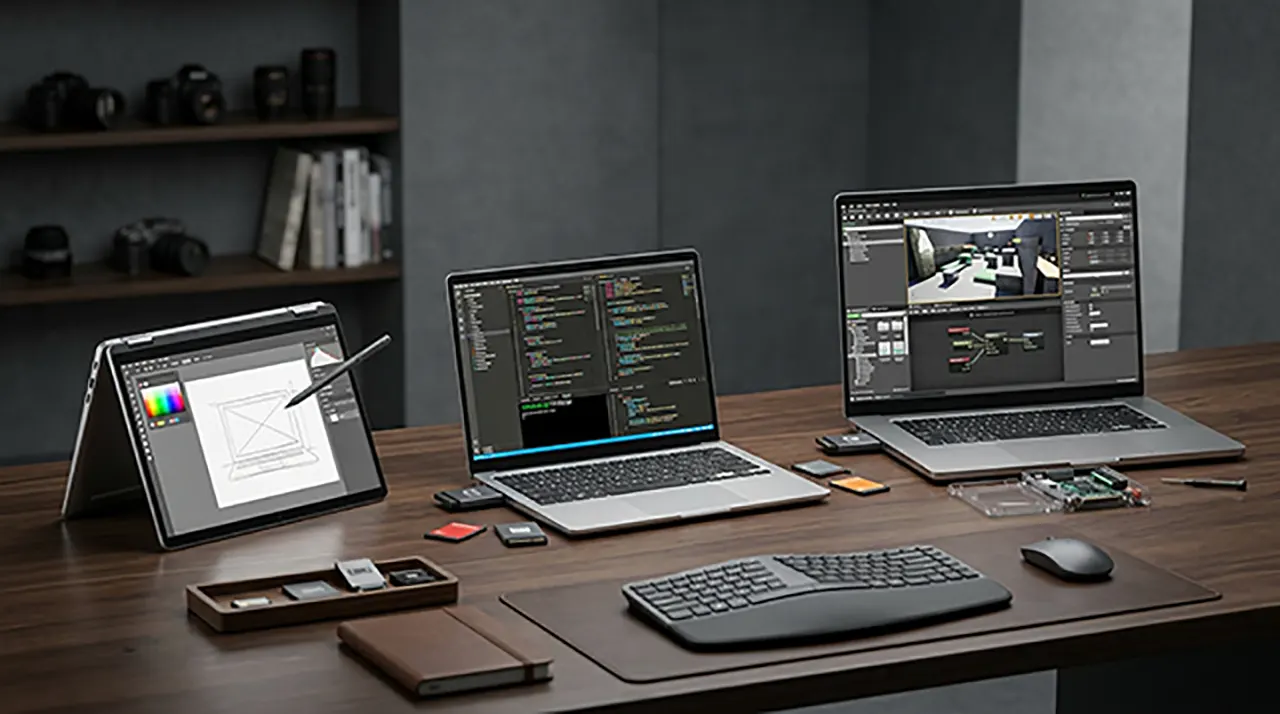
The Framework Laptop 12 vs 13 vs 16 choice comes down to what you value most. Choose the Laptop 12 for a compact 2-in-1 touchscreen, the Laptop 13 for portable productivity and development, and the Laptop 16 for heavier workloads and upgradeable graphics. Framework’s current lineup also includes the separate Laptop 13 Pro, which is worth considering if you want a premium 13-inch machine.
Framework Laptop 12 vs 13 vs 16: Which One Fits You?
Framework makes the decision unusually interesting because these laptops aren’t simply three sizes of the same machine. The Laptop 12 is a compact convertible, the Laptop 13 is the portable all-rounder, and the Laptop 16 moves into a much larger performance-focused category. Framework also now sells the Laptop 13 Pro, so buyers searching for a 13-inch Framework need to know which model they’re actually comparing.
The right choice depends less on having the fastest processor and more on how you plan to use the laptop.
Want a touchscreen you can fold into tablet mode? The 12 makes the most sense. Need a portable machine for writing, coding, research, or everyday work? The 13 is the natural middle ground. Want more graphics power and a larger workspace? That’s where the 16 earns its place.
And there’s a significant 2026 update to keep in mind: Framework has refreshed the Laptop 12 with Intel Core Series 3 processors, Thunderbolt 4, Wi-Fi 7, optional backlighting, and a fingerprint reader on higher configurations. Framework says the new platform can substantially improve battery life compared with the previous generation.
So rather than asking “Which Framework laptop is best?”, the better question is:
Which Framework laptop gives you the capabilities you actually need without carrying around or paying for capabilities you don’t?
Framework Laptop 12 vs 13 vs 16 at a Glance
| Framework Laptop 12 | Framework Laptop 13 | Framework Laptop 16 | |
|---|---|---|---|
| Best for | Students, touch users, compact 2-in-1 use | Coding, writing, work, everyday productivity | Gaming, demanding workloads, large-screen use |
| Form factor | Convertible | Traditional laptop | Large performance laptop |
| Display | 12.2-inch touchscreen | 13.5-inch | 16-inch |
| Touch | Yes | Configuration-dependent | Configuration-dependent |
| Graphics | Integrated | Integrated | Optional discrete GPU |
| Portability | Excellent | Excellent | Moderate |
| Upgradeability | Strong | Strong | Highest graphics flexibility |
| Linux | Strong support | Strong support | Strong support |
| Gaming | Limited | Casual/light gaming | Best Framework option for gaming |
The table is intentionally high-level. Exact processors, memory, storage, display options, and other specifications vary by configuration and generation, so a configuration-level comparison is more useful than treating every Laptop 12, 13, or 16 as identical.
The Framework Laptop 12: Choose flexibility over raw power
The Laptop 12‘s biggest advantage isn’t its processor. It’s the 12.2-inch convertible touchscreen design.
You get a compact machine that can work as a conventional laptop or fold into other positions for touch and pen-based interaction. The 2026 refresh keeps that basic design while bringing Intel Core Series 3 processors and other platform improvements.
That makes it particularly interesting for:
- Students
- Note-taking
- Casual computing
- Travel
- Touch-oriented workflows
- Users who want a small convertible
- Linux users looking for a compact Framework
It’s not the model I’d choose when sustained CPU or GPU performance is the main priority. Recent community feedback also illustrates the trade-off: one 2026 user reported that the 12 struggled with complex website compilation while their Framework 13 handled the workload much better. That’s an individual experience, not a controlled benchmark, but it illustrates why workload matters.
The Framework Laptop 13: The productivity sweet spot
The Laptop 13 occupies the middle ground.
It’s still compact enough to carry easily, but its conventional 13.5-inch design gives you more workspace than the 12. Current configurations include AMD Ryzen AI 300 processors, and the platform remains highly modular. Independent testing also distinguishes the current 2025 Laptop 13 from older generations, including changes to the keyboard, thermals, display options, and processor lineup.
For many people, this is the default Framework choice.
It’s especially compelling if your day involves:
- Programming
- Writing
- Web development
- Research
- Office work
- Multiple browser tabs
- External monitors
- General productivity
The key advantage is balance. You don’t move all the way down to the compact 12’s performance-oriented compromises, and you don’t take on the size and weight of the 16.
The Framework Laptop 16: Buy it for what the extra size enables
The Laptop 16 makes the most sense when the larger display and graphics capability are genuinely useful.
Its current platform is designed around AMD Ryzen AI 300 processors and can be configured with an NVIDIA GeForce RTX 5070 Laptop GPU. That makes it fundamentally different from the integrated-graphics approach of the smaller models.
It’s therefore the Framework to consider for:
- Gaming
- GPU-accelerated creative work
- Larger development workloads
- Heavy multitasking
- Users who prefer a large display
- Buyers who specifically value upgradeable graphics
The trade-off is straightforward: you get more capability, but you also carry a much larger machine.
That distinction will matter more to someone commuting every day than a benchmark score ever will.
One More Framework You Should Know About: Laptop 13 Pro
If you’re comparing Framework laptops in 2026, there’s one easy mistake to make: treating Laptop 13 and Laptop 13 Pro as the same product.
They’re not.
Framework’s current lineup explicitly separates the Laptop 12, Laptop 13, Laptop 13 Pro, and Laptop 16.
The 13 Pro is positioned as a higher-end 13-inch machine, with newer processor technology and a more premium design. Recent independent reviews have also highlighted its substantially improved battery performance compared with earlier Framework generations.
For this comparison, we’ll keep the standard Laptop 13 as the main model because that’s what your target keyword specifies. But if you’re shopping at the higher end, the 13 Pro deserves its own consideration before you make a final decision.
Framework Laptop 12 vs 13: Which Is Better?
The Framework Laptop 12 is the better choice if you value a compact convertible touchscreen, while the Framework Laptop 13 makes more sense for sustained productivity, programming, and a larger conventional laptop workspace. They are close in portability, but they solve different problems.
Size, weight, and portability
The interesting part of this comparison is that the size difference does not translate into a huge weight difference.
The current Laptop 12 weighs about 1.3 kg (2.87 lb). The Laptop 13 is also around the same weight class. The 12 therefore isn’t simply a lighter version of the 13; its main advantage is the smaller footprint and convertible design.
That matters if you regularly carry your laptop between classes, meetings, coffee shops, or different rooms.
The 13, however, gives you more screen real estate in a similarly portable package. For long coding sessions or writing, that extra workspace can matter more than the small difference in physical dimensions.
Decision rule: If portability means smallest possible footprint, lean toward the 12. If it means a portable laptop that still gives you plenty of workspace, the 13 is more compelling.
Display and touchscreen experience
This is one of the clearest differences.
The Laptop 12 has a 12.2-inch, 1920 × 1200 touchscreen and a 360-degree hinge. It supports USI 2.0 styluses and can be used in laptop, tent, or tablet modes.
The Laptop 13 is built around a larger conventional display. Current 2025 configurations also include an optional 120Hz display, giving the 13 a more productivity-focused screen experience.
So the question isn’t simply which display has better specifications.
It’s this:
- Want touch, pen input, and tablet-style flexibility? → Laptop 12
- Want more conventional screen space for productivity? → Laptop 13
A student who takes handwritten notes or sketches may get more practical value from the 12 than from a faster processor.
Performance
This is where you should be careful with old comparison articles.
Framework Laptop 13 has gone through multiple processor generations. The current 2025 model uses AMD Ryzen AI 300 options, while the refreshed Laptop 12 now uses Intel Core Series 3.
The newer Laptop 12 platform is designed around efficiency and compact-device workloads. Framework says its Core Series 3 configuration can deliver substantially longer battery life than the previous Laptop 12 generation.
That doesn’t make the 12 a performance replacement for the 13.
For demanding development work, compiling larger projects, sustained multitasking, or CPU-heavy workloads, the Laptop 13’s higher-end configurations are the more appropriate direction.
The useful distinction: Don’t choose the 12 because a benchmark says it is “fast enough.” Choose it because its form factor and efficiency match your workload.
Battery life
Battery comparisons are especially easy to get wrong because processor generation matters.
Framework says the refreshed Laptop 12 can achieve up to 70% longer Netflix 4K streaming battery life than the previous generation under its stated test conditions.
That’s a manufacturer test, not a promise that every user will get the same runtime.
Your actual battery life depends on factors such as:
- Display brightness
- Browser workload
- CPU utilization
- Video playback
- Wireless activity
- External displays
- Power-management settings
- Installed software
The Laptop 13 also has multiple generations and configurations, so simply comparing battery capacity isn’t enough.
Keyboard and everyday usability
The Laptop 13 has an advantage if your laptop is primarily a typing machine.
That includes:
- Programming
- Writing
- Research
- Documentation
- Long-form browsing
- Spreadsheet work
The Laptop 12’s keyboard is part of a much more compact convertible design. Its value comes from versatility rather than maximizing conventional laptop workspace.
This is one reason the same person could reasonably prefer the 12 for school and the 13 for professional development work.
Who should choose the Laptop 12?
Choose the Framework Laptop 12 if your priorities are:
- Compact size
- Convertible design
- Touchscreen
- Stylus support
- Tablet mode
- Portability
- Everyday school or general-purpose work
- Linux on a small convertible
Framework currently offers the Laptop 12 with Fedora pre-installed and describes its Linux support as a core part of the product.
Who should choose the Laptop 13?
Choose the Framework Laptop 13 if your priorities are:
- Programming
- Writing
- General productivity
- Larger workspace
- More demanding CPU workloads
- Traditional laptop use
- External-monitor workflows
- Long-term modular upgrades
For many buyers, this is the safest all-round Framework choice.
Framework Laptop 13 vs 16: Is the Bigger Laptop Worth It?
The Framework Laptop 16 is worth considering when you actually need its larger screen, higher performance ceiling, or upgradeable graphics. If your workload is mostly web browsing, writing, programming, and office work, the Laptop 13’s portability can be more valuable than the 16’s additional capability.
Performance and processor options
The current Laptop 16 uses AMD Ryzen AI 300 processors and is designed as Framework’s higher-performance platform. Its larger chassis also gives the system more room for cooling and expansion.
The Laptop 13, meanwhile, remains much easier to carry.
Independent comparisons show the expected trade-off: the Laptop 16 can deliver substantially higher performance, particularly in graphics-heavy workloads, while the Laptop 13 has a major portability advantage.
GPU and gaming performance
This is the biggest reason to move from the 13 to the 16.
The current Laptop 16 can be configured with an NVIDIA GeForce RTX 5070 Laptop GPU. Framework’s modular design also allows its graphics system to be upgraded rather than treating the GPU as permanently fixed to the machine.
That gives the 16 a completely different role.
If you mainly use:
- Web apps
- Office software
- Programming tools
- Text editors
- Browsers
- Lightweight creative applications
you probably don’t need the 16 simply because it is faster.
But if you want serious GPU acceleration or modern PC gaming, the 16 is the Framework model to examine first.
Independent comparison data also shows a large gaming-performance gap between the 16 and integrated-graphics Laptop 13 configurations.
Display and workspace
The 16’s larger panel is useful when you need multiple windows visible at once.
Think:
Code editor + browser + terminal
or
Timeline + preview + asset panel
or
Game + communication tools
A larger display can reduce the need to constantly rearrange windows.
The trade-off is obvious: the bigger workspace comes with a bigger laptop.
If you spend most of your day moving between locations, that matters.
Portability
This is where the Laptop 13 wins decisively.
Independent comparison data puts the Laptop 16 at roughly 800 grams heavier than the Laptop 13 in the compared configurations.
That doesn’t sound dramatic until you carry the machine, charger, and accessories every day.
So ask yourself:
Do I need the 16-inch machine’s capabilities every day, or would I rather have a smaller computer and use a desktop or external GPU setup when I need more power?
That’s a much better buying question than simply asking which model benchmarks higher.
Upgradeability
All three Framework models are designed around repair and upgradeability, but the Laptop 16 takes modularity further.
Framework introduced two additional modular systems with the 16: a reconfigurable input deck and modular graphics.
That makes the 16 particularly interesting for people who want their laptop to remain adaptable as their computing needs change.
The Laptop 13 still offers extensive modularity, including replaceable components and Expansion Cards. Framework provides repair and upgrade documentation for individual modules.
Who should choose the Laptop 16?
Choose it if you genuinely need:
- Dedicated graphics
- Gaming capability
- Heavy GPU workloads
- A large screen
- Higher performance headroom
- Maximum Framework modularity
Who should stay with the Laptop 13?
Stay with the 13 if you mainly need:
- Portability
- Programming
- Writing
- Productivity
- Research
- Web development
- A conventional everyday laptop
Bigger isn’t automatically better. It is better only when the extra capability solves a problem you actually have.
Which Framework Laptop Is Best for Gaming?
The Framework Laptop 16 is the clear choice for serious gaming among these three models because it is the only one designed around an upgradeable discrete-GPU ecosystem. The current model can be configured with an NVIDIA GeForce RTX 5070 Laptop GPU.
The Laptop 12 and Laptop 13 are better understood as productivity-oriented machines with integrated graphics.
When integrated graphics are enough
You don’t necessarily need a discrete GPU for:
- Older games
- Less demanding games
- Indie titles
- Browser games
- Emulation where appropriate
- General graphics work
- Everyday applications
But if modern gaming performance is one of your main reasons for buying the laptop, moving to the 16 makes far more sense.
When you actually need a discrete GPU
Look at the Laptop 16 if your workload includes:
- Modern 3D games
- GPU-heavy creative applications
- 3D rendering
- GPU-accelerated development
- Other sustained graphics workloads
The important trade-off is that you’re accepting a larger and heavier computer to get that capability.
Which Framework Laptop Is Best for Programming and Work?
For most developers, the Framework Laptop 13 is the best balance of portability, screen space, performance, and upgradeability.
The Laptop 12 becomes attractive if you value portability and touchscreen flexibility more than sustained performance.
The Laptop 16 becomes attractive when your development workflow involves heavy compute or GPU workloads.
Best Framework for software development
Laptop 13 is the balanced choice.
Laptop 13 Pro deserves consideration if battery life, premium construction, and higher-end developer workloads matter more than keeping the cost down. Framework positions the 13 Pro specifically as a developer and power-user machine, with Intel Core Ultra Series 3 processors and a 74Wh battery.
Best Framework for writing and office work
The Laptop 13 is the most natural fit.
Its larger conventional display gives you more comfortable workspace while retaining the portability that makes a small laptop useful.
The Laptop 12 can still be excellent for students and casual users, especially when touch and tablet modes are useful.
Best Framework for students
There’s no universal winner.
Laptop 12: better if you value compactness, touch, stylus input, and tablet mode.
Laptop 13: better if your studies involve lots of writing, coding, research, and multitasking.
Laptop 16: better if you study subjects that benefit from substantial GPU or compute performance and don’t mind carrying a larger machine.
Best Framework for Linux users
All three are worth considering.
Framework actively maintains Linux support, and the current Laptop 12 is available with Fedora pre-installed. The Laptop 13 Pro also has an Ubuntu option and Framework describes it as having strong Linux support.
However, Linux compatibility can depend on the exact hardware configuration and distribution, so it is better to check Framework’s current Linux documentation for the specific configuration before purchasing.
Framework Laptop 12 vs 13 vs 16: Battery Life, Upgradeability, and Long-Term Ownership
Choosing a Framework laptop is not only about CPU speed. Battery life, repairability, upgrade paths, Linux support, and the parts you can replace later can have a bigger impact on how useful the laptop remains over time.
The current Framework lineup spans several generations, so always check the exact configuration before comparing specifications. Framework’s current BIOS and driver page, for example, lists separate support packages for the 13th Gen and Core Series 3 Laptop 12, several Laptop 13 generations, both Laptop 13 Pro platforms, and both Laptop 16 generations.
Battery Life: Framework Laptop 12 vs 13 vs 16
Battery life is one area where a simple “X has a bigger battery, so it lasts longer” comparison can be misleading.
The processor, display, brightness, refresh rate, software, and workload all affect runtime.
Framework Laptop 12
The current Laptop 12 has a 50Wh removable battery and a 12.2-inch 1920 × 1200, 60Hz display. Its compact design and relatively modest display resolution make it an interesting option for mobile use.
Framework also offers a 60W USB-C GaN power adapter with the Laptop 12.
Framework Laptop 13
The Laptop 13 comes in several processor generations, so battery-life claims need to identify the exact model.
That’s particularly important when comparing older Intel or AMD configurations with newer AMD Ryzen AI 300 systems.
Framework Laptop 16
The Laptop 16 is designed for considerably more performance. Its current configuration can include a discrete RTX 5070 GPU, with up to 100W GPU power on AC and up to 50W on battery.
That performance comes with a practical consequence: a high-performance 16-inch laptop should not be expected to behave like a small productivity notebook when running demanding workloads on battery.
Which has the best battery life?
There isn’t one universal winner across every configuration.
If battery endurance is your top priority, compare the exact processor, display, battery, and workload rather than relying on the laptop’s model number alone.
And don’t confuse Framework’s manufacturer testing with your own expected runtime.
For example, Framework currently advertises up to 20 hours of Netflix 4K streaming for the Intel-based Laptop 13 Pro under specified test conditions. That’s a useful reference point, but it isn’t a guarantee of 20 hours of coding, gaming, or video conferencing.
Upgradeability, DIY Editions, and Expansion Cards
Repairability is one of the main reasons to consider Framework in the first place.
Framework says its laptops are designed to be customized and upgraded, with the company’s current buying guide covering the Laptop 12, Laptop 13, Laptop 13 Pro, and Laptop 16.
But “upgradeable” doesn’t mean every component is interchangeable between every generation.
That’s an important distinction.
What can you upgrade?
Depending on the model and generation, Framework laptops allow users to replace or upgrade components such as:
- Memory
- SSD storage
- Mainboard
- Keyboard/input components
- Display components
- Expansion Cards
- Battery
- Other replacement parts
The exact options differ by model.
For example, the current Laptop 12 has one SO-DIMM slot supporting up to 48GB DDR5 and one M.2 2230 NVMe slot supporting up to 2TB.
The Laptop 16 has two SO-DIMM slots and supports up to 96GB DDR5-5600, along with separate primary and secondary NVMe storage options.
DIY Edition vs Pre-Built
The DIY Edition is particularly interesting if you already have an operating system and want more control over your configuration.
Framework’s Linux documentation says the DIY Edition comes without an operating system, allowing you to bring your own OS.
That can appeal to experienced users who want to install Linux themselves.
For someone who simply wants a laptop that works immediately, however, a pre-built configuration can be easier.
Decision rule:
- Want maximum setup control? → DIY Edition
- Want a simpler out-of-box experience? → Pre-built
Expansion Cards
Framework’s Expansion Card system is another major difference from conventional laptops.
Instead of permanently fixing every port to the chassis, compatible Framework models let you choose which ports and functions occupy the Expansion Card slots.
The current Laptop 12, for example, has four user-selectable Expansion Card slots, with options including USB-C, USB-A, HDMI, DisplayPort, Ethernet, MicroSD, SD, and storage options.
The Laptop 16 goes further with six user-selectable Expansion Card slots.
That makes Framework especially attractive if your connectivity requirements change over time.
Mainboard and Processor Upgrades
This is where Framework’s philosophy becomes particularly interesting.
Instead of automatically replacing the entire laptop when a newer platform becomes available, Framework has designed its systems around replaceable mainboards.
That means an older chassis can potentially remain useful while the computing platform changes.
However, compatibility is model- and generation-specific. Don’t assume that a new mainboard will fit every Framework chassis simply because it carries the Framework name.
The same caution applies to BIOS and driver support. Framework’s current download page separately lists the supported generations rather than providing one universal firmware package.
Which Framework Offers the Most Upgrade Flexibility?
If you’re ranking the three primary models purely by the breadth of modular hardware possibilities, the Laptop 16 is the standout.
It combines:
- Replaceable memory
- Replaceable storage
- Modular Expansion Cards
- Replaceable mainboard
- Modular keyboard/input area
- Upgradeable graphics options
The current Laptop 16 can be configured without discrete graphics or with an RTX 5070 Laptop GPU, depending on the configuration.
The Laptop 13 remains extremely attractive for users who want a smaller, more portable modular computer.
The Laptop 12 sacrifices some of that larger-system flexibility for its compact convertible design.
So the practical ranking isn’t simply:
16 > 13 > 12
Instead:
Laptop 16 = maximum performance + modularity
Laptop 13 = portability + modularity
Laptop 12 = compact convertible + modularity
That’s a much more useful way to think about the lineup.
Framework Laptop 12 vs 13 vs 16: Which One Is Best for You?
There’s no single winner.
The best model depends on what you do with your computer.
Choose Framework Laptop 12 if…
You should lean toward the Laptop 12 if you want:
- A small footprint
- A 360-degree hinge
- Touchscreen support
- Stylus support
- Tablet-style flexibility
- A 1.3kg laptop
- A compact Linux-capable machine
The current Laptop 12 has a 12.2-inch touchscreen, 360-degree hinge, stylus support, removable battery, and four Expansion Card slots.
Best fit: students, travelers, casual users, and people who specifically want a convertible.
Choose Framework Laptop 13 if…
The Laptop 13 is the better fit if your laptop is primarily a work tool.
Think:
- Programming
- Writing
- Web development
- Research
- Office work
- General productivity
- Long typing sessions
- Portable development
It’s the model I’d put at the center of the comparison for someone who says:
“I want one Framework laptop that does almost everything well, but I don’t want a 16-inch machine.”
Choose Framework Laptop 13 Pro if…
Don’t overlook the Laptop 13 Pro if you’re willing to move beyond the standard Laptop 13.
The current Pro model uses Intel Core Ultra Series 3, supports up to 64GB of modular LPCAMM2 memory, up to 8TB PCIe Gen 5 storage, and is designed around higher-end developer workloads. Framework currently advertises up to 20 hours of Netflix 4K streaming under its specified test conditions.
It also has a CNC-machined aluminum chassis and official Ubuntu certification.
Best fit: developers and power users who want a premium 13-inch Framework rather than the standard model.
Choose Framework Laptop 16 if…
Choose the Laptop 16 if you specifically need:
- Dedicated graphics
- Gaming capability
- GPU-heavy workloads
- A large 16-inch display
- Higher performance headroom
- More modular hardware
The current Laptop 16 offers an RTX 5070 option, a 2560 × 1600 165Hz display with VRR and FreeSync, and up to 96GB DDR5 memory.
Best fit: gamers, creators, engineers, developers with demanding workloads, and desktop-replacement users.
Choose Something Else If…
Framework isn’t automatically the right answer for everyone.
You might prefer another laptop if your priorities are primarily:
- The absolute lowest price
- Maximum gaming performance per dollar
- A very lightweight machine with no interest in repairability
- A specialized professional GPU
- A specific enterprise-management ecosystem
Framework’s biggest advantage is ownership and flexibility, not necessarily winning every specification or price category.
That’s an important distinction when making a fair comparison.
A Simple Decision Tree
Want a touchscreen convertible?
→ Framework Laptop 12
Want a portable general-purpose work/development laptop?
→ Framework Laptop 13
Want a premium 13-inch developer laptop with strong battery-life claims?
→ Framework Laptop 13 Pro
Want gaming or serious GPU performance?
→ Framework Laptop 16
Want the biggest modular platform?
→ Framework Laptop 16
Want the smallest footprint?
→ Framework Laptop 12
Want the best balance for everyday professional use?
→ Framework Laptop 13
Framework Laptop 12 vs 13 vs 16: Final Verdict
There isn’t one Framework laptop that wins for everyone.
The better choice depends on what you need the laptop to do, how much you carry it, and whether you need dedicated graphics.
Best overall balance: Framework Laptop 13
For most people who want a Framework as their main everyday computer, the Laptop 13 is the easiest recommendation.
It combines a relatively portable design with a larger 3:2 display, strong performance options, replaceable components, and Framework’s Expansion Card system. The current AMD Ryzen AI 300 version has a 61Wh battery and is positioned by Framework as a thin, light, high-performance notebook.
Choose it for: programming, writing, research, office work, web development, and general productivity.
Best compact option: Framework Laptop 12
Choose the Laptop 12 when the convertible design matters more than maximum performance.
Its 12.2-inch touchscreen, 360-degree hinge, stylus support, and compact footprint make it fundamentally different from the conventional Laptop 13. Framework also announced a new Core Series 3 version on August 18, 2026, including Thunderbolt 4, Wi-Fi 7, optional fingerprint reader and backlit keyboard, and a Fedora Linux configuration.
Choose it for: students, travel, touch input, note-taking, and users who want a small convertible.
Best for gaming and GPU-heavy work: Framework Laptop 16
If gaming or serious GPU workloads are a major priority, the Laptop 16 is the obvious choice.
Its larger chassis and modular graphics system give it capabilities the smaller Framework models aren’t designed to match.
Choose it for: gaming, GPU-heavy creative work, demanding development, and users who want a large-screen performance laptop.
Best premium 13-inch option: Framework Laptop 13 Pro
There’s now an important fourth option.
The Laptop 13 Pro is a ground-up redesign with Intel Core Ultra Series 3, a 74Wh battery, LPCAMM2 memory, a CNC aluminum chassis, haptic touchpad, and an optional Ubuntu configuration. Framework claims up to 20 hours of battery life under its specified test conditions.
Choose it for: developers and power users who want a premium, highly portable 13-inch Framework.
The Short Version
| If you want… | Pick |
|---|---|
| Smallest, most flexible convertible | Framework Laptop 12 |
| Best all-round portable work laptop | Framework Laptop 13 |
| Premium 13-inch developer machine | Framework Laptop 13 Pro |
| Gaming and dedicated graphics | Framework Laptop 16 |
| Touchscreen + tablet-style use | Laptop 12 |
| Programming + portability | Laptop 13 |
| Maximum performance | Laptop 16 |
| Long-term modular ownership | Any of them, depending on your workload |
The most important thing is not to buy the largest or fastest Framework simply because it has better specifications. If your workload doesn’t need a discrete GPU, the Laptop 16’s extra size may be unnecessary. If you don’t need a touchscreen or convertible design, the Laptop 12’s defining feature may not matter much to you.
And if you’re comparing high-end 13-inch models in 2026, don’t overlook the Laptop 13 Pro. It changes the decision considerably for developers and power users.
Frequently Asked Questions
Is Framework Laptop 12 better than Laptop 13?
Not universally.
The Laptop 12 is better for users who want a compact convertible touchscreen and stylus support. The Laptop 13 is better for users who prioritize conventional laptop productivity, programming, and a larger workspace.
Is Framework Laptop 16 worth it over Laptop 13?
It can be, but mainly if you need what the 16 adds.
Choose the 16 for gaming, GPU-heavy applications, a larger display, or higher performance headroom. For writing, coding, browsing, and general productivity, the 13’s portability can be the more useful advantage.
Which Framework laptop is best for gaming?
Framework Laptop 16.
It’s the Framework model designed around dedicated, modular graphics. The smaller Laptop 12 and 13 are better suited to productivity and general-purpose workloads.
Which Framework laptop is best for programming?
For most developers, Framework Laptop 13 is the best balance.
The 13 Pro deserves a closer look if you’re willing to spend more for its newer platform, larger battery, LPCAMM2 memory, premium chassis, and stronger battery-life claims. Framework specifically positions the 13 Pro as its developer and power-user laptop.
Which Framework laptop has the best battery life?
There isn’t a fair single answer without specifying the exact configuration and workload.
Framework’s current 13 Pro has a 74Wh battery and a manufacturer-rated claim of up to 20 hours under specific testing conditions. The standard Laptop 13 currently uses a 61Wh battery, while the Laptop 16 uses a much larger battery but also supports substantially more demanding hardware.
Always compare like-for-like configurations.
Are Framework laptops good for Linux?
Yes. Linux is a significant part of Framework’s platform strategy.
Framework maintains a dedicated Linux compatibility resource, and the current Laptop 12 is available with Fedora Linux preloaded. The Laptop 13 Pro also offers Ubuntu as an option.
For a specific Linux distribution, however, check compatibility for the exact hardware configuration before buying.
Which Framework laptop is easiest to upgrade?
All of the current Framework laptops are designed around repairability and upgradeability, but they offer different forms of modularity.
The Laptop 16 has the broadest performance-oriented modularity, including its graphics system. The Laptop 13 offers an excellent balance of modularity and portability, while the Laptop 12 brings modularity to a compact convertible format.
Framework also provides documentation for replacing individual Laptop 13 components, reinforcing that repairability is a core part of the platform rather than simply a marketing feature.
Should you buy a Framework Laptop DIY Edition?
The DIY Edition makes the most sense if you are comfortable configuring the machine yourself and installing your own operating system.
Framework’s Linux documentation specifically notes that the DIY Edition ships without an operating system, allowing users to bring their own OS.
If you want the simplest out-of-box experience, a pre-built configuration is the easier route.
Final Takeaway
Framework Laptop 12 vs 13 vs 16 isn’t really a three-way race.
They’re aimed at different users:
Laptop 12 = compact flexibility
Laptop 13 = portable productivity
Laptop 13 Pro = premium portable performance
Laptop 16 = maximum performance and graphics
That makes the Laptop 13 the safest all-round recommendation, the 12 the most interesting compact option, and the 16 the obvious choice for gaming and demanding GPU workloads.
But there’s now a fourth model that can change the equation: Laptop 13 Pro. For a developer who wants a premium 13-inch machine and puts a high value on battery life, it may be the more compelling choice than the standard 13.
Which Framework would you choose – 12, 13, 13 Pro, or 16? And what would you mainly use it for? Drop your choice in the comments. It would be interesting to see whether portability, performance, or repairability wins out.

Belayet Hossain is a Senior Tech Expert and Certified AI Marketing Strategist. Holding an MSc in CSE (Russia) and over a decade of experience since 2011, he combines traditional systems engineering with modern AI insights. Specializing in Vibe Coding and Intelligent Marketing, Belayet provides forward-thinking analysis on software, digital trends, and SEO, helping readers navigate the rapidly evolving digital landscape. Connect with Belayet Hossain on Facebook, Twitter, Linkedin or read my complete biography.