


Published on: 09/05/2026 | Updated on: May 9, 2026
Stop guessing if your return window is closed
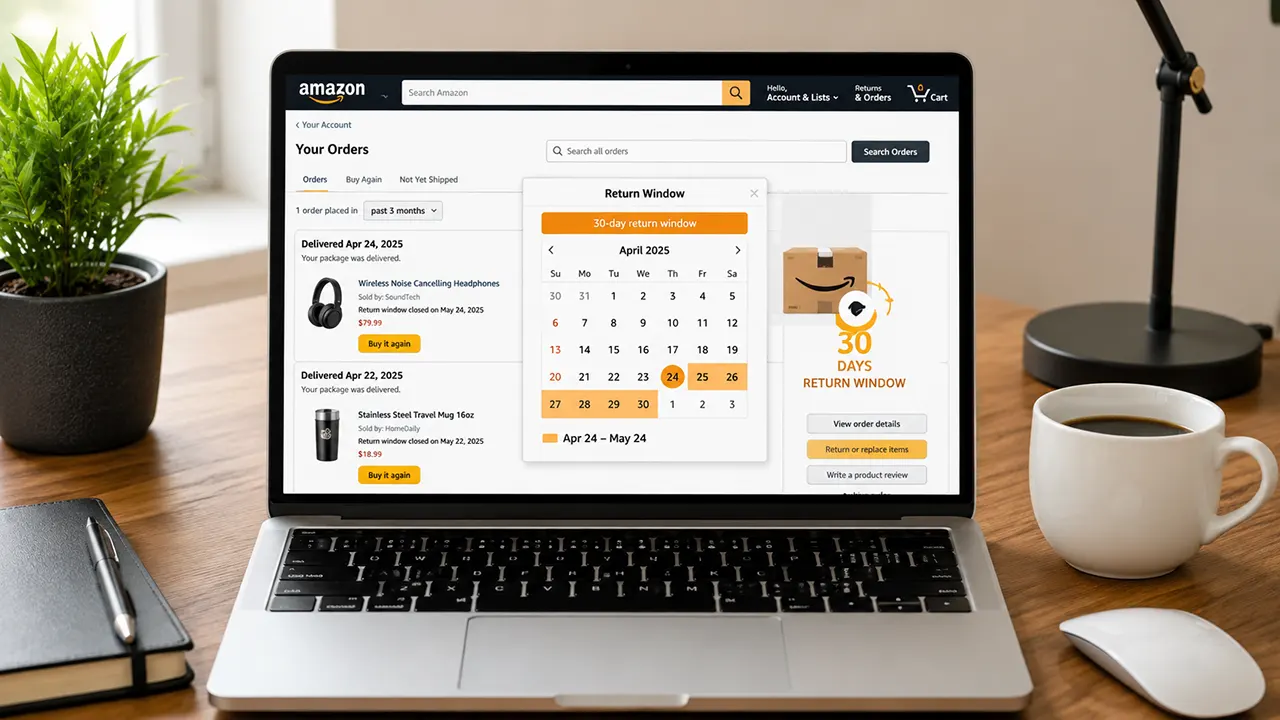
Amazon tracks return eligibility down to the exact hour. Instead of doing mental math or risking a rejected package, use our interactive return window calculator below to check your exact deadline before you print your label.
Amazon return window calculator
Check your exact deadline before it closes
The Core Amazon Return Policy Rules
The Amazon return policy operates on a strict 30-day countdown starting from the Estimated Delivery Date, not the date you actually opened the package. Most items shipped by Amazon or third-party sellers qualify for a full refund as long as the products remain in original, unused condition.
In our experience tracking e-commerce return trends, shoppers often lose out on refunds simply because they miscount the 30-day window. The Amazon system automatically locks the "Return Items" button at midnight on the 30th day.
💡 Key Takeaway: Always check your "Your Orders" page rather than your email receipt. The estimated delivery date listed in your account is the only date Amazon's algorithm uses to validate your return.
The standard 30-day rule applies to general merchandise. However, specific categories have extended or reduced windows. For example, Amazon Warehouse items often come with a shorter 15-day return window, while specific electronics might carry a 15-day window for defective exchanges only.
Can You Return Amazon Items After 30 Days?
Amazon does not guarantee returns after the 30-day window closes, but late returns are not automatically rejected. If you miss the standard Amazon return policy deadline, you must contact Amazon Customer Service directly to request a late return exception.
Customer service representatives have the authority to grant one-time extensions, usually adding another 15 to 30 days to your window. Your success depends entirely on your reason for the delay and your account history. Let's be honest, claiming you "forgot" rarely works if your account shows a pattern of late returns.
Pro Tip: Use the live chat feature rather than email. Live chat agents have a higher authorization limit for overriding the 30-day Amazon return policy block compared to tier-one email support.
Amazon recently implemented stricter tracking for "return abuse." If you frequently return items past the 30-day mark, or if your return rate spikes abruptly, the algorithm will flag your account. Flagged accounts lose the ability to request late returns automatically and may face temporary purchase restrictions. Valid reasons for late returns include receiving a defective item discovered after the window, being hospitalized, or a delayed gift exchange.
Which Items Are Non-Returnable on Amazon?
The Amazon return policy strictly prohibits returns on specific high-risk or consumable categories. Amazon will immediately reject return requests for digital products, downloadable software, gift cards, and hazardous materials (like flammable liquids or certain batteries).
Additionally, grocery items from Amazon Fresh or Whole Foods are highly restricted. Perishable goods cannot be returned once delivered unless they arrive damaged or spoiled. You must report spoiled grocery items within 24 hours of delivery, complete with photos, to receive an immediate refund without needing to physically send the food back.
How to Return Amazon Items Without the Original Box
You do not need the original product box to successfully process an Amazon return. Amazon explicitly allows you to use any sturdy, oversized box or poly mailer as long as the item is protected from damage during transit. The myth that you must tape a product's retail box back together perfectly causes unnecessary friction for most shoppers.
For third-party seller returns, sellers legally cannot mandate the original retail box under the standard Amazon return policy unless the box itself is considered the product packaging required for resale. In practice, throwing a loose electronic accessory into a generic bubble mailer with a printed return label is completely acceptable.
If you are using an Amazon physical drop-off location like Kohl's or UPS, you often do not need a box at all. You can simply hand the bare, unwrapped item with the QR code on your phone to the store clerk.
The No-Box Drop-Off Process
Amazon partnered with Kohl's, Whole Foods, and UPS to create a completely box-free, label-free return system. This method is the fastest way to get rid of unwanted items without hunting for packing tape.
Open the Amazon app and navigate to "Your Orders." Select the item you want to send back and click "Return or Replace Items."
Choose your reason for the return. On the following screen, select the "Box-free drop-off" option instead of a UPS pickup or USPS label.
A unique QR code will appear on your screen. Take a screenshot of this code to find an Amazon return store near you.
Hand the bare item and your phone screen showing the QR code to the cashier. The clerk scans the code, handles the packaging, and you receive an instant refund confirmation on your phone.
Are Amazon Returns Still Free?
Amazon returns are free for most items, but recent policy updates have introduced deduction fees for specific situations. If you use the Amazon locker, Kohl's, Whole Foods, or UPS drop-off methods, you will never pay a return shipping fee. However, if you choose to ship the item back yourself using a non-Amazon provided label, Amazon will deduct the return shipping cost from your final refund amount.
Furthermore, Amazon now charges a "Returnless Refund" processing fee or a restocking fee on certain categories where the item's value is lower than the cost of return shipping. In these cases, Amazon will issue your refund immediately and tell you to keep or dispose of the item, but the refund might be slightly reduced. Large, heavy items like furniture or oversized outdoor equipment may also incur deductable return shipping fees if returned via mail instead of a scheduled pickup.
How to Get a Refund Without Returning an Item
Amazon automatically issues "Returnless Refunds" for low-value items where shipping the product back costs more than the item itself. You do not need to request this manually; the system will flag the order and email you a notification stating your refund has been processed and you do not need to return the item.
For items that do not qualify automatically, you cannot force a refund without a return. Valid excuses like "it arrived damaged" require photo evidence submitted through the app. If Amazon approves the damage claim based on your photos, a carrier may still be dispatched to pick up the item, or you may be instructed to dispose of it locally. Attempting to fabricate a reason to keep an expensive item without sending it back will result in a denied claim and a flagged account under the strict Amazon return policy.
Navigating the Amazon Gift Return Process
You can return an Amazon gift without the sender ever knowing. The Amazon gift return policy uses a specific "Gift Return" feature that breaks the link between the return transaction and the original purchaser's order history. The gift sender receives absolutely no notification, and their gift receipt remains untouched.
To execute an Amazon gift return, you need the 17-digit order number from the packing slip. If you do not have the packing slip, you can initiate the return by entering the gift giver's email address or phone number on the Amazon Gift Returns page. Once verified, you can choose whether you want your gift refund issued as an Amazon gift card balance, or back to the original payment method if you were the one who actually paid.
Warning: If the gift was purchased using a shared Amazon Prime account, the primary account holder might see the refund adjustment on their shared payment method depending on their bank's statement formatting. Opting for an Amazon gift card refund is the only 100% anonymous method.
Secure Your Refund Before Time Runs Out
The Amazon return policy is a rigid system designed for scale, not flexibility. Waiting until day 29 to initiate a return risks technical glitches or carrier delays pushing your request past the hard deadline. Your next step is to open the "Your Orders" tab right now, verify the exact estimated delivery date listed on the item you need to return, and initiate the process immediately. Do not wait for the system to lock you out.
Frequently Asked Questions

Belayet Hossain is a Senior Tech Expert and Certified AI Marketing Strategist. Holding an MSc in CSE (Russia) and over a decade of experience since 2011, he combines traditional systems engineering with modern AI insights. Specializing in Vibe Coding and Intelligent Marketing, Belayet provides forward-thinking analysis on software, digital trends, and SEO, helping readers navigate the rapidly evolving digital landscape. Connect with Belayet Hossain on Facebook, Twitter, Linkedin or read my complete biography.