
Published on: 28/10/2025 | Updated on: October 28, 2025
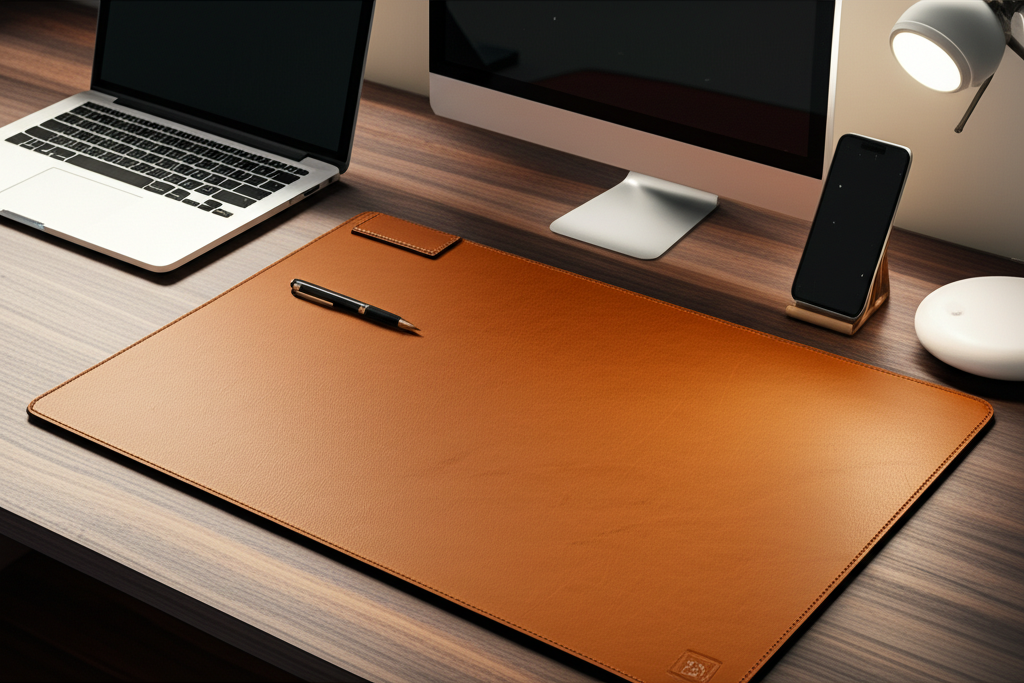
Upgrade your home office with the best desk pad. This guide helps you choose the perfect one for comfort, organization, and style, making your workspace a dream.
Creating a comfortable and efficient home office is key to productivity and well-being. But sometimes, the most impactful upgrades are the simplest. A desk pad might seem like a small addition, but it can dramatically change how you interact with your workspace. It protects your desk, keeps your mouse gliding smoothly, and can even add a touch of personal style. We’ll walk through everything you need to know to find the best desk pad for your home office, ensuring you create a space that works for you. Get ready to transform your desk!
Why You Need the Best Desk Pad for Your Home Office
A desk pad is more than just a mat. It’s a functional accessory that offers a surprising number of benefits for any home office setup. It acts as a protective barrier, shielding your desk surface from scratches, spills, and general wear and tear. This is especially important if you have a valuable or delicate desk. A good desk pad also provides a consistent and comfortable surface for your mouse, improving tracking and reducing wrist strain. Many people find it makes their workspace feel more organized and visually appealing, contributing to a more focused work environment.
Essential Features to Look for in a Desk Pad
When selecting the best desk pad for your home office, several key features deserve your attention. Material quality is paramount, as it dictates durability, feel, and ease of cleaning. Size is another critical factor; you need a pad that fits your desk space without being overwhelming. Consider the thickness, as this affects cushioning and stability. The surface texture also matters, particularly for mouse performance. Finally, look at the design and color options to ensure it complements your personal style and existing office decor.
Material Matters: What Your Desk Pad is Made Of

The material of your desk pad greatly influences its performance and longevity. Leather and PU leather pads offer a premium feel and excellent durability, often developing a nice patina over time. They are generally easy to clean and provide a smooth surface. Felt pads offer a softer, warmer touch and can add a cozy aesthetic, but they might attract dust and pet hair more easily. Rubber is a common material for the base, providing excellent grip and preventing the pad from sliding. Some modern pads use high-density cloth or neoprene, balancing comfort, mouse tracking, and water resistance.
Size and Fit: Finding the Perfect Dimensions
Choosing the right size desk pad is crucial for both functionality and aesthetics. Measure your desk area to determine the ideal dimensions. Many desk pads come in standard sizes like A4, A3, or larger desk-length options that cover a significant portion of your workspace. A larger pad can accommodate your keyboard, mouse, and even a notebook, creating a unified zone. Ensure the pad is not too large that it encroaches on other essential desk items, nor too small that it feels cramped. A well-fitting pad enhances organization and prevents items from sliding off the edge.
Thickness and Comfort: Cushioning Your Workspace
The thickness of a desk pad affects its cushioning and how it feels under your arms and wrists. Thicker pads (around 3-5mm) offer more cushioning, which can be beneficial for prolonged computer use, reducing pressure points. However, excessively thick pads might make it harder for your keyboard to sit stably. Thinner pads (1-2mm) provide a firmer surface and are less noticeable, often preferred by those who prioritize a sleek look and precise mouse control. The ideal thickness is a balance between comfort and practicality for your specific needs.
Surface Texture: For Smooth Mouse Gliding
The surface texture of your desk pad is vital for mouse performance. A smooth, consistent surface ensures accurate tracking and effortless gliding, reducing friction and improving your cursor control. Most cloth or neoprene pads offer a good balance for optical and laser mice. Leather and PU leather pads also provide a smooth experience. Avoid pads with overly rough or uneven textures, as these can hinder mouse movement and cause unnecessary wear on your mouse feet. A well-chosen surface means less frustration and more precision.
Style and Aesthetics: Personalizing Your Space
Your desk pad is an opportunity to inject personality into your home office. They come in an astonishing array of colors, patterns, and finishes. From minimalist black or grey to vibrant hues and intricate designs, there’s a pad to match every taste. Consider materials like wood, marble patterns, or even custom printing for a truly unique look. A stylish desk pad can tie your workspace together, making it a more inviting and inspiring place to spend your time. It’s a simple way to elevate your office’s overall appearance.
Top Desk Pad Materials Explored
Let’s dive deeper into the most popular materials used for desk pads. Each offers a distinct set of advantages and potential drawbacks. Understanding these differences will help you pinpoint the best desk pad for your home office based on your priorities.
Leather and PU Leather: The Classic Choice
Leather and its synthetic counterpart, PU (polyurethane) leather, are perennial favorites for desk pads. They exude a sense of sophistication and professionalism. Real leather is durable, develops a rich patina over time, and offers a smooth, luxurious feel. PU leather offers a similar aesthetic at a more accessible price point and is often easier to clean. Both provide excellent mouse tracking and protect your desk surface effectively. Their primary downsides can be cost (for real leather) and potential for scratching if not cared for properly.
Felt: For a Cozy and Natural Feel
Felt desk pads offer a distinctively different experience, bringing a sense of warmth and natural texture to your workspace. They are typically made from wool or synthetic fibers. Felt is soft to the touch, providing a comfortable resting place for your wrists and arms. It also has good grip, preventing items from sliding. However, felt can be more prone to attracting dust, crumbs, and pet hair, requiring more frequent cleaning. Its surface might not offer the same level of precise mouse tracking as smoother materials.
Neoprene and Rubber: Performance and Grip
Neoprene and rubber are workhorse materials, especially for the base of desk pads, ensuring they stay put. Neoprene, a synthetic rubber, is also used for the top surface of many gaming or productivity pads. It offers a smooth, consistent surface ideal for mouse tracking, is water-resistant, and provides a comfortable cushion. Rubber bases offer superior grip, preventing any unwanted movement. These materials are generally durable and easy to wipe clean, making them practical choices for busy home offices.
Cork: Eco-Friendly and Functional
Cork desk pads are gaining popularity for their eco-friendly nature and unique properties. Cork is a sustainable material harvested from the bark of cork oak trees. It’s naturally antimicrobial and water-resistant. The surface of a cork pad offers a good balance of grip and smoothness, suitable for most mice. It has a pleasant, natural texture and a distinctive look. While durable, cork can be susceptible to deep scratches or staining if spills are left unaddressed.
Types of Desk Pads for Your Home Office
Beyond materials, desk pads come in various types, each catering to different needs and preferences. Understanding these categories can help you narrow down your search for the best desk pad for your home office.
Standard Desk Pads
These are your everyday desk pads, typically rectangular and available in a wide range of sizes and materials. They cover a portion of your desk, usually large enough for your keyboard and mouse. Standard pads are versatile and suit most home office setups, offering basic protection and improved mouse performance. They are the most common choice due to their availability and variety.
Extended/Desk-Length Mats
For those who want maximum coverage and organization, extended or desk-length mats are the way to go. These mats span the entire width of your desk, or a significant portion of it. They create a unified surface for your keyboard, mouse, and other accessories, preventing them from sliding around. This type of pad is excellent for gamers, multi-monitor setups, or anyone who likes a clean, cohesive workspace. They provide excellent desk protection across a larger area.
Minimalist Blotters
Blotters are often thinner and more minimalist in design. They focus on providing a smooth writing surface and a place for your mouse, without adding significant bulk. Traditionally made of leather or cardstock, modern versions can incorporate other materials. They are ideal for those who prefer a clean, uncluttered desk aesthetic and don’t need extensive cushioning. Blotters add a touch of classic elegance to a workspace.
Specialty Pads (e.g., Gaming, Armrest)
Specialty pads are designed with specific users in mind. Gaming desk pads often feature extra-large sizes, ultra-smooth surfaces for precise mouse movements, and reinforced edges to prevent fraying. Some might even include built-in wrist rests or cable management features. Armrest pads, though less common as a desk pad type, are designed to attach to the edge of a desk to provide comfortable arm support. These cater to niche needs for enhanced performance or comfort.
How to Choose the Best Desk Pad for Your Home Office: A Step-by-Step Guide
Finding the perfect desk pad involves considering your personal needs and workspace. Follow these steps to make an informed decision.
Step 1: Assess Your Desk Space and Needs
Before browsing, measure your desk. How much space do you realistically have for a pad? Consider where your keyboard and mouse sit. Do you need space for a notebook, phone, or other items? Think about your primary use: extensive typing, gaming, general office work, or creative tasks. Your answers will guide the size and material selection.
Step 2: Prioritize Material Based on Use and Style
If durability and a premium feel are important, consider leather or PU leather. For a softer, warmer touch and a cozy vibe, felt might be appealing. If precise mouse tracking and water resistance are key, neoprene or rubber options are excellent. For an eco-conscious choice, look at cork. Match the material to your daily activities and aesthetic preferences.
Step 3: Determine the Ideal Size and Shape
Based on your desk measurements and how you use your space, decide on the dimensions. Do you need a standard pad, an extended mat, or something custom? Ensure the pad will not obstruct drawers or other desk features. A well-sized pad enhances both functionality and the visual harmony of your office.
Step 4: Consider Thickness and Comfort
Think about how much cushioning you desire. If you spend long hours at your desk, a slightly thicker pad can offer welcome relief. If you prefer a firm, stable surface and a sleek look, opt for a thinner pad. Test different thicknesses if possible, or read reviews that mention comfort levels.
Step 5: Evaluate Surface Texture for Mouse Performance
If you use a mouse extensively, the surface texture is critical. Look for pads described as smooth, consistent, or optimized for mouse tracking. Avoid anything that sounds rough or uneven. Most modern desk pads are designed to work well with optical and laser mice, but some surfaces are superior.
Step 6: Browse Designs and Colors
Once you’ve narrowed down the functional aspects, choose a design that complements your home office decor. Whether you prefer a bold statement or a subtle accent, there are countless options available. This is where you can truly personalize your workspace and make it feel like your own.
Popular Desk Pad Brands and What They Offer
Several brands have made a name for themselves in the desk pad market, offering a range of quality products. Exploring these options can provide a good starting point for finding the best desk pad for your home office.
Grovemade
Grovemade is renowned for its premium desk accessories, often crafted from natural materials like leather, wood, and cork. Their desk pads are known for their exceptional quality, minimalist design, and durability. They offer a sophisticated look that can elevate any workspace.
Satechi
Satechi offers a range of tech accessories, including stylish desk pads made from materials like vegan leather and aluminum. Their products often focus on functionality and sleek design, integrating well with Apple products and modern office setups.
Deskmat.co
This brand specializes in extended desk mats, offering a vast selection of designs, from subtle textures to vibrant artistic prints. They focus on providing a smooth, durable surface ideal for both productivity and gaming.
AmazonBasics
For budget-friendly options, AmazonBasics provides reliable and functional desk pads in various sizes and materials. These are great for those looking for basic protection and improved mouse performance without a significant investment.
Maintaining Your Desk Pad for Longevity
To ensure your chosen desk pad remains a valuable part of your home office, proper maintenance is key. Regular cleaning will keep it looking good and functioning well.
Cleaning Your Desk Pad
Most desk pads can be cleaned with a damp cloth. For tougher spots, a mild soap solution can be used, followed by a thorough wipe-down with a clean, damp cloth. Always ensure the pad is dry before placing items back on it. For felt pads, vacuuming regularly can help remove dust and debris. Avoid harsh chemicals or abrasive cleaners, which can damage the surface.
Preventing Wear and Tear
To prolong the life of your desk pad, try to avoid placing excessively hot items directly on its surface. Be mindful of sharp objects that could cause scratches, especially on leather or cork. If your pad has a rubber base, ensure it doesn’t react with certain finishes on your desk, which can happen rarely with some wood treatments. Rotating the pad occasionally can also help distribute wear evenly.
Frequently Asked Questions About Desk Pads
Here are answers to some common questions beginner users have about desk pads.
Q1: Will a desk pad protect my desk from scratches?
Yes, a desk pad acts as a protective layer. It shields your desk surface from scratches caused by keyboards, mice, pens, and general movement of objects.
Q2: Are desk pads necessary for a home office?
While not strictly necessary, they offer significant benefits like desk protection, improved mouse tracking, and enhanced organization. They contribute to a more comfortable and professional workspace.
Q3: How do I choose the right size desk pad?
Measure your desk and consider how much space you need for your keyboard, mouse, and other essentials. Opt for a size that fits comfortably without overwhelming your workspace.
Q4: Can I use any mouse on a desk pad?
Most modern desk pads work well with optical and laser mice. Very smooth or glossy surfaces might pose challenges for some mice, but this is less common with quality pads.
Q5: How often should I clean my desk pad?
It depends on your usage and environment. A quick wipe-down every few days or weekly is usually sufficient. Deep cleaning can be done as needed, perhaps monthly, or if spills occur.
Q6: Do desk pads help with wrist comfort?
Some thicker desk pads offer cushioning that can provide a more comfortable resting place for your wrists and forearms during long work sessions.
Conclusion: Elevate Your Home Office with the Best Desk Pad
Finding the best desk pad for your home office is a straightforward process once you know what to look for. It’s a simple yet effective upgrade that offers protection, enhances comfort, and adds a touch of personal style to your workspace. Whether you opt for the classic elegance of leather, the natural feel of felt, or the performance of neoprene, a quality desk pad can transform your daily work experience. By considering material, size, thickness, and surface texture, you can ensure your chosen pad meets all your needs. Investing in the right desk pad is an investment in your productivity and overall well-being. Make your home office a place you truly enjoy working in.

Belayet Hossain is a Senior Tech Expert and Certified AI Marketing Strategist. Holding an MSc in CSE (Russia) and over a decade of experience since 2011, he combines traditional systems engineering with modern AI insights. Specializing in Vibe Coding and Intelligent Marketing, Belayet provides forward-thinking analysis on software, digital trends, and SEO, helping readers navigate the rapidly evolving digital landscape. Connect with Belayet Hossain on Facebook, Twitter, Linkedin or read my complete biography.