

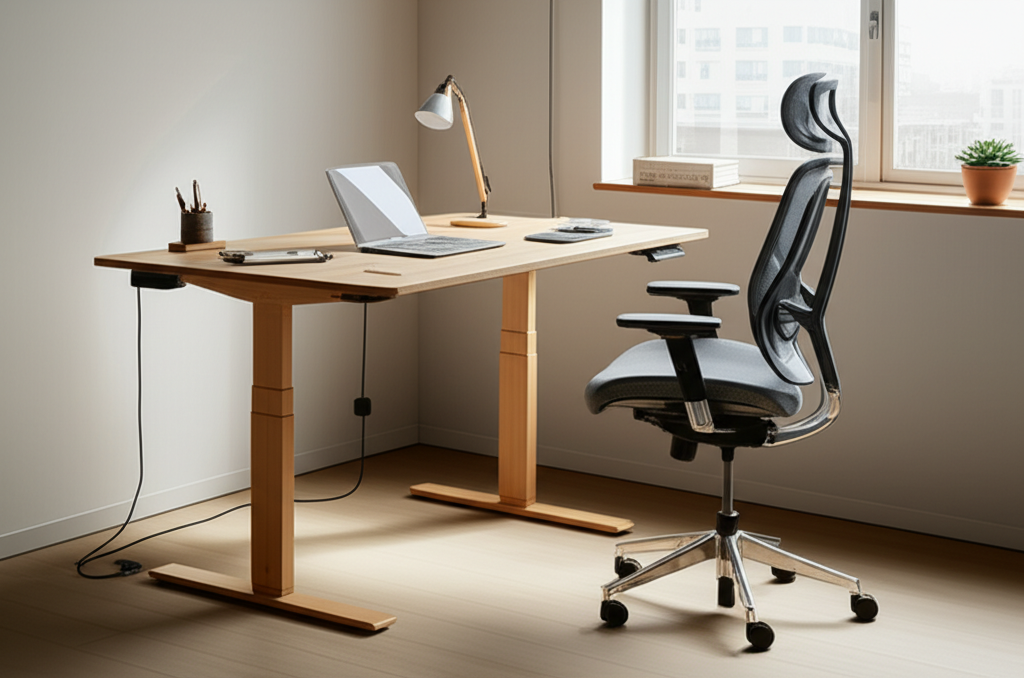
Published on: 28/10/2025 | Updated on: October 28, 2025
Discover the best ergonomic desk and chair setups to boost your comfort and productivity. This guide explores essential features, types, and buying tips to help you find the perfect fit for your workspace, preventing pain and enhancing focus.
Working from home or the office has become a huge part of our lives. Many of us spend hours each day sitting at a desk. This can lead to discomfort, pain, and even long-term health issues if we’re not careful. The good news is that choosing the right best ergonomic desk and chair can make a world of difference. It’s not just about comfort; it’s about protecting your body and improving how well you work. In this guide, I’ll walk you through everything you need to know to create a healthier, more comfortable workspace. We’ll look at what makes a desk and chair truly ergonomic and how to pick the perfect ones for you.
Why Your Workspace Comfort Matters More Than You Think
Your workspace setup directly impacts your well-being and productivity. Poor posture from an unsuitable desk and chair can cause back pain, neck strain, and fatigue. This makes it harder to concentrate and get your work done effectively. Investing in an ergonomic setup is an investment in your health and your ability to perform at your best. It helps prevent the aches and pains that can creep up over time.
A comfortable workspace helps you stay focused and energized. It reduces the distractions caused by physical discomfort. This leads to better work quality and increased efficiency throughout your day.
Understanding Ergonomics: What Does It Really Mean?
Ergonomics is the science of designing things for people to use. It focuses on fitting the workspace to the user, not the other way around. For desks and chairs, this means they should support your body’s natural posture. They should help reduce strain on your muscles, nerves, and skeleton. The goal is to make your work environment as comfortable and safe as possible.
Good ergonomic design considers factors like adjustability and support. It aims to minimize physical stress and maximize efficiency. This approach helps prevent injuries and promotes overall well-being.
Key Principles of Ergonomic Design

Ergonomic design follows certain principles to ensure comfort and safety. These include maintaining neutral postures for your body. This means avoiding awkward or strained positions. It also involves providing adequate support where your body needs it most, like your back and arms.
Another principle is adjustability. Furniture should adapt to your unique body shape and size. This ensures a personalized fit. The aim is to reduce repetitive strain and discomfort during long periods of sitting or working.
The Best Ergonomic Chair: Your Foundation for Comfort
Your chair is arguably the most critical part of your ergonomic setup. It supports your entire body while you work. A good ergonomic chair offers adjustable features to fit your body perfectly. It should promote good posture and reduce pressure points.
Look for features like adjustable height, lumbar support, and armrests. These allow you to customize the chair to your specific needs. This personalized fit is key to preventing pain and discomfort.
Essential Features of an Ergonomic Chair
When choosing an ergonomic chair, several features are non-negotiable. Adjustable seat height allows your feet to rest flat on the floor. Your knees should be at a 90-degree angle. Adjustable lumbar support cradles the natural curve of your lower back.
Swiveling and wheels provide freedom of movement. Padded armrests reduce shoulder and neck strain. A breathable mesh back can keep you cool. These elements work together to create a supportive and comfortable seating experience.
Types of Ergonomic Chairs to Consider
There are several types of ergonomic chairs, each with its benefits. Standard ergonomic office chairs are the most common choice. They offer a wide range of adjustability. Task chairs are simpler but still provide good support for shorter periods.
Ergonomic kneeling chairs can help promote a more upright posture. They distribute weight differently. However, they may not be suitable for everyone or for very long work sessions.
Top Ergonomic Chair Picks for Every Budget
Finding the best ergonomic desk and chair involves selecting the right chair first. Here are a few popular options:
High-End: Herman Miller Aeron Chair. Known for its exceptional support and durability. It features a breathable mesh and advanced lumbar support.
Mid-Range: Steelcase Gesture Chair. Offers excellent adjustability and comfort for long hours. Its armrests are highly versatile.
Budget-Friendly: Hbada Ergonomic Office Chair. Provides good lumbar support and adjustable features at a more accessible price point.
These chairs offer different levels of support and adjustability. They cater to various needs and budgets.
The Best Ergonomic Desk: A Solid Base for Productivity
Your desk is more than just a surface; it’s the anchor of your workspace. An ergonomic desk supports proper posture and keeps your equipment within easy reach. The height of your desk is crucial. It should allow your arms to rest comfortably at a 90-degree angle while typing.
Adjustable desks, like sit-stand desks, offer even greater flexibility. They allow you to switch between sitting and standing. This can reduce sedentary behavior and improve circulation.
What Makes a Desk Ergonomic?
An ergonomic desk should allow for proper positioning of your monitor and keyboard. Your monitor should be at eye level. Your keyboard and mouse should be at elbow height. This prevents neck, shoulder, and wrist strain.
Sufficient desk space is also important. It allows you to arrange your equipment without feeling cramped. Cable management features can help keep your workspace tidy and free from distractions.
Sit-Stand Desks: The Ultimate Ergonomic Solution?
Sit-stand desks, also known as height-adjustable desks, are a game-changer for ergonomics. They allow you to transition between sitting and standing throughout the day. This variation can reduce the negative health effects of prolonged sitting. Studies suggest that alternating between sitting and standing can improve energy levels and reduce back pain.
According to a study published in the Journal of Occupational and Environmental Medicine*, using a sit-stand desk reduced upper back and neck pain by 54% after three weeks. This demonstrates their significant impact on comfort.
Types of Ergonomic Desks
There are several types of ergonomic desks. Fixed-height desks are the most basic. They are often less ergonomic unless they are at the perfect height for you. Height-adjustable desks allow manual or electric adjustments.
Standing desk converters are a great option if you don’t want a full desk replacement. They sit on top of your existing desk. They allow you to raise your monitor and keyboard to a standing position.
Choosing the Right Desk Size and Shape
The size and shape of your desk depend on your available space and needs. A larger desk provides more surface area for equipment and work materials. L-shaped desks can maximize corner space and offer ample room.
Consider the depth of the desk. You need enough space to position your monitor at a proper distance from your eyes. This prevents eye strain. Ensure there’s enough legroom underneath.
Creating the Perfect Ergonomic Desk and Chair Combination
The best ergonomic desk and chair work together harmoniously. They create a unified system for comfort and health. The ideal setup ensures that your desk height complements your chair height. This allows you to maintain good posture effortlessly.
When pairing a desk and chair, consider how they interact. Your chair’s height adjustment should allow your feet to be flat on the floor. Your desk height should then accommodate this position for your arms.
The 90-Degree Rule: A Simple Guideline
A simple guideline for an ergonomic setup is the 90-degree rule. Your elbows should be bent at approximately 90 degrees when typing. Your feet should be flat on the floor, with your knees also at about 90 degrees. Your chair’s lumbar support should fit the curve of your lower back.
Your monitor should be positioned so the top of the screen is at or slightly below eye level. This prevents neck strain. Following these simple rules creates a comfortable and healthy working posture.
Monitor Placement: Key to Neck Comfort
Proper monitor placement is crucial for preventing neck pain. The monitor should be directly in front of you. It should be at arm’s length away. The top edge of the screen should be at or just below your eye level.
If you use multiple monitors, position them close together. Place your primary monitor directly in front of you. This reduces the need to constantly turn your head. Using monitor stands or arms can help achieve the optimal height and angle.
Keyboard and Mouse Placement: Preventing Wrist Strain
Your keyboard and mouse should be placed so your wrists are straight and relaxed. They should be at elbow height, allowing your arms to rest comfortably. Avoid bending your wrists up, down, or sideways. This can lead to repetitive strain injuries like carpal tunnel syndrome.
Consider using an ergonomic keyboard and mouse. These are designed to promote a more natural hand and wrist position. A wrist rest can also provide support.
Beyond the Desk and Chair: Essential Accessories
While the best ergonomic desk and chair are fundamental, other accessories can enhance your comfort. These additions fine-tune your workspace for optimal ergonomics. They address specific needs and can further reduce strain.
Consider accessories that support your posture and reduce physical stress. They can make a significant difference in your daily work experience. These items often fill the gaps left by standard furniture.
Footrests: For Proper Leg and Foot Support
A footrest is essential if your feet don’t comfortably reach the floor when your chair is at the correct height. It helps maintain proper leg and foot posture. This improves circulation and reduces pressure on your thighs.
A good footrest is adjustable. It allows you to set the height and angle to your preference. This ensures consistent support throughout the day.
Monitor Arms: Flexibility and Space Saving
Monitor arms offer great flexibility for screen positioning. They allow you to easily adjust the height, tilt, and swivel of your monitor. This makes it simple to achieve the perfect eye level. They also free up desk space.
Many monitor arms can hold one or two screens. This is ideal for multitasking. They help keep your desk clutter-free and your setup perfectly aligned.
Keyboard Trays and Mousepads
Keyboard trays can help position your keyboard and mouse at the optimal height. They are especially useful with fixed-height desks or when using a very thick desk. Some trays have adjustable tilt and height.
Ergonomic mousepads and wrist rests can provide additional support. They help maintain a neutral wrist position. This reduces the risk of strain and discomfort.
Evaluating Your Current Workspace: Identifying Potential Issues
Before buying new equipment, it’s wise to assess your current setup. Look for signs of discomfort or strain. Are you experiencing back pain, neck stiffness, or wrist soreness? These are clear indicators that your workspace needs adjustment.
Observe your posture throughout the day. Are you slouching? Is your head jutting forward? Identifying these issues is the first step toward finding solutions. A simple self-assessment can reveal a lot.
Common Ergonomic Mistakes to Avoid
Many people make common mistakes when setting up their workspace. These include having a desk that’s too high or too low. Placing the monitor too far away or too close is another issue. Not utilizing lumbar support is also frequent.
Another mistake is maintaining the same static posture for too long. Remember to move and change positions regularly. Even the best ergonomic setup requires movement.
When to Consider an Upgrade
If your current desk and chair are old, worn out, or not adjustable, it’s likely time for an upgrade. If you experience persistent pain or discomfort despite making adjustments, new ergonomic furniture is probably needed. Look for signs of wear and tear on your existing furniture. This can compromise its support.
Your body changes, and so should your workspace. If your needs have changed, like increasing work hours, consider upgrading. A new setup can prevent future health problems.
The Link Between Ergonomics and Productivity
A well-designed ergonomic workspace isn’t just about comfort; it’s a powerful tool for boosting productivity. When you’re comfortable and free from pain, you can focus better. Your energy levels remain higher throughout the day. This allows you to accomplish more tasks.
Reduced discomfort means fewer breaks needed to stretch or alleviate pain. This leads to more uninterrupted work time. Ultimately, an ergonomic setup supports sustained concentration and efficiency.
How Comfort Enhances Focus
Physical discomfort is a major distraction. When your back aches or your neck feels stiff, your mind wanders. You find yourself thinking more about the pain than your work. An ergonomic setup minimizes these distractions.
By supporting your body correctly, it allows your mind to concentrate on the task at hand. This leads to deeper focus and better output. Think of it as removing roadblocks to your concentration.
Reducing Fatigue and Increasing Stamina
Prolonged sitting in an unsupportive chair can lead to significant fatigue. Your muscles work harder to keep you upright. An ergonomic chair distributes your weight evenly and supports your spine. This reduces muscle strain and conserves energy.
When you’re less fatigued, you can work for longer periods without feeling drained. This increases your overall stamina and productivity. You can maintain a good pace throughout the workday.
Budgeting for Your Ergonomic Workspace: Smart Investments
Setting up an ergonomic workspace doesn’t always require a massive budget. While high-end options exist, many affordable and effective solutions are available. The key is to prioritize. Focus on the most impactful items first, like a good chair.
Consider your long-term health and productivity. Investing in quality ergonomic furniture can save you money on medical bills and lost workdays down the line. It’s a smart investment in yourself.
Where to Find the Best Deals on Ergonomic Furniture
You can find great deals on ergonomic furniture in various places. Many online retailers offer a wide selection and competitive pricing. Look for sales events and discount codes.
Second-hand office furniture stores can be a goldmine for high-quality, gently used ergonomic chairs and desks. Many companies also offer bulk discounts if you’re setting up an office for multiple people. Always compare prices before making a purchase.
Prioritizing Your Purchases
If your budget is limited, prioritize your purchases. A high-quality ergonomic chair should be your top priority. It has the most direct impact on your posture and comfort. A good chair can make a significant difference even with a basic desk.
Next, consider essential accessories like a monitor stand or a footrest. These can greatly improve your setup without the cost of a new desk. You can upgrade your desk later if needed.
Frequently Asked Questions About Ergonomic Desks and Chairs
What is the most important feature of an ergonomic chair?
The most important feature is adjustable lumbar support. It helps maintain the natural curve of your lower back. This prevents slouching and reduces strain.
Can a standing desk really prevent back pain?
Yes, standing desks can help reduce back pain by encouraging movement. Alternating between sitting and standing reduces the strain of prolonged static postures. However, proper posture is still crucial in both positions.
How do I know if my desk is the right height?
Your desk is the right height if your elbows are bent at about 90 degrees when typing. Your wrists should be straight and your shoulders relaxed. If the desk is too high, your shoulders will be hunched.
Is it better to have a sit-stand desk or a fixed-height desk?
A sit-stand desk offers more flexibility. It allows you to change positions throughout the day, which is beneficial for health and energy. A fixed-height desk can be ergonomic if it’s the perfect height for you.
How far away should my monitor be?
Your monitor should be about an arm’s length away. The top of the screen should be at or slightly below eye level. This prevents neck and eye strain.
Do I really need a special ergonomic mouse and keyboard?
Not necessarily, but they can help. Ergonomic mice and keyboards are designed to promote more natural hand and wrist positions. If you experience wrist pain, they are worth considering.
How often should I adjust my chair and desk?
You should aim to adjust your position frequently. Try to change between sitting and standing if you have a sit-stand desk. Even small adjustments to your chair or desk height can help.
Conclusion: Invest in Your Comfort, Invest in Yourself
Creating an ergonomic workspace with the best ergonomic desk and chair is a vital step towards better health and increased productivity. It’s about tailoring your environment to your body’s needs. This reduces physical strain and prevents discomfort. By understanding the key features of ergonomic furniture and accessories, you can make informed choices. Prioritize adjustability, support, and proper posture. Whether you’re working from home or in an office, investing in an ergonomic setup is an investment in your long-term well-being. Start assessing your current workspace today and take the first step towards a more comfortable and productive tomorrow.

Belayet Hossain is a Senior Tech Expert and Certified AI Marketing Strategist. Holding an MSc in CSE (Russia) and over a decade of experience since 2011, he combines traditional systems engineering with modern AI insights. Specializing in Vibe Coding and Intelligent Marketing, Belayet provides forward-thinking analysis on software, digital trends, and SEO, helping readers navigate the rapidly evolving digital landscape. Connect with Belayet Hossain on Facebook, Twitter, Linkedin or read my complete biography.