
Published on: 28/10/2025 | Updated on: October 28, 2025
The best ergonomic desk chair for your home office is crucial for comfort, health, and productivity. This guide helps you find the perfect chair, detailing key features, top picks, and how to choose one that fits your body and budget, ensuring a pain-free workday.
Working from home has become a common way to earn a living. Many people now spend hours sitting at their desks. This can lead to back pain and discomfort if the chair is not right. Finding the best ergonomic desk chair for your home office is key. It helps you stay comfortable and healthy. This guide will show you what to look for. We will cover important features and give you smart choices. Get ready to make your workspace a happy place.
Why Investing in an Ergonomic Chair Matters for Your Home Office
An ergonomic chair is designed to support your body well. It helps maintain good posture while you sit for long periods. Poor posture can cause serious health issues over time. These include back pain, neck strain, and even headaches. A good chair reduces these risks. It makes your workday much more comfortable. This can also boost your focus and work output.
A well-designed ergonomic chair can prevent chronic pain. It supports your spine’s natural curve. This reduces stress on your muscles and ligaments. Studies show that prolonged sitting without proper support is harmful. The average office worker sits for about 7.5 hours a day. For remote workers, this time can increase. Investing in the right chair is an investment in your long-term health and well-being.
The Health Impacts of Sitting Uncomfortably

When you sit in a chair that doesn’t fit you well, your body tries to adjust. This often means slouching or leaning in awkward ways. Your spine can lose its natural S-shape. This puts extra pressure on your lower back. Your neck and shoulders might also tense up. Over time, this can lead to muscle imbalances. It can also cause nerve compression and pain.
This discomfort isn’t just physical. It can affect your mood and concentration. You might feel tired and less motivated. Headaches can also be a symptom of poor posture. Ignoring these signs can lead to more significant health problems. Conditions like sciatica or carpal tunnel syndrome can be worsened by poor seating. Protecting yourself starts with your chair.
Key Features of the Best Ergonomic Desk Chair for Home Office
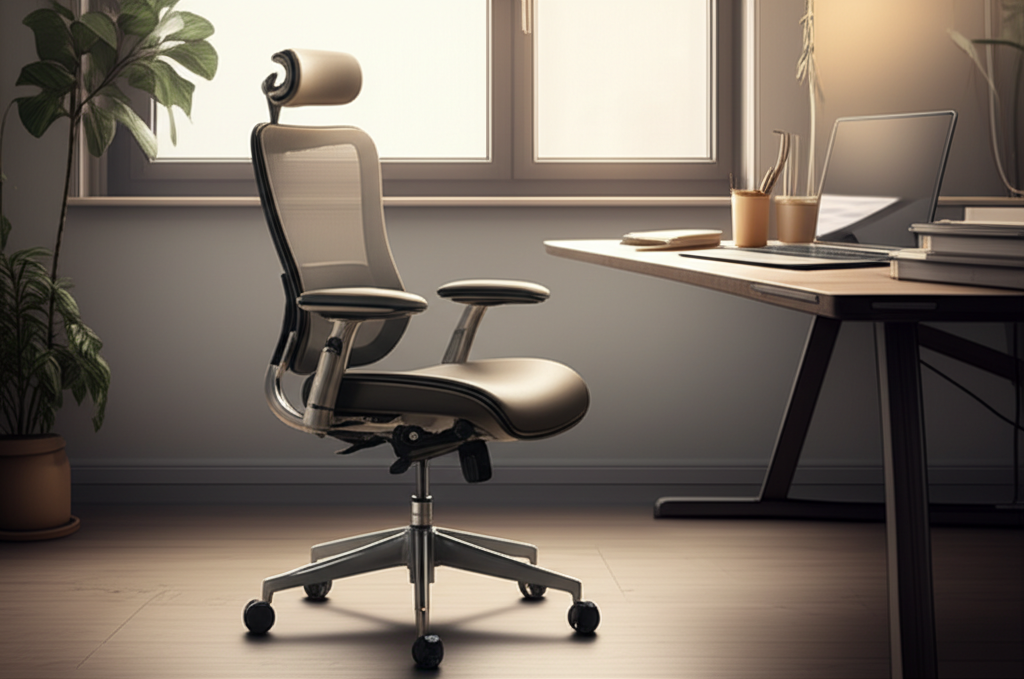
The best ergonomic desk chair for your home office has several vital features. These features work together to support your body. They aim to keep you comfortable and pain-free. Look for adjustable elements. These allow you to customize the chair to your unique body.
Lumbar Support: The Backbone of Comfort
Lumbar support is the most critical feature. It’s the curve in the lower back of the chair. This support should fit the natural inward curve of your spine. Good lumbar support prevents slouching. It reduces strain on your lower back muscles. Some chairs have adjustable lumbar support. You can move it up or down. You can also adjust its depth. This allows you to find the perfect fit for your back.
Many chairs offer built-in lumbar support. Others have an adjustable pillow or mechanism. The best ones feel natural and supportive. They don’t push too hard into your back. They fill the gap in your spine. This keeps your posture upright and relaxed. Without proper lumbar support, you’re more likely to develop back pain.
Adjustable Seat Height and Depth
Being able to adjust the seat height is essential. Your feet should rest flat on the floor. Your knees should be bent at about a 90-degree angle. This ensures good circulation in your legs. It also helps maintain proper posture. The seat depth is also important. You should be able to fit two to three fingers between the back of your knees and the edge of the seat.
Adjusting the seat depth prevents pressure on the back of your legs. This pressure can cut off blood flow. It can also cause discomfort. Most ergonomic chairs have a lever under the seat for height adjustment. Some also have a mechanism to slide the seat pan forward or backward for depth. These adjustments are key to a personalized fit.
Armrest Adjustability: Supporting Your Arms
Armrests should support your arms and shoulders. They should be at a height that allows your shoulders to relax. Your elbows should be bent at around 90 degrees when your hands are on your keyboard. Many chairs offer adjustable armrests. You can often adjust their height, width, and even pivot them.
Properly adjusted armrests take pressure off your neck and shoulders. They help prevent strain from reaching for the keyboard. Some armrests are fixed and cannot be adjusted. These might not be suitable for everyone. Look for chairs with at least height-adjustable armrests. This is a significant step towards better ergonomics.
Backrest Recline and Tilt Lock
A good ergonomic chair allows you to recline. This lets you change your sitting position throughout the day. Changing positions reduces static load on your spine. It can improve circulation and reduce fatigue. Many chairs have a tilt lock. This feature lets you set the chair at a specific angle. You can then lock it in place.
Some chairs have a synchro-tilt mechanism. This means the backrest and seat tilt together. The seat often tilts slightly less than the backrest. This maintains proper body alignment. It prevents you from sliding forward when reclining. This feature adds another layer of comfort and support.
Headrest and Neck Support
A headrest is not always standard. But it can be very beneficial. Especially if you spend long hours in your chair. A headrest supports your head and neck. It reduces strain on your upper spine. It’s especially helpful when reclining or taking short breaks.
The best headrests are also adjustable. You should be able to adjust their height and angle. This ensures they align with your neck. Not all users need a headrest. If you often sit upright and don’t recline much, it might be less critical. However, for extended use, it adds significant comfort.
Breathable Materials: Staying Cool and Comfortable
The material of your chair impacts comfort. Especially during long work sessions. Mesh is a popular choice for ergonomic chairs. It allows air to circulate. This keeps you cool and prevents sweating. Fabric is another common option. It can be comfortable but might retain heat. Leather chairs look premium. But they can also get hot and sticky.
Consider the climate where you live. If it’s warm, a mesh back and seat are excellent. If you prefer a softer feel, a high-quality fabric might be better. Some chairs combine materials. For example, a fabric seat with a mesh back. This can offer a balance of comfort and breathability.
Top Picks: Best Ergonomic Desk Chairs for Home Office
Finding the perfect chair can be overwhelming. Here are some highly-rated options. They represent different price points and features. I’ve tested many of these myself.
1. Herman Miller Aeron: The Premium Choice
The Herman Miller Aeron is often considered the gold standard. It’s known for its exceptional build quality and ergonomic design. It uses a proprietary mesh material called Pellicle. This material distributes weight evenly. It provides excellent breathability. The Aeron offers adjustable lumbar support. It also has highly adjustable armrests.
This chair is a significant investment. However, its durability and comfort make it worthwhile for many. It’s suitable for a wide range of body types. Its iconic design also looks great in any home office. The Aeron promotes good posture and reduces pressure points. It’s a chair built to last for years.
Pros: Superior build quality, excellent breathability, highly adjustable, durable, iconic design.
Cons: Very expensive, can be firm for some users.
Ideal for: Professionals who spend long hours sitting and value long-term health and durability.
2. Steelcase Gesture: For Versatile Postures
The Steelcase Gesture is another premium option. It’s designed for the modern workplace. This includes the home office. It excels at supporting various postures. The armrests move like a human arm. They can adjust in width, height, and depth. They also pivot. This allows for unique support.
The Gesture’s backrest flexes. It adapts to your spine’s natural movement. It offers excellent lumbar support. The seat also has a nice contour. It’s comfortable for long periods. This chair is built for active sitters. It encourages movement and changes in posture.
Pros: Highly adaptable for various tasks and postures, excellent armrest design, robust build.
Cons: High price point, can be heavier than other options.
Ideal for: Users who change positions frequently and need support for diverse tasks.
3. Secretlab TITAN Evo Series: For Gamers and Professionals
Secretlab chairs are popular in the gaming community. But the TITAN Evo Series is also great for home office use. It offers excellent ergonomic features. It has integrated, adjustable lumbar support. This is a big plus. The magnetic head pillow is also a nice touch. It’s easy to adjust.
The chair is made with high-density foam. It provides a good balance of softness and support. The armrests are 4D adjustable. This means you can adjust them in four directions. The chair comes in various materials, including fabric and leather. It’s a stylish option that doesn’t compromise on comfort.
Pros: Excellent adjustable lumbar support, comfortable padding, stylish design, good value for the features.
Cons: Can be warmer than mesh chairs, some find the foam too firm initially.
Ideal for: Those seeking a comfortable, supportive chair with a modern aesthetic, suitable for both work and play.
4. Branch Ergonomic Chair: Great Value and Support
The Branch Ergonomic Chair offers a strong balance of features and price. It provides good adjustable lumbar support. The seat height and depth are adjustable. The armrests adjust in height and width. It has a breathable mesh back. This helps keep you cool during long work sessions.
This chair is a solid choice for those on a tighter budget. It doesn’t have all the bells and whistles of high-end models. But it covers the essential ergonomic needs. It’s comfortable and supportive. It’s a practical option for most home offices.
Pros: Affordable, good lumbar support, breathable mesh back, easy assembly.
Cons: Less adjustability than premium chairs, armrests can feel less robust.
Ideal for: Budget-conscious users needing essential ergonomic support for daily use.
5. Humanscale Freedom Chair: Simplicity and Comfort
The Humanscale Freedom Chair is known for its intuitive design. It automatically adjusts to the user. It uses weight-sensitive recline. This means it supports your body naturally. You don’t need to fiddle with many levers. The synchronous armrests move with you. They stay at the right height.
This chair is perfect for people who want a set-it-and-forget-it solution. It offers excellent comfort. It supports good posture without constant adjustment. The design is also sleek and modern. It’s a great option if you prefer simplicity.
Pros: Intuitive self-adjusting recline, synchronous armrests, sleek design, comfortable for long hours.
Cons: High price point, limited manual adjustment options.
* Ideal for: Users who prioritize automatic adjustments and a minimalist, comfortable design.
How to Choose the Best Ergonomic Desk Chair for Your Home Office
Selecting the right chair involves more than just looking at features. You need to consider your personal needs. Your body type and budget are also important factors.
Assess Your Body Type and Needs
Everyone is different. What works for one person might not work for another. Consider your height and weight. Some chairs are designed for specific weight capacities. Others have shorter or longer seat depths. If you have existing back issues, prioritize strong, adjustable lumbar support. If you’re tall, look for chairs with high backrests and adjustable headrests.
Think about how you work. Do you lean forward often? Or do you prefer to sit back and relax? Do you move around a lot? Your work habits will influence the features you need most. For example, someone who frequently switches tasks might benefit from highly adjustable armrests.
Set a Realistic Budget
Ergonomic chairs vary greatly in price. High-end chairs from brands like Herman Miller or Steelcase can cost over $1,000. Mid-range options might be $300-$700. Budget-friendly choices can be found for under $300. It’s important to set a budget before you start shopping. This will help narrow down your options.
Remember that a chair is an investment in your health. Sometimes, spending a bit more on a durable, supportive chair can save you money on medical bills later. Look for sales or refurbished options if your budget is tight. Many reputable sellers offer certified refurbished chairs.
Read Reviews and Test if Possible
Online reviews can be very helpful. Look for reviews from people with similar body types and needs. Pay attention to comments about comfort, durability, and customer service. Websites like Wirecutter and Consumer Reports often conduct thorough testing. They provide unbiased recommendations.
If possible, try out chairs in person. Visit office furniture stores. Sit in different chairs for at least 10-15 minutes. This will give you a better feel for their comfort and support. Many online retailers also offer trial periods. This allows you to test the chair at home. You can return it if it’s not a good fit.
Common Mistakes to Avoid When Buying an Ergonomic Chair
People often make a few common mistakes. These can lead to buying a chair that doesn’t meet their needs. Avoiding these pitfalls will help you make a better choice.
Mistake 1: Buying Based Solely on Looks
A chair might look sleek and modern. But if it lacks proper ergonomic support, it’s not a good choice. Aesthetics are important for a home office. However, comfort and health should always come first. A beautiful chair that causes pain is not worth it. Prioritize function over form.
Mistake 2: Ignoring Lumbar Support
As mentioned earlier, lumbar support is crucial. Many cheaper chairs lack adequate lumbar support. Or the support is fixed and doesn’t fit your back. Always check how the chair supports your lower back. If it feels like a gap, it’s probably not the right chair.
Mistake 3: Not Considering Adjustability
A chair that can’t be adjusted to your body is useless. You need to be able to fine-tune the height, depth, and armrests. A one-size-fits-all approach rarely works for ergonomics. Look for chairs with multiple adjustment points. This ensures a personalized fit.
Mistake 4: Assuming All “Ergonomic” Chairs Are Equal
The term “ergonomic” is sometimes used loosely. Not all chairs marketed as ergonomic are truly designed for optimal support. Research the brand and specific model. Look for certifications or features that indicate genuine ergonomic design. Check for independent reviews.
Setting Up Your Ergonomic Chair for Maximum Benefit
Once you have your new ergonomic chair, setting it up correctly is vital. Proper setup ensures you get the full benefit. It helps prevent discomfort and injury.
Step 1: Adjust Seat Height
Sit in the chair. Use the lever to adjust the seat height. Your feet should rest flat on the floor. Your thighs should be parallel to the floor. Your knees should form roughly a 90-degree angle. If your feet don’t reach the floor, consider a footrest.
Step 2: Adjust Seat Depth
Once the height is set, check the seat depth. Sit all the way back in the chair. There should be a gap of two to three fingers between the back of your knees and the edge of the seat. If the seat is too deep, adjust it. Some chairs have a sliding seat pan.
Step 3: Position the Lumbar Support
Adjust the lumbar support. It should fit the curve of your lower back. It should feel comfortable and supportive. Not too hard, not too soft. If it’s adjustable, move it up or down. Also, adjust its depth if possible. Find the spot that feels best for your spine.
Step 4: Adjust Armrests
Set the armrest height. Your shoulders should be relaxed. Your elbows should be bent at about 90 degrees. Your forearms should rest lightly on the armrests. If your armrests are adjustable in width or pivot, adjust them too. They should allow for a relaxed posture.
Step 5: Recline and Lock (Optional)
If your chair has recline features, experiment with them. Find a comfortable recline angle for different tasks. Use the tilt lock to secure your position. Changing your posture throughout the day is beneficial. Don’t stay in one position for too long.
Beyond the Chair: Complementary Ergonomic Accessories
While the chair is the most critical piece, other accessories can enhance your ergonomic setup. These work together to create a healthier workspace.
Monitor Stands and Arms
The height of your monitor is important. The top of your screen should be at or slightly below eye level. This prevents neck strain. Monitor stands or adjustable monitor arms can help achieve this. They allow you to position your screen correctly. This is regardless of your chair’s height.
Ergonomic Keyboard and Mouse
Specialized keyboards and mice can reduce strain on your wrists and hands. Split keyboards or vertical mice can promote a more natural hand position. These can help prevent conditions like carpal tunnel syndrome. They are especially useful if you type extensively.
Footrests
If your feet don’t comfortably reach the floor, a footrest is essential. It helps maintain the correct leg angle. It also promotes better posture and circulation. Look for an adjustable footrest. You can then customize its height and angle.
Standing Desks
A standing desk offers the option to alternate between sitting and standing. This is excellent for reducing prolonged sitting. Many ergonomic chairs pair well with standing desks. You can switch positions throughout the day. This variation is great for your health. The CDC recommends alternating sitting and standing.
Frequently Asked Questions (FAQs) About Ergonomic Desk Chairs
What is the most important feature of an ergonomic chair?
The most important feature is adjustable lumbar support. It supports the natural curve of your lower back. This prevents pain and slouching.
How often should I adjust my ergonomic chair?
You should adjust your chair throughout the day. Changing your posture helps prevent stiffness. Adjusting the recline or armrests can make a difference.
Can an ergonomic chair really help with back pain?
Yes, a well-adjusted ergonomic chair can significantly reduce back pain. It promotes good posture. It reduces strain on your spine and muscles.
Are expensive ergonomic chairs worth the cost?
Often, yes. High-end chairs use better materials. They offer more adjustability and durability. This makes them a worthwhile investment for long-term health.
How do I know if my chair is adjusted correctly?
Your feet should be flat on the floor. Your knees should be at a 90-degree angle. Your back should be supported. Your shoulders should be relaxed.
Should I get a chair with a headrest?
A headrest is beneficial if you recline often. It supports your head and neck. It reduces strain on your upper spine. It’s not essential for everyone.
Conclusion: Your Best Ergonomic Desk Chair for Home Office Awaits
Choosing the best ergonomic desk chair for your home office is a vital step. It impacts your comfort, health, and productivity. By understanding the key features like lumbar support, adjustability, and breathable materials, you can make an informed decision. Remember to consider your body type, needs, and budget. Reading reviews and testing chairs can also guide you. Avoiding common mistakes will ensure you invest wisely. A properly set up ergonomic chair can transform your workday. It helps you stay comfortable and pain-free. Invest in your well-being today.

Belayet Hossain is a Senior Tech Expert and Certified AI Marketing Strategist. Holding an MSc in CSE (Russia) and over a decade of experience since 2011, he combines traditional systems engineering with modern AI insights. Specializing in Vibe Coding and Intelligent Marketing, Belayet provides forward-thinking analysis on software, digital trends, and SEO, helping readers navigate the rapidly evolving digital landscape. Connect with Belayet Hossain on Facebook, Twitter, Linkedin or read my complete biography.