


Published on: 23/09/2025 | Updated on: September 23, 2025
Unlock dynamic visual storytelling in education with the DJI Osmo Mobile 3 Gimbal, transforming smartphone videography for engaging lessons and projects.
Are you an educator looking to elevate your teaching materials with captivating video content? Creating stable, professional-looking footage can feel like a hurdle, especially with the everyday tools you have. Many educators struggle to produce polished videos that truly engage students, often finding their handheld footage shaky and uninspiring. This guide is here to demystify the process, showing you how the DJI Osmo Mobile 3 Gimbal can be your secret weapon for creating stunning educational videos with ease. We’ll explore its features, benefits, and practical applications specifically tailored for the classroom.
Why the DJI Osmo Mobile 3 Gimbal is a Game-Changer for Educators
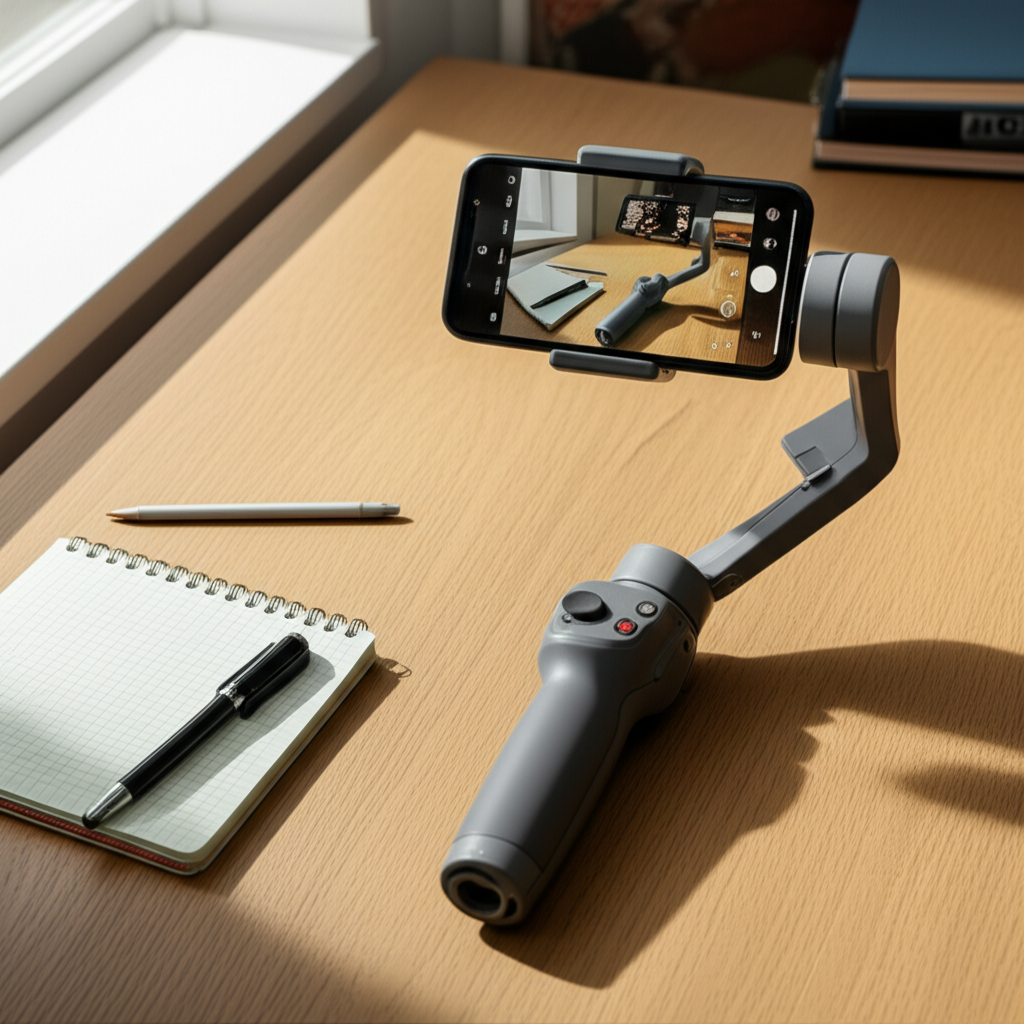
The DJI Osmo Mobile 3 Gimbal offers a powerful yet accessible solution for educators seeking to enhance their visual communication. It transforms your smartphone into a professional filmmaking tool, enabling smooth, cinematic shots that capture attention. This device is designed to combat the common problem of shaky footage, making your lessons more professional and engaging for students.
Transforming Classroom Content Creation

This gimbal empowers educators to create dynamic video lessons, engaging project presentations, and informative tutorials without the need for expensive equipment. Its intuitive design ensures that even those new to videography can achieve impressive results quickly. By stabilizing your shots, you make your content more visually appealing and easier for students to follow.
Understanding the DJI Osmo Mobile 3 Gimbal: Key Features for Educators
The DJI Osmo Mobile 3 Gimbal boasts a range of features that make it an indispensable tool for educators. Its intelligent design focuses on ease of use, portability, and advanced stabilization technology. Understanding these core features will help you leverage its full potential in your teaching practice.
Intelligent Stabilization for Smooth Footage
At its heart, the Osmo Mobile 3 provides incredible stabilization, smoothing out every shake and wobble. This brushless motor system ensures that even when you’re walking or panning, your video remains steady and professional. This is crucial for maintaining viewer focus and preventing distractions caused by jerky movements in educational content.
Compact and Foldable Design
Portability is key for busy educators, and the Osmo Mobile 3 excels here with its foldable design. It easily fits into a backpack or bag, making it simple to transport between classrooms, school events, or even for field trips. This convenience means you’re always ready to capture spontaneous learning moments or planned video projects.
Intuitive Controls and Easy Setup
Setting up and using the Osmo Mobile 3 is remarkably straightforward. The integrated controls allow you to adjust settings, start/stop recording, and switch between modes without needing to touch your phone. This user-friendly interface means less time fumbling with technology and more time focusing on your educational message.
Long Battery Life for Extended Shoots
With a battery that lasts for hours, the Osmo Mobile 3 can handle extended filming sessions. This is perfect for recording longer lectures, documenting events, or completing multi-part video projects without worrying about running out of power. Educators can rely on it to last through a full day of content creation.
Leveraging the DJI Mimo App for Enhanced Educational Videos
The DJI Mimo app is the creative hub for the Osmo Mobile 3, unlocking a suite of powerful editing and shooting tools. This app is where the magic happens, allowing you to transform raw footage into polished, engaging educational videos. Its intelligent features are designed to simplify complex video editing tasks.
Intelligent Shooting Modes
The Mimo app offers several intelligent shooting modes that are incredibly useful for educators. Modes like Story mode provide pre-set templates with dynamic camera movements and music, perfect for quickly creating engaging short videos. ActiveTrack 3.0 keeps your subject in frame, ideal for filming demonstrations or student presentations.
Built-in Editing Tools
Forget transferring footage to a computer for basic edits. The Mimo app includes robust editing capabilities, allowing you to trim clips, add music, apply filters, and even adjust playback speed directly on your smartphone. This streamlined workflow significantly speeds up the video production process for educators.
Customizable Camera Settings
For those who want more control, the app offers customizable camera settings. You can adjust exposure, white balance, and focus to achieve the desired look for your videos. This level of control ensures that your educational content matches your specific vision and teaching style.
Practical Applications of the DJI Osmo Mobile 3 Gimbal in Education
The DJI Osmo Mobile 3 Gimbal isn’t just a gadget; it’s a versatile tool that can revolutionize how educators create and deliver content. Its applications extend across various subjects and teaching methodologies, making learning more dynamic and accessible. Consider how these practical uses can benefit your students and your teaching practice.
Creating Engaging Video Lessons and Tutorials
Turn dry lectures into captivating visual experiences. Use the Osmo Mobile 3 to record yourself teaching a concept, demonstrating a process, or explaining complex theories with smooth, stable visuals. This helps students better absorb information and stay focused on the material.
Documenting School Events and Field Trips
Capture the energy and excitement of school events, sports days, or educational field trips with cinematic flair. The gimbal’s stabilization ensures that even fast-paced action is recorded clearly, creating lasting memories and engaging recaps for students, parents, and the school community.
Facilitating Student Project Creation
Empower students to become content creators themselves. The Osmo Mobile 3 can be used by students for their own projects, such as creating documentaries, short films, or presentations. This fosters creativity, digital literacy, and collaborative skills in a hands-on way.
Showcasing School Programs and Initiatives
Promote your school’s unique programs, facilities, or community involvement with professional-quality videos. A well-stabilized video tour or an interview with staff can make a significant impact in showcasing what your institution has to offer.
Supporting Remote and Hybrid Learning
In today’s educational landscape, the Osmo Mobile 3 is invaluable for creating high-quality content for remote or hybrid learning environments. Stable, well-produced videos can bridge the gap and keep students engaged regardless of their physical location.
Tips for Educators Using the DJI Osmo Mobile 3 Gimbal
To get the most out of your DJI Osmo Mobile 3 Gimbal, here are some practical tips tailored for educators. These suggestions will help you streamline your workflow and produce even more impactful video content for your students. Mastering these techniques can elevate your video projects from good to great.
Plan Your Shots in Advance
Before you start recording, take a moment to plan what you want to capture. Sketch out your shots, consider the angles, and think about the message you want to convey. This preparation will lead to more focused and effective video content.
Master the Basic Gimbal Movements
Familiarize yourself with basic gimbal movements like panning, tilting, and tracking. Practice these movements slowly and deliberately to ensure smooth transitions. The DJI Mimo app often provides tutorials to help you learn these techniques.
Utilize the Story Mode for Quick Content
When you need to create engaging content quickly, the Story mode in the Mimo app is your best friend. It offers pre-designed templates that guide you through specific shots, making it easy to produce dynamic videos with minimal effort. This is perfect for announcements or quick lesson summaries.
Experiment with ActiveTrack 3.0
For demonstrations or when you need to follow a specific subject, ActiveTrack 3.0 is incredibly useful. Learn how to activate and use it effectively to keep your subject centered and in focus throughout the shot. This is a powerful tool for showcasing processes or student work.
Focus on Audio Quality
While the Osmo Mobile 3 excels at video stabilization, remember that good audio is equally important. Consider using an external microphone for clearer sound, especially in noisy environments. Clear audio ensures your message is easily understood.
Batch Your Filming Sessions
To maximize efficiency, try to batch your filming sessions. Dedicate specific times to record multiple lessons or project segments at once. This reduces setup time and allows you to get into a creative flow.
DJI Osmo Mobile 3 Gimbal vs. Other Stabilization Options for Educators
While the DJI Osmo Mobile 3 Gimbal is a top contender, it’s helpful to understand how it compares to other stabilization methods available to educators. Each option has its own strengths and weaknesses, and the best choice depends on your specific needs and budget. Considering these alternatives can solidify your decision.
Handheld Shooting (No Gimbal)
The most basic method is simply holding your phone. This is the least stable option and often results in shaky, unprofessional footage. While it requires no extra equipment, the quality suffers significantly, making it unsuitable for polished educational content.
Digital Stabilization (In-Phone)
Many smartphones have built-in digital stabilization. This can help to some extent but cannot match the smooth, fluid motion provided by a physical gimbal. Digital stabilization often crops the image and can introduce artifacts, whereas a gimbal offers superior performance.
External Gimbals (Other Brands)
There are many other gimbal brands on the market. Some may offer more advanced features or a different price point. However, DJI is renowned for its reliable stabilization technology and user-friendly ecosystem, making the Osmo Mobile 3 a strong all-around choice for educators.
Professional Camera Stabilizers
These are much larger, heavier, and more expensive devices, typically used by professional filmmakers. They are overkill for most educational applications and require significant training to operate effectively. The Osmo Mobile 3 offers a much more practical and accessible solution for educators.
The DJI Osmo Mobile 3 Gimbal stands out for its excellent balance of performance, portability, and affordability. It provides a significant upgrade in video quality over basic smartphone stabilization without the complexity or cost of professional gear. This makes it an ideal investment for educators looking to enhance their digital content creation capabilities.
Troubleshooting Common Issues with the DJI Osmo Mobile 3 Gimbal
Even with advanced technology, occasional issues can arise. Knowing how to troubleshoot common problems with your DJI Osmo Mobile 3 Gimbal can save you time and frustration. Addressing these minor hiccups quickly ensures you can get back to creating valuable educational content.
Gimbal Not Connecting to Phone
Ensure Bluetooth is enabled on your smartphone and that the Osmo Mobile 3 is powered on. Try closing and reopening the DJI Mimo app, and if the issue persists, restart both your phone and the gimbal. Sometimes, re-pairing the device via Bluetooth can resolve connectivity problems.
Unbalanced Footage or Shaking
Proper balancing is crucial for optimal gimbal performance. Ensure your smartphone is securely mounted and centered on the gimbal’s clamp. Adjust the phone’s position until it remains relatively still when the motors are off. Consult the Mimo app’s tutorials for detailed balancing instructions.
App Not Responding or Crashing
Make sure you have the latest version of the DJI Mimo app installed from your phone’s app store. Check your phone’s operating system for updates as well. If the app continues to crash, try clearing its cache or uninstalling and then reinstalling it.
Gimbal Motors Behaving Erratically
This can often be due to poor balancing or firmware issues. Re-balance your phone carefully, ensuring all locks are released and the motors are free to move. Check the Mimo app for any available firmware updates for the gimbal and install them promptly.
Battery Not Charging
Ensure you are using the correct USB-C cable and a reliable power source. Try a different charging cable and power adapter to rule out equipment failure. If the gimbal still doesn’t charge, contact DJI support for assistance.
Regularly checking for app and firmware updates is key to preventing many common issues. Proper care and understanding of the balancing process will ensure your DJI Osmo Mobile 3 Gimbal performs reliably for all your educational video needs.
Where to Buy and Pricing for Educators
When considering the DJI Osmo Mobile 3 Gimbal for your educational institution or personal use, understanding purchasing options and pricing is important. While the Osmo Mobile 3 is an older model, it often represents excellent value, and its features remain highly relevant for educators. Finding the best deal can make this powerful tool even more accessible.
Online Retailers and Marketplaces
You can typically find the DJI Osmo Mobile 3 Gimbal on major online retail platforms like Amazon, B&H Photo Video, and Adorama. These sites often have competitive pricing, customer reviews, and various bundle options. It’s worth comparing prices across different retailers to find the best offer.
DJI Official Store and Certified Resellers
Purchasing directly from the official DJI store or a certified reseller guarantees authenticity and often provides access to customer support and warranty services. While prices might be standard, buying direct can offer peace of mind. Check DJI’s website for authorized dealers in your region.
Refurbished and Used Options
For budget-conscious educators, looking for refurbished or used DJI Osmo Mobile 3 Gimbals can be a smart move. Many reputable sellers offer certified refurbished units with warranties, providing significant savings. Always buy from trusted sources with good return policies.
Educational Discounts and Bulk Orders
Some retailers or DJI itself may offer educational discounts for teachers or schools. If your institution is looking to purchase multiple units, inquire about bulk order discounts. Contacting sales departments directly can often lead to better pricing for multiple purchases.
The DJI Osmo Mobile 3 Gimbal, though not the latest model, continues to be a highly capable and affordable option for educators. Its robust features and ease of use make it a worthwhile investment for enhancing digital teaching materials. Always compare prices and consider refurbished options for the best value.
Frequently Asked Questions about the DJI Osmo Mobile 3 Gimbal for Educators
Can I use the DJI Osmo Mobile 3 Gimbal with any smartphone?
The DJI Osmo Mobile 3 Gimbal is compatible with most modern smartphones, both iOS and Android. However, there are size and weight limitations. It’s best to check DJI’s official compatibility list to ensure your specific phone model works seamlessly with the gimbal.
Do I need to pay for the DJI Mimo app?
No, the DJI Mimo app is free to download and use. It comes bundled with the essential features for operating the Osmo Mobile 3 Gimbal and editing your videos. Some advanced templates or features might occasionally have in-app purchase options, but the core functionality is free.
How does the DJI Osmo Mobile 3 Gimbal improve video quality?
The gimbal uses advanced motors and sensors to counteract your hand movements, resulting in incredibly smooth and stable footage. This eliminates the shakiness often seen in handheld videos, making your educational content look more professional and easier for students to watch.
Is the DJI Osmo Mobile 3 Gimbal easy to learn for beginners?
Yes, the DJI Osmo Mobile 3 Gimbal is designed with user-friendliness in mind. Its intuitive controls and the helpful tutorials within the DJI Mimo app make it accessible for educators with little to no prior videography experience.
What is ActiveTrack 3.0, and how can educators use it?
ActiveTrack 3.0 is a feature that allows the gimbal to automatically track a selected subject within the frame. Educators can use this to keep themselves in focus while demonstrating something, follow a student presenting, or track an object during an experiment.
Can the DJI Osmo Mobile 3 Gimbal be used for live streaming?
While the Osmo Mobile 3 is primarily designed for recording, its stable output can be beneficial for live streaming if your phone’s streaming app supports external gimbal control or if you’re using a capture card setup. However, direct live streaming integration isn’t its main feature.
What is the difference between this and newer Osmo Mobile models?
Newer models often feature improved stabilization, more advanced tracking capabilities, longer battery life, and sometimes additional features like built-in lighting or higher payload capacities. However, the Osmo Mobile 3 remains a very capable and cost-effective option for most educational needs.
Conclusion: Elevate Your Educational Videos with the DJI Osmo Mobile 3 Gimbal
The DJI Osmo Mobile 3 Gimbal is more than just a smartphone accessory; it’s a powerful tool that can significantly enhance the way educators create and share knowledge. By providing stable, professional-quality video, it helps to capture student attention, improve comprehension, and foster a more engaging learning environment. Its user-friendly design, combined with the robust features of the DJI Mimo app, makes advanced videography accessible to educators of all technical backgrounds.
Whether you’re creating dynamic lesson plans, documenting exciting school events, or empowering students to become creators themselves, the DJI Osmo Mobile 3 Gimbal offers a reliable and cost-effective solution. Investing in this gimbal is an investment in more impactful and memorable educational content. Embrace the power of smooth, cinematic storytelling and transform your teaching materials today.

Belayet Hossain is a Senior Tech Expert and Certified AI Marketing Strategist. Holding an MSc in CSE (Russia) and over a decade of experience since 2011, he combines traditional systems engineering with modern AI insights. Specializing in Vibe Coding and Intelligent Marketing, Belayet provides forward-thinking analysis on software, digital trends, and SEO, helping readers navigate the rapidly evolving digital landscape. Connect with Belayet Hossain on Facebook, Twitter, Linkedin or read my complete biography.