


Published on: 27/09/2025 | Updated on: September 27, 2025
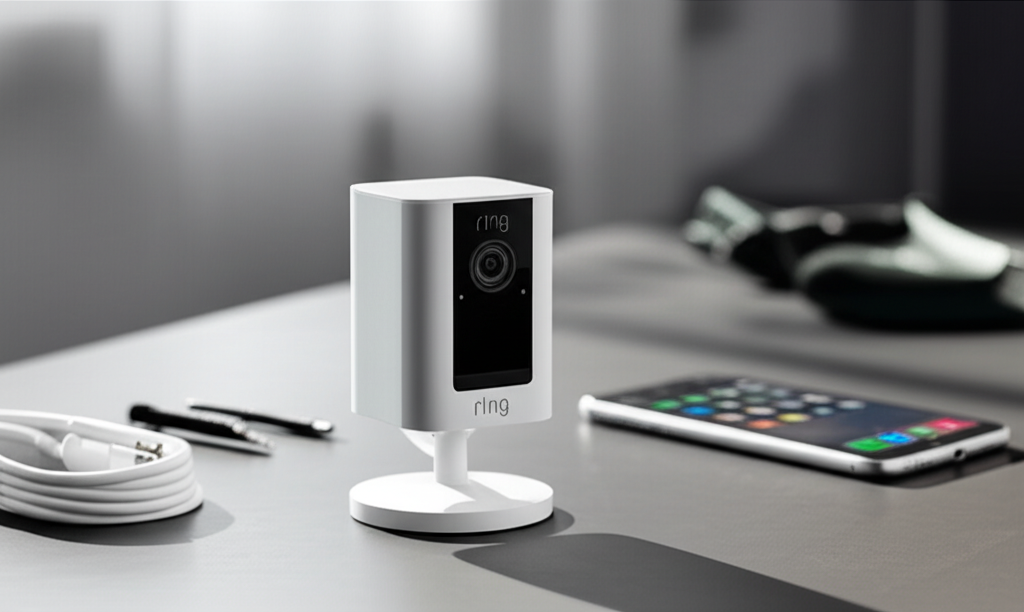
The Ring Stick Up Cam is a versatile and powerful smart security camera, offering flexible placement options and robust features to enhance your home’s protection. This guide explores its capabilities, setup, and how it acts as an essential powerhouse for modern security.
Securing our homes has become a top priority in today’s world, and keeping an eye on things, whether you’re at home or away, brings immense peace of mind. Many of us have looked into smart home devices that can help with this, but the sheer number of options can feel overwhelming. You might be wondering if a device like the Ring Stick Up Cam truly lives up to its reputation as an essential powerhouse for home security. Well, you’re in the right place! I’m here to break down everything you need to know about this popular smart camera, from its impressive features to how it can seamlessly integrate into your life. Get ready to understand how the Ring Stick Up Cam can be your vigilant guardian.
Ring Stick Up Cam: Your Flexible Guardian Angel
The Ring Stick Up Cam is a versatile smart security camera designed to provide a flexible and robust solution for monitoring your home, both indoors and out. It’s engineered for easy installation and offers a range of features that make it an “essential powerhouse” for many homeowners and renters seeking enhanced security and peace of mind. This device acts as your eyes and ears, keeping you connected to what matters most.
This smart camera excels in its adaptability, allowing you to place it almost anywhere to cover blind spots or monitor specific areas. Its wireless design and various mounting options simplify the setup process, making it accessible even for those who aren’t tech experts. The Ring Stick Up Cam is more than just a camera; it’s a central part of a connected home security ecosystem.
Unpacking the Ring Stick Up Cam: What’s Inside the Box?

When you purchase a Ring Stick Up Cam, you’re investing in a comprehensive security solution. The package typically includes the Stick Up Cam itself, a mounting bracket, and a screw kit for installation. You’ll also find a user manual to guide you through the setup and operation of your new device.
Depending on the specific model you choose, you might also find a charging cable for the battery or a solar panel accessory for continuous power. Ring has designed these kits to be as user-friendly as possible, ensuring you have most of what you need right out of the box to get started. It’s all about making smart security accessible and straightforward.
Powering Your Peace of Mind: Battery vs. Wired Options
One of the most significant advantages of the Ring Stick Up Cam is its power flexibility. You can choose between battery-powered models, which offer unparalleled placement freedom, or wired versions that provide a continuous power source. This choice allows you to tailor the camera to your specific needs and location constraints.
The battery-powered Stick Up Cam is perfect for renters or for areas where running wires is difficult. You can easily recharge the battery or opt for a solar panel to keep it powered up indefinitely. For those who prefer a set-it-and-forget-it approach, the wired option eliminates battery management entirely, ensuring constant surveillance.
Installation Made Simple: DIY Friendly Setup
Setting up the Ring Stick Up Cam is designed to be a straightforward DIY process. The included mounting bracket can be attached to walls, ceilings, or shelves, and the camera easily snaps into place. Its adjustable mount allows you to angle the camera precisely where you need it for optimal coverage.
The entire process, from unboxing to having your camera live and connected, can often be completed in under an hour. The accompanying Ring app guides you through each step, including connecting to your Wi-Fi network and customizing your camera settings. This ease of installation makes advanced home security accessible to everyone.
Key Features That Make the Ring Stick Up Cam a Powerhouse
The Ring Stick Up Cam is packed with intelligent features that contribute to its “essential powerhouse” status. These capabilities go beyond basic video recording, offering advanced motion detection, two-way talk, and seamless integration with other Ring devices and Alexa-enabled products. It’s designed to be smart, responsive, and informative.
These features work together to provide a comprehensive surveillance solution that keeps you informed and in control. You can customize motion zones, receive instant alerts on your phone, and even communicate with visitors through the camera’s built-in microphone and speaker. This makes the Ring Stick Up Cam a truly dynamic security tool.
Crystal Clear Video: Day and Night Surveillance
The Ring Stick Up Cam captures sharp, clear video footage in high definition, ensuring you don’t miss any important details. During the day, you get vibrant, true-to-life images, while at night, the advanced infrared night vision kicks in, providing clear visibility even in complete darkness. This 24/7 monitoring capability is crucial for effective home security.
The quality of the video feed means you can easily identify individuals or observe activities happening around your property. Whether it’s checking on a package delivery or monitoring your entryway, the clear video ensures you have a reliable record of events. This visual clarity is a cornerstone of the Ring Stick Up Cam’s effectiveness.
Intelligent Motion Detection and Alerts
One of the most praised features of the Ring Stick Up Cam is its intelligent motion detection. You can customize motion zones to focus on specific areas, reducing false alerts from passing cars or swaying branches. When motion is detected within your set zones, you’ll receive an instant alert on your smartphone or tablet.
This immediate notification system ensures you’re always aware of potential activity around your home. The ability to customize these zones is a game-changer, allowing you to fine-tune the camera’s sensitivity and focus on what truly matters for your security. It’s proactive security at its finest.
Two-Way Talk: Communicate from Anywhere
The built-in microphone and speaker on the Ring Stick Up Cam enable two-way talk functionality. This means you can not only see and hear what’s happening but also speak to anyone in front of the camera through the Ring app on your mobile device. This feature is incredibly useful for greeting visitors, deterring unwanted guests, or speaking with family members.
Imagine being able to tell a delivery driver exactly where to leave a package or calmly address someone approaching your door – all from miles away. This interactive capability adds a significant layer of convenience and control to your home security setup. It bridges the gap between you and your home, no matter the distance.
Customizable Privacy Zones
Ring understands the importance of privacy, and the Stick Up Cam includes customizable privacy zones. These zones allow you to exclude specific areas from video recording and motion detection, such as a neighbor’s window or a public walkway. This ensures that you are only monitoring areas you intend to and respecting the privacy of others.
This thoughtful feature demonstrates Ring’s commitment to responsible surveillance technology. By giving you control over what the camera records, it helps build trust and ensures the device is used ethically and effectively for your security needs. It’s about smart monitoring, not intrusive surveillance.
Ring Stick Up Cam vs. Other Models: Which Is Right for You?
Ring offers a variety of cameras, and understanding the differences can help you choose the perfect Stick Up Cam for your needs. The Stick Up Cam generally sits as a versatile option, bridging the gap between indoor-specific cameras and more robust outdoor models like the Spotlight Cam or Floodlight Cam. Its adaptability is its key strength.
While other Ring cameras might offer integrated spotlights or sirens, the Stick Up Cam focuses on core surveillance with flexibility. If you need a camera for indoor use, a covered porch, or a less exposed outdoor area, the Stick Up Cam provides excellent value and performance. For areas requiring more deterrence or illumination, other Ring models might be better suited.
Ring Stick Up Cam (3rd Gen) vs. Stick Up Cam Battery vs. Stick Up Cam Plug-In
The latest Ring Stick Up Cam (3rd Gen) often builds upon the strengths of its predecessors, offering improved motion detection, enhanced image quality, and seamless integration. The choice between battery and plug-in versions primarily comes down to power preference and installation convenience.
Stick Up Cam Battery: Offers maximum flexibility for placement anywhere, indoors or outdoors, without needing a power outlet nearby. Recharging or solar power is required.
Stick Up Cam Plug-In: Requires a nearby power outlet, ensuring continuous power without battery management. Ideal for locations where power is easily accessible.
Stick Up Cam (3rd Gen): This generation often refines existing features and may introduce enhancements like better Wi-Fi connectivity or improved motion sensing algorithms, available in both battery and plug-in configurations.
The core functionality remains consistent, focusing on high-definition video, two-way talk, and motion alerts, making each a powerful tool for home monitoring.
Integrating the Ring Stick Up Cam into Your Smart Home Ecosystem
The true “powerhouse” potential of the Ring Stick Up Cam is unlocked when it’s integrated into a broader smart home ecosystem. It plays exceptionally well with other Ring devices, creating a unified security network for your entire property. Furthermore, its compatibility with Amazon Alexa opens up a world of voice control and automation possibilities.
Imagine asking Alexa to show you the feed from your Stick Up Cam on your Echo Show, or having your Ring doorbell and Stick Up Cam trigger together when motion is detected. This interconnectedness amplifies the convenience and effectiveness of your smart home setup, making security more intuitive and responsive.
Works with Alexa: Voice Control and Automation
The “Works with Alexa” certification means your Ring Stick Up Cam can be controlled using voice commands through any Alexa-enabled device. You can ask Alexa to “show me the front door camera” or “arm my Ring system.” This hands-free operation adds a layer of convenience to managing your security.
Beyond simple commands, you can set up custom Alexa routines. For example, you could create a routine where motion detected by your Stick Up Cam triggers your smart lights to turn on, providing an immediate visual deterrent and illuminating the area. This level of automation transforms your home into a more responsive and secure environment.
Connecting with Other Ring Devices
When you have multiple Ring devices, such as a Ring Video Doorbell, other Stick Up Cams, or Ring Alarm security system, they can communicate with each other. This synergy enhances your overall security coverage. For instance, if your Ring Doorbell detects motion, you can configure your Stick Up Cam to start recording simultaneously.
This interconnectedness ensures that no event goes unnoticed and provides a more complete picture of what’s happening around your property. The Ring app serves as a central hub to manage all your devices, view live feeds, and review recorded events, creating a cohesive and powerful security system.
Ring Protect Plans: Enhancing Your Stick Up Cam Experience
While the Ring Stick Up Cam offers impressive live viewing and motion alerts for free, subscribing to a Ring Protect plan unlocks its full potential for recorded events and advanced features. These plans are essential for leveraging the full “powerhouse” capabilities of your camera, providing video storage, professional monitoring, and more.
A Ring Protect plan ensures that you don’t miss any crucial moments by storing your video recordings for a specified period. This allows you to review footage at your convenience, share clips with others, or provide evidence if needed. It’s an investment in comprehensive security.
Ring Protect Basic: Covers one Ring device and includes video recording and photo snapshots for up to 180 days. You can review, save, and share videos from events.
Ring Protect Plus: Covers all Ring devices at your home and includes all features of Basic, plus enhanced warranties, 24/7 professional monitoring for Ring Alarm (if applicable), and a discount on future Ring purchases.
Choosing the right plan depends on the number of Ring devices you have and the level of security coverage you desire.
Advanced Settings and Customization for Optimal Performance
The Ring app is your command center for customizing the Ring Stick Up Cam to meet your specific needs. You can fine-tune motion settings, adjust video quality, manage notifications, and even set up custom schedules for when your camera is active. This level of control ensures your camera is always working efficiently and effectively.
Experimenting with these settings is key to maximizing the benefits of your Stick Up Cam. For instance, adjusting the motion detection sensitivity and range can significantly reduce unnecessary alerts, ensuring you only get notified about events that truly require your attention. Smart settings lead to smart security.
Troubleshooting Common Ring Stick Up Cam Issues
Like any tech gadget, you might occasionally encounter minor issues with your Ring Stick Up Cam. Most problems are easily resolved with a few troubleshooting steps. Common issues often relate to Wi-Fi connectivity, battery life, or notification delivery.
For Wi-Fi problems, ensure your router is within range and that your network is stable. Sometimes, simply restarting your router and camera can resolve connectivity glitches. If you’re experiencing battery drain on a battery-powered model, check if solar charging is functioning correctly or if the battery needs replacement.
Connectivity Issues: Ensure your Wi-Fi password is correct and that your network signal is strong at the camera’s location. Consider a Wi-Fi extender if needed.
Motion Alerts Not Received: Verify that motion detection is enabled in the app and that you have allowed notifications for the Ring app on your mobile device. Check your custom motion zones.
Poor Video Quality: Ensure the lens is clean and that your internet speed is sufficient for streaming high-definition video.
Battery Draining Quickly: For battery models, ensure the battery is fully charged and check if extreme temperatures or frequent motion events are impacting its life. Consider a solar panel accessory.
The Ring community and support resources are excellent for finding solutions to more complex issues.
The Future of Home Security: Ring Stick Up Cam and AI
The future of home security is increasingly intertwined with artificial intelligence, and Ring is at the forefront of this innovation. While the current Stick Up Cam offers smart features, future iterations and advancements in Ring’s AI capabilities promise even more intelligent and proactive security solutions. Think of AI-powered person detection that can differentiate between a person, a pet, or a vehicle, further refining alerts.
AI can also optimize battery life by intelligently managing recording and transmission based on learned activity patterns. As AI evolves, devices like the Ring Stick Up Cam will become even more sophisticated, offering enhanced threat detection, predictive analytics, and seamless integration into a truly intelligent home. This makes the Ring Stick Up Cam not just a current powerhouse, but a gateway to future security advancements.
Frequently Asked Questions About the Ring Stick Up Cam
Can I use the Ring Stick Up Cam without a subscription?
Yes, you can use the Ring Stick Up Cam for live viewing and motion alerts without a Ring Protect subscription. However, a subscription is required to store and review recorded video footage.
How long does the battery last on the Stick Up Cam Battery?
Battery life can vary significantly depending on usage, Wi-Fi signal strength, and environmental factors. On average, a fully charged battery can last from a few weeks to several months. Using a solar panel can provide continuous charging.
Is the Ring Stick Up Cam waterproof?
The Ring Stick Up Cam is designed for both indoor and outdoor use and is weather-resistant. It can withstand rain, snow, and moderate temperatures, making it suitable for various environmental conditions.
Can I connect multiple Ring Stick Up Cams to one account?
Absolutely! You can connect and manage multiple Ring devices, including several Stick Up Cams, under a single Ring account through the Ring app.
Does the Ring Stick Up Cam require a Wi-Fi connection?
Yes, the Ring Stick Up Cam requires a stable Wi-Fi connection (2.4 GHz band) to function, allowing it to stream live video, send alerts, and connect to your Ring account.
* What is the range of the motion detection for the Ring Stick Up Cam?
The motion detection range can be adjusted within the Ring app, but typically extends up to 30 feet, with customizable motion zones for precise targeting.
Conclusion: The Ring Stick Up Cam – A Smart Investment in Security
The Ring Stick Up Cam truly earns its title as an “essential powerhouse” for home security. Its combination of flexible power options, straightforward installation, and a robust suite of intelligent features makes it an incredibly versatile and effective surveillance tool. Whether you’re a tech enthusiast looking to expand your smart home or a homeowner seeking simple, reliable security, the Ring Stick Up Cam delivers.
From its crystal-clear HD video and night vision to its intelligent motion detection and two-way talk capabilities, this camera provides comprehensive monitoring and control. When paired with a Ring Protect plan and integrated into your smart home ecosystem, its capabilities are further amplified, offering peace of mind whether you’re home or away. The Ring Stick Up Cam is a smart, adaptable, and powerful choice for enhancing your home’s safety and security.

Belayet Hossain is a Senior Tech Expert and Certified AI Marketing Strategist. Holding an MSc in CSE (Russia) and over a decade of experience since 2011, he combines traditional systems engineering with modern AI insights. Specializing in Vibe Coding and Intelligent Marketing, Belayet provides forward-thinking analysis on software, digital trends, and SEO, helping readers navigate the rapidly evolving digital landscape. Connect with Belayet Hossain on Facebook, Twitter, Linkedin or read my complete biography.