


Published on: 27/09/2025 | Updated on: September 27, 2025
Unlock the full potential of your Sonos One SL with these essential secrets, transforming your home audio experience through smart sound optimization and hidden features. Discover how to get the most out of this versatile speaker.
Sonos One SL: Essential Smart Sound Secrets Revealed
Are you looking to elevate your home audio experience beyond basic playback? The Sonos One SL offers incredible sound quality and smart capabilities, but many users don’t tap into its full potential. It’s frustrating when a powerful device like the Sonos One SL sits underutilized, leaving you with sound that’s good, but not truly great. This guide is here to change that. I’ll walk you through the secrets to unlocking immersive, personalized audio with your Sonos One SL, ensuring you get the best possible sound and smart integration. Get ready to transform your listening.
What Makes the Sonos One SL a Smart Choice for Audio?
The Sonos One SL stands out as a smart audio choice due to its exceptional sound engineering within a compact form factor. It’s designed for those who prioritize audio fidelity but may not need voice control integration, making it a more accessible entry point into the Sonos ecosystem. Its smart capabilities lie in its seamless connectivity and ability to form part of a larger, intelligent home sound system.
This speaker is a testament to Sonos’s dedication to delivering premium audio without unnecessary complexity. Its core strength is its ability to produce rich, room-filling sound that belies its size.
Sonos One SL: Unpacking the Core Features

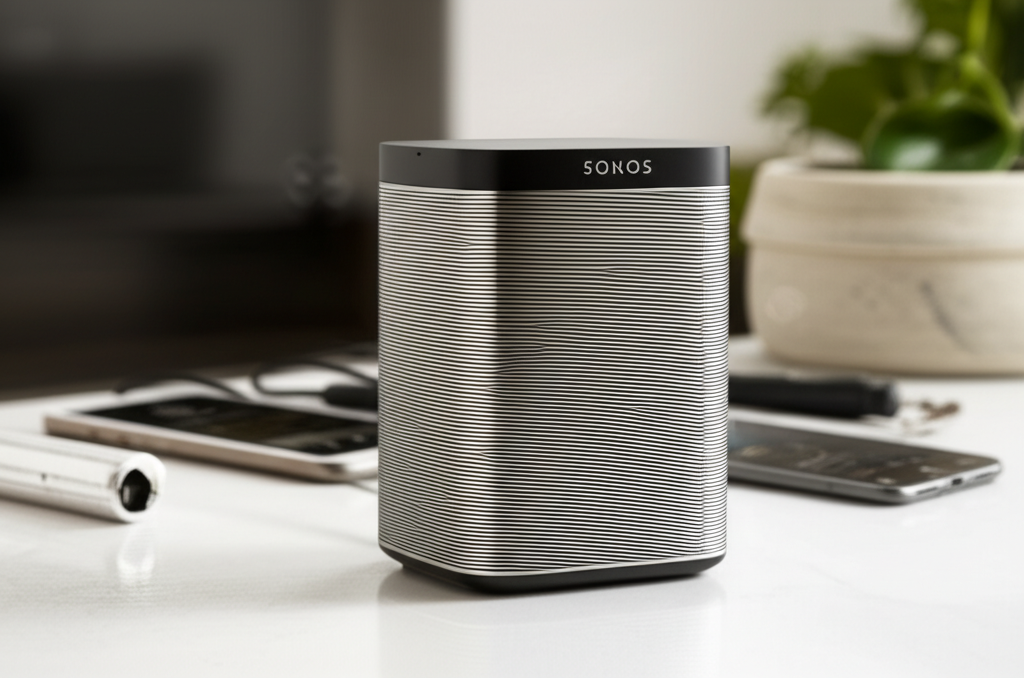
At its heart, the Sonos One SL is a beautifully designed, compact smart speaker engineered for brilliant sound. It boasts custom-built drivers and passive radiators that deliver crisp highs, deep lows, and balanced mid-ranges. The speaker excels in its ability to reproduce music with clarity and depth, making it a favorite for audiophiles on a budget.
Its simple, elegant design ensures it blends seamlessly into any home decor. The tactile buttons on top provide easy control for playback and volume, offering a tactile satisfaction that digital interfaces sometimes lack.
The Magic of Stereo Pairing and Surround Sound
One of the most significant secrets to unlocking the Sonos One SL’s true potential lies in its ability to stereo pair or be used as surround speakers. When you pair two Sonos One SL speakers, you create a dedicated left and right channel, delivering a vastly more immersive and detailed stereo soundstage. This is transformative for music listening, allowing you to discern individual instruments and spatial cues with remarkable clarity.
For home theater enthusiasts, using two Sonos One SLs as rear surrounds, paired with a Sonos soundbar like the Beam or Arc, creates a truly cinematic experience. The speakers add depth and dimension to movie soundtracks, pulling you deeper into the action. This flexibility makes the Sonos One SL a surprisingly versatile component for any home entertainment setup.
Setting Up Your Sonos One SL: A Seamless Experience
Getting your Sonos One SL up and running is designed to be incredibly straightforward, thanks to the intuitive Sonos S2 app. The app guides you through connecting the speaker to your Wi-Fi network and adding it to your Sonos system. You’ll be prompted to name your speaker, typically by room, which helps with organization and voice control if you later add a voice-enabled Sonos product.
The setup process is typically completed within minutes, requiring no technical expertise. It’s a testament to Sonos’s user-friendly approach, ensuring that even the most novice tech user can enjoy high-quality sound immediately.
Understanding Sonos Trueplay: Tuning Your Speaker to Your Room
Perhaps the most powerful “secret” to exceptional sound from your Sonos One SL is Sonos Trueplay. This innovative feature uses the microphone on your iOS device (iPhone or iPad) to measure how sound reflects off walls, furniture, and other surfaces in your room. It then fine-tunes the EQ of your Sonos One SL to optimize the audio output specifically for that environment.
Different rooms have unique acoustic properties, and Trueplay automatically compensates for these, reducing echo and improving clarity. This ensures your Sonos One SL sounds its best, whether it’s placed in a large living room, a small bedroom, or even a kitchen. The difference Trueplay makes can be astonishing, revealing nuances in your music you might not have heard before.
How to Use Sonos Trueplay: A Step-by-Step Guide
Using Sonos Trueplay is a simple yet crucial step for optimizing your Sonos One SL’s sound.
1. Open the Sonos S2 App: Navigate to System Settings.
2. Select Your Room: Choose the room where your Sonos One SL is located.
3. Tap Trueplay: Select the “Trueplay” option.
4. Follow On-Screen Prompts: The app will instruct you to hold your iOS device and walk around the room, holding it at different heights. This process typically takes about 2-3 minutes.
5. Let the App Tune: Once completed, the app will process the data and apply the optimized EQ settings to your speaker.
This tuning process should be repeated if you move your Sonos One SL to a different room or significantly rearrange your furniture. It’s a quick way to ensure consistently excellent audio performance.
Beyond Music: The Sonos One SL for Podcasts and Audiobooks
While renowned for its music playback, the Sonos One SL truly shines when used for podcasts and audiobooks. Its clear vocal reproduction means you won’t miss a single word of dialogue or narration. The balanced sound profile ensures that voices are presented naturally, without the harshness or muddiness that can plague lesser speakers.
Whether you’re catching up on your favorite true-crime podcast or getting lost in an epic novel, the Sonos One SL delivers an engaging listening experience. The ability to group multiple Sonos speakers means you can even extend your podcast to other rooms, never missing a beat.
Integrating the Sonos One SL into Your Smart Home Ecosystem
The Sonos One SL, despite lacking built-in voice assistants, integrates brilliantly into a broader smart home. It connects seamlessly with other Sonos speakers, allowing for multi-room audio control via the Sonos app. This means you can play the same music throughout your house or different music in different rooms, all managed from your smartphone or tablet.
Furthermore, it works with Apple AirPlay 2, enabling you to stream audio directly from your Apple devices. This offers another layer of convenience and integration, especially for Apple users looking for a robust wireless audio solution.
Sonos One SL vs. Sonos One: Understanding the Difference
The primary distinction between the Sonos One SL and the Sonos One lies in voice control capabilities. The Sonos One features built-in Amazon Alexa and Google Assistant, allowing you to control music playback, ask questions, and manage smart home devices using just your voice. The Sonos One SL, as its name suggests, omits these microphones and voice assistants.
This difference makes the Sonos One SL a more budget-friendly option and an excellent choice for users who already have voice-enabled devices elsewhere or prefer to manage their audio through the Sonos app or AirPlay 2. The audio performance and core functionality remain virtually identical between the two models.
Here’s a quick comparison:
Feature
Sonos One SL
Sonos One
Voice Control (Alexa/Google Assistant)
No
Yes
Microphones
No
Yes
Audio Quality
Excellent
Excellent
Stereo Pairing
Yes
Yes
Surround Sound Capability
Yes
Yes
AirPlay 2 Support
Yes
Yes
App Control (Sonos S2)
Yes
Yes
Price Point
Lower
Higher
Choosing between them depends entirely on whether you require integrated voice commands or prioritize cost savings while still getting fantastic Sonos sound.
Troubleshooting Common Sonos One SL Issues
While the Sonos One SL is generally reliable, occasional hiccups can occur. The most common issues usually relate to Wi-Fi connectivity or app responsiveness. If your speaker drops offline, the first step is always to reboot your router and then your Sonos speaker by unplugging it for 30 seconds.
Ensure your Sonos system is running the latest software updates, as these often contain bug fixes and performance improvements. If playback is choppy, check your Wi-Fi signal strength in the room where the speaker is located. You can use the Sonos app’s Wi-Fi diagnostics tool for a more detailed analysis.
If you encounter persistent problems, the Sonos support website offers extensive troubleshooting guides, and their customer service is generally very helpful. Often, a simple reset of the network settings within the Sonos app can resolve connectivity woes.
Maximizing Your Sonos One SL with the Sonos S2 App
The Sonos S2 app is your central command for everything Sonos, and mastering its features is key to unlocking the full potential of your One SL. Beyond basic playback, the app allows you to create custom speaker groups, set alarms, and access a vast library of streaming services directly. You can also manage Trueplay settings, adjust EQ manually if needed, and check for system updates.
The app’s interface is designed for ease of use, enabling you to quickly switch between sources, control volume on individual speakers or groups, and discover new music. Exploring the settings menu will reveal options for managing your Sonos library, adding new services, and even setting up sleep timers.
The Future of Sound: AI and the Sonos Ecosystem
While the Sonos One SL doesn’t have AI built-in, the broader Sonos ecosystem is increasingly influenced by advancements in artificial intelligence and machine learning. Sonos is continuously refining its algorithms for audio processing, aiming to deliver even more adaptive and personalized sound experiences. Future updates and potential new hardware will likely leverage AI to further enhance features like Trueplay, improve multi-room audio synchronization, and perhaps even offer more intelligent music recommendations.
The company’s focus on software updates means that even older devices like the Sonos One SL can benefit from ongoing innovation. This commitment to evolving its platform ensures that your investment in Sonos remains relevant and capable of delivering cutting-edge audio experiences. Exploring new features and updates within the Sonos app is a great way to stay on top of these advancements.
Frequently Asked Questions About the Sonos One SL
Q1: Can I use the Sonos One SL without Wi-Fi?
No, the Sonos One SL requires a Wi-Fi connection to function. It needs to connect to your home network to stream music and be controlled by the Sonos app.
Q2: Does the Sonos One SL work with Bluetooth?
No, the Sonos One SL does not support Bluetooth connectivity. It relies on Wi-Fi for streaming and communication within the Sonos ecosystem.
Q3: Can I connect the Sonos One SL to my TV?
You cannot directly connect the Sonos One SL to your TV via HDMI or optical cable. For TV audio, Sonos offers soundbars like the Beam, Arc, or Ray, which can be paired with Sonos speakers for surround sound.
Q4: How do I reset my Sonos One SL?
To reset your Sonos One SL, unplug the power cord, press and hold the Play/Pause button, and plug the power cord back in while continuing to hold the button until the light flashes amber.
Q5: Can I use Spotify Connect with the Sonos One SL?
Yes, you can use Spotify Connect with the Sonos One SL. You can initiate playback from the Spotify app on your phone or tablet and direct it to your Sonos speaker.
Q6: Is the Sonos One SL waterproof?
No, the Sonos One SL is not waterproof or water-resistant. It should be kept away from moisture and extreme temperatures.
Conclusion: Elevating Your Audio with the Sonos One SL Secrets
The Sonos One SL is a powerhouse of smart sound, offering exceptional audio quality and seamless integration into a connected home. By understanding and utilizing features like stereo pairing, surround sound capabilities, and especially Sonos Trueplay, you can transform your listening experience from good to truly remarkable. Its straightforward setup and robust app control make it accessible for everyone, while its core audio prowess appeals to the discerning listener.
Whether you’re a music aficionado, a movie buff, or a podcast devotee, the secrets revealed here will help you get the most out of your Sonos One SL. It’s more than just a speaker; it’s a gateway to immersive, personalized audio that enriches your everyday life. Embrace these tips, and let your Sonos One SL fill your home with brilliant sound.

Belayet Hossain is a Senior Tech Expert and Certified AI Marketing Strategist. Holding an MSc in CSE (Russia) and over a decade of experience since 2011, he combines traditional systems engineering with modern AI insights. Specializing in Vibe Coding and Intelligent Marketing, Belayet provides forward-thinking analysis on software, digital trends, and SEO, helping readers navigate the rapidly evolving digital landscape. Connect with Belayet Hossain on Facebook, Twitter, Linkedin or read my complete biography.