


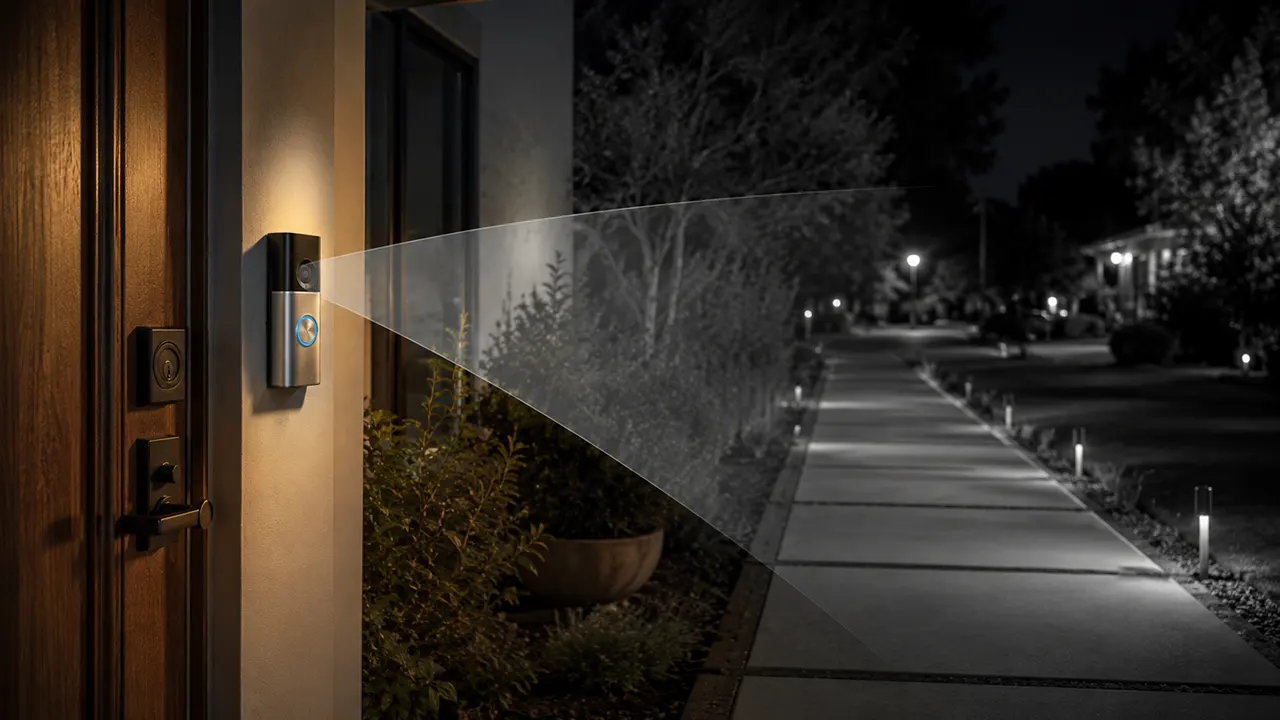
How far can a Ring Doorbell see at night? The honest answer is that there is no single distance for every Ring Doorbell.
A compatible Ring device can capture video in low light and, when the environment becomes completely dark, automatically switch to black-and-white infrared night vision. But how far you can actually see useful detail depends on your Ring model, available light, camera angle, distance, and the environment.
The most important thing to understand is this:
At night, what your Ring camera can see, what it can detect, and what it can show clearly are three different things.
A person might appear in the camera frame but look unclear. Motion might trigger an alert even when the video is not highly detailed. A passing vehicle may also trigger detection differently from a person walking toward your door.
This guide explains what really determines your Ring Doorbell’s nighttime range and how to get better coverage after dark.
Quick Answer: How Far Can a Ring Doorbell See at Night?
A Ring Doorbell does not have one guaranteed nighttime viewing distance.
Its camera can capture activity within its field of view, while the usefulness of the footage depends on conditions.
At night, the biggest factors are:
- Available light
- Infrared night vision
- Your specific Ring model
- Distance from the camera
- Camera angle
- Movement
- Reflections and glare
Ring says compatible devices can capture true-color video in dim light and automatically switch to black-and-white infrared imaging when the environment becomes fully dark.
So, asking only:
“How many feet can a Ring Doorbell see at night?”
does not tell the whole story.
A better question is:
How far away can my Ring Doorbell capture useful nighttime footage?
That answer will vary from one home to another.
How Ring Night Vision Works
Can Ring Cameras See at Night?
Yes. Compatible Ring cameras and doorbells can capture footage after dark using Night Vision.
However, Ring’s nighttime performance can change depending on how much light is available.
There are two basic situations.
In Dim Light: Color Video
When some light is available, compatible Ring devices can capture color video.
Ring says this can help you see details such as:
- Clothing colors
- Vehicle colors
- General surroundings
For example, your front entrance may have:
- A porch light
- A nearby streetlight
- Driveway lighting
In these conditions, the camera may have enough available light to preserve color.
In Complete Darkness: Infrared Night Vision
When the environment becomes fully dark, compatible Ring devices automatically switch to black-and-white infrared imaging.
Infrared allows the camera to capture activity without relying on visible light.
The switch happens automatically.
You normally do not need to manually change the camera between these modes.
However, infrared night vision does not mean:
Everything will look equally clear at any distance.
Distance still matters.
The Three Different “Ranges” That Matter at Night
This is where most confusion happens.
When someone asks:
How far can a Ring Doorbell see at night?
they may actually be asking about three different things.
1. Camera Visibility
This means:
Does the object appear in the camera’s view?
A person or vehicle may be visible within the camera’s field of view.
But visibility alone does not guarantee useful detail.
2. Motion Detection
This means:
Does movement trigger the device?
Ring currently says the standard maximum detection range for its devices is 30 feet. Ring also notes that larger objects in the distance, such as vehicles, may still trigger motion alerts.
However:
30 feet is not the camera’s nighttime viewing limit.
It is a motion detection reference.
The actual behavior can vary depending on:
- Device type
- Motion settings
- Motion Zones
- Placement
- The type of movement
Ring also states that maximum motion range varies by device type.
3. Useful Image Detail
This is the question many people actually care about.
A camera might technically capture a person.
But can you clearly see useful details?
That depends on:
- How far away the person is
- How dark the environment is
- Whether infrared is being used
- How quickly the person is moving
- The camera’s resolution
- The available lighting
This creates a simple rule:
Visible does not always mean clear.
At night, this difference becomes even more important.
How Far Can a Ring Doorbell See at Night Without a Porch Light?
Without a porch light or other visible lighting, compatible Ring devices can use black-and-white infrared imaging when the environment becomes fully dark.
However, Ring does not provide one universal nighttime distance that applies to every doorbell.
That is because Ring Doorbells differ in:
- Camera technology
- Resolution
- Field of view
- Motion detection technology
Your environment also matters.
For example, two homes could use the same device.
Home A
The doorbell faces:
- An open walkway
- Few reflective surfaces
- A clear approach
Home B
The doorbell faces:
- A nearby wall
- Glass
- Shiny siding
- Moving branches
The second installation may experience more visual problems.
So there is no honest universal answer such as:
“Every Ring Doorbell sees exactly X feet in complete darkness.”
The useful nighttime range depends on the device and installation.
What Affects How Far a Ring Doorbell Can See at Night?
1. Available Light
A small amount of useful light can make a significant difference.
Potential sources include:
- Porch lights
- Exterior wall lights
- Driveway lighting
- Streetlights
With dim lighting, compatible Ring devices can capture color video. In complete darkness, they switch to infrared imaging.
But brighter is not always better.
A poorly positioned light can create:
- Glare
- Harsh shadows
- Reflections
The goal is to light the area you want to monitor, rather than shine a bright light directly toward the camera.
2. Distance
Distance is one of the biggest limits on useful detail.
As a person moves farther from the camera, that person occupies a smaller part of the video.
At night, darkness can make this more noticeable.
For example:
Near the door
A visitor may occupy a larger part of the frame.
Farther down the walkway
The person may still be visible but contain less useful visual detail.
This is why a camera’s ability to see something and show it clearly should not be treated as the same thing.
3. Reflections
Reflective surfaces can affect Ring camera performance.
Ring specifically warns that surfaces such as nearby windows or mirrors may affect motion detection.
At night, reflections can become particularly distracting.
Check for:
- Glass near the camera
- Shiny decorations
- Mirrors
- Reflective siding
If your nighttime footage looks strange, reflections are worth investigating.
4. Camera Angle
Your Ring Doorbell may have a wide view, but a poor angle can waste much of it.
For example, the camera might capture:
- Too much sky
- A nearby wall
- Passing traffic
- An unnecessary section of the street
Ring explains that Wedge and Corner Kits can help adjust the viewing angle when stairs, siding, corners, or other installation conditions affect coverage.
At night, the correct angle becomes even more important because you want the available light and useful coverage concentrated on the area that matters.
5. Movement
A stationary object and a moving object do not always appear the same.
Movement can affect:
- Motion detection
- Image clarity
- The usefulness of the recorded footage
A person slowly approaching your front door may be easier to capture than fast-moving activity near the edge of the frame.
How Far Can a Ring Camera Detect Motion at Night?
Nighttime motion detection should not be confused with nighttime camera visibility.
Ring’s current guidance says:
The standard maximum detection range for Ring devices is 30 feet.
Ring also notes that larger objects, such as vehicles in the distance, may still cause a motion alert.
However, motion detection performance can vary.
Ring allows compatible devices to adjust Motion Sensitivity, and the maximum range varies by device type.
The important takeaway:
A Ring Doorbell does not stop seeing at 30 feet.
The 30-foot figure refers to standard motion detection guidance.
The camera may still capture areas beyond that distance if they are within its field of view.
Can a Ring Camera See Across the Street at Night?
It may be able to capture an area across the street if that area is within the camera’s field of view.
However, that does not guarantee useful nighttime detail.
The result depends on:
- Distance
- Lighting
- Your Ring model
- Camera angle
- Obstructions
There is another practical issue.
If your Ring Doorbell faces a busy street, you may receive unnecessary activity from:
- Cars
- Pedestrians
- Moving lights
Ring recommends using Motion Zones to focus on areas that matter and reduce unwanted alerts from high-traffic locations.
For most homes, the best priority is:
- The front door
- The porch
- The visitor path
- The relevant part of the driveway
Do Ring Doorbells Record Cars Driving By at Night?
They can.
A vehicle may trigger motion detection if it falls within the relevant detection area and your device settings allow it.
Ring specifically notes that larger objects in the distance, including vehicles, can sometimes trigger motion alerts beyond the standard maximum detection range.
This can be useful.
But it can also create too many notifications.
If your home faces:
- A busy street
- A main road
- A frequently used driveway
consider adjusting your Motion Zones.
Ring recommends Motion Zones to focus on important areas and reduce unwanted alerts.
How to Improve Your Ring Doorbell’s Night Vision
If your nighttime footage is disappointing, start with the following checks.
1. Check the Area You Want to Monitor
Open your Ring camera at night.
Look at:
- The porch
- The walkway
- The driveway
- The edge of the camera view
Ask:
Is the important area actually visible?
Sometimes the problem is not the camera.
It is the area being covered.
2. Improve Lighting Carefully
A well-positioned porch or exterior light may improve useful nighttime visibility.
Avoid placing lights directly in front of the camera.
Instead, illuminate:
- The walkway
- The visitor path
- The porch
This can reduce deep shadows while avoiding unnecessary glare.
3. Check for Reflections
Look for:
- Glass
- Mirrors
- Shiny surfaces
- Reflective decorations
Ring specifically identifies reflective surfaces as a possible factor affecting motion detection.
If you recently added a decoration near the doorbell, test the camera after removing it.
4. Adjust the Camera Angle
A small change in angle can improve useful coverage.
This is especially important if your door is:
- On stairs
- Near angled siding
- Around a corner
Ring recommends Wedge or Corner Kits where installation conditions make the normal camera angle less effective.
5. Adjust Motion Zones
Motion Zones can help you focus detection on areas that matter.
For example:
Useful area
- Porch
- Walkway
- Driveway entrance
Less useful area
- Busy road
- Distant sidewalk
- Areas behind walls
Ring says Motion Zones can help reduce unwanted alerts and focus motion detection on important areas.
6. Check Your Wi-Fi Signal
Poor Wi-Fi does not reduce the physical distance your camera lens can see.
However, a weak connection can affect how reliably your device performs.
Ring recommends checking Signal Strength in the Device Health section when troubleshooting connection or video problems.
Remember:
Better Wi-Fi improves connectivity. It does not increase night vision range.
Does a Ring Camera Range Extender Improve Night Vision?
Usually, when people search for a Ring camera range extender, they mean one of two things.
Wi-Fi Range
A network extender may improve the connection between your Ring device and your home network.
Ring’s Chime Pro, for example, is designed to extend Wi-Fi coverage for Ring devices.
This may improve:
- Connection reliability
- Video access
- Device communication
But it does not increase:
- Camera field of view
- Infrared capability
- Nighttime visual distance
Camera Coverage
If you want to monitor an area far from your front door, a Wi-Fi extender will not make the doorbell camera physically see farther.
You may need a separate camera positioned closer to that area.
A Ring Doorbell is designed primarily around entrance coverage.
How to Adjust Ring Doorbell Distance
There is no single setting that increases the physical distance your camera can see.
However, you can improve practical coverage.
Adjust Motion Sensitivity
Ring allows compatible devices to adjust Motion Sensitivity.
Lower sensitivity can reduce detection range and help reduce false alerts.
Higher sensitivity may help if relevant events are being missed.
Make small adjustments rather than immediately choosing the maximum setting.
Adjust Motion Zones
Motion Zones help define the areas you want the camera to focus on.
Ring recommends considering:
- Where people approach the device
- High-traffic areas
- Areas that do not need monitoring
Adjust the Physical Angle
Sometimes a better angle is more valuable than higher sensitivity.
A correctly angled camera can improve useful coverage without increasing unwanted alerts.
A Simple Nighttime Test to Find Your Real Ring Range
The best way to understand your own Ring Doorbell is to test it.
Every home is different.
Step 1: Test Your Visitor Path
Walk toward your door the same way a visitor normally would.
Check:
- When you become visible
- When motion is detected
- How clearly you appear
Step 2: Test Several Natural Distances
You do not need to measure every foot.
Test locations such as:
- Near the door
- On the porch
- Halfway down the walkway
- Near the driveway
Step 3: Repeat the Test at Night
Compare the results.
Look for changes in:
- Color
- Brightness
- Detail
- Shadows
- Reflections
Step 4: Separate the Results
Ask four questions:
- Could the camera see me?
- Did it detect motion?
- Did it send an alert?
- Was the footage useful?
This is the best way to understand your Ring Doorbell’s real nighttime performance.
Ring Doorbell Models Can Have Different Nighttime Capabilities
You should avoid assuming every Ring Doorbell has identical specifications.
For example, Ring’s current product documentation lists different fields of view and features across models.
The Wired Doorbell 2K includes Night Vision and a wide 173-degree diagonal field of view, while the Battery Doorbell 2K Plus lists Night Vision and a 178-degree diagonal field of view.
Some compatible Ring devices also support Color Night Vision settings.
Ring maintains a list of devices compatible with Color Night Vision.
The important lesson:
Check the specifications for your exact Ring model.
Do not apply one device’s field of view or feature set to every Ring Doorbell.
Frequently Asked Questions
How far can a Ring Doorbell see at night?
There is no universal distance. A Ring Doorbell’s nighttime visibility depends on the model, available light, infrared capability, camera angle, distance, and environmental conditions.
Can Ring cameras see at night?
Yes. Compatible Ring cameras and doorbells can capture color video in dim light and automatically switch to black-and-white infrared imaging in complete darknes
How far can a doorbell camera see at night?
It depends on the specific device and conditions. The camera may capture activity within its field of view, but useful image detail decreases depending on darkness, distance, movement, and lighting.
How far away can a Ring camera see?
There is no universal fixed distance. Ring cameras can capture activity within their field of view, while useful detail depends on the specific model, lighting, resolution, and distance.
How far can a Ring camera detect motion?
Ring says the standard maximum detection range for its devices is 30 feet, although larger objects, such as vehicles, may sometimes trigger alerts from farther away. Detection range also varies by device type and settings
How far can a Ring Doorbell see at night without a porch light?
Compatible devices can switch to black-and-white infrared imaging in complete darkness. However, Ring does not provide one universal nighttime viewing distance for all models. Useful visibility depends on the device and installation.
Can a Ring camera see across the street?
It may capture areas across the street if they fall within the camera’s field of view. However, useful nighttime detail depends on distance, lighting, and the camera’s position.
Do Ring Doorbells record cars driving by?
They can record or detect vehicles when relevant motion occurs and the device settings support the event. Ring notes that larger objects in the distance may sometimes trigger alerts beyond the standard maximum detection range.
Does a Wi-Fi range extender increase a Ring camera’s viewing distance?
No. Better Wi-Fi can improve connectivity, but it does not increase the camera’s field of view or infrared night vision distance.
Final Verdict: How Far Can a Ring Doorbell See at Night?
There is no single number that honestly answers the question.
A Ring Doorbell’s nighttime performance depends on three separate things:
What the camera can capture.
What the device can detect.
What the footage can show clearly.
Compatible Ring devices can use color video in dim conditions and automatically switch to black-and-white infrared imaging in complete darkness.
Ring’s 30-foot standard maximum detection range is useful for understanding motion detection, but it should not be treated as a nighttime camera viewing limit.
For the best nighttime results, focus on the area that matters most:
- Your front door
- Your porch
- The visitor path
- Package delivery areas
- The relevant part of your driveway
Then test the camera after dark.
The best Ring Doorbell nighttime range is not the farthest distance visible on camera. It is the distance where you get reliable, useful coverage when it matters.
For a broader explanation of camera range, field of view, and daytime coverage, see our complete guide on how far a Ring Doorbell can see.

Belayet Hossain is a Senior Tech Expert and Certified AI Marketing Strategist. Holding an MSc in CSE (Russia) and over a decade of experience since 2011, he combines traditional systems engineering with modern AI insights. Specializing in Vibe Coding and Intelligent Marketing, Belayet provides forward-thinking analysis on software, digital trends, and SEO, helping readers navigate the rapidly evolving digital landscape. Connect with Belayet Hossain on Facebook, Twitter, Linkedin or read my complete biography.